Making Connections: Camera Data

Coming up with ways to get information about the physical world into Max is one of the most fun aspects of working with the software. Whether it is for video processing, sound creation, or any other type of output, physical interactions provide a space for much more interesting relationships to develop.

Unfortunately, many ways to get this information into Max require the user to get comfortable with connecting wires to circuit boards and understanding basic (and sometimes not-so-basic) electronics. For this reason, camera-based interactivity can be pretty enticing. There is also a reasonably low startup cost and plugging a camera in is usually a pretty user-friendly process. In this article, I will share a couple of basic techniques for using affordable webcams to gather data in MaxMSP/Jitter.

Download the patches used in this tutorial.

First, You Need a Camera

To get started, you will need a camera that you can access from Jitter using jit.qt.grab (or jit.dx.grab on Windows). A lot of laptops have built-in cameras now, which should work fine to get started. Eventually though, you will want to move on to a higher quality input at some point. Now, I’m often asked which camera I would recommend for use with Jitter, and this is always a really difficult question to answer. You can pretty much figure I haven’t tested anything that costs more than $200, but here is a list of features I look for when purchasing a camera for live video and computer vision projects:

1. “Tossability” Factor – If I don’t feel comfortable tossing something into my messenger bag and jumping on a bus with it, it will probably never get used. For this reason, an ideal camera should be low cost, easy to protect from damage, and reasonably small.

2. Compatibility with Jitter – On Mac, this means having Quicktime compatible drivers. Firewire cameras are usually supported by the generic DV or IIDC-1394 Quicktime drivers. There is also the open-source Macam driver that supports a wide range of USB webcams on Mac OS X. If you use Windows, you will want to make sure the camera has Direct X compatibility.

3. Control – Don’t let the camera make any decisions for you. When shopping for a camera, you want something that allows you to override the automatic image adjustments and gives you the ability to manually focus the lens.

I currently own two cameras that satisfy these needs fairly well. The first is the Unibrain Fire-i Board Camera. This little workhorse connects via FireWire 400, is supported by the IIDC Quicktime driver, and features a standard m12x0.5 screw mount lens holder. The 1394store website has a good variety of inexpensive lenses you can purchase with the camera, and also sells a C-mount lens adapter for use with higher quality lenses. Since focussing is done by manually screwing the lens in its mount, there is a great deal of control over focus. As a beginner’s camera for Jitter, it does pretty well.

The other camera is a PlayStation 3 Eye camera. After reading the rave reviews of this camera on Create Digital Motion, I purchased this camera for a recent gallery installation. So far, I admit I have been really impressed by the quality and reliability for such an inexpensive camera. The PS3 Eye is a USB camera that requires downloading the most recent Macam component to get it working on Mac OS X, and there are supposedly some third-party drivers available for Windows as well. There is a lot of discussion about this camera on the NUI Group forums, and there are even detailed instructions for opening it up and modifying it. For the tweakers out there willing to pry open a plastic bubble and install third party drivers, this is a pretty excellent solution.

How Much Action?

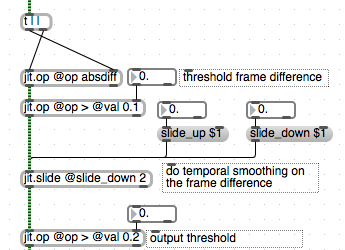
The most simple way to detect motion in video is to do a simple frame-differencing operation. This finds the difference, for each pixel, between successive frames. Combined with a threshold, it is easy to find which pixels have changed between frames and use that as an indicator of how much movement is happening in the scene. The middle (mean) outlet of jit.3m can then be used to calculate the number of pixels that are above the difference threshold. An example of this can be found in the “frame-differences” patch. Since the middle outlet of jit.3m gives the mean of all the pixel values, you can simply multiply that value by the total number of pixels in a frame (width x height) to get an absolute pixel count. For most purposes though, the average value is perfectly useable.

From here, you might want to know if this motion is happening in a particular region of the scene. To do this we can do a very simple masking operation. We simply supply a matrix with white pixels to designate a region of interest and multiply the output of our frame-differencing patch by this mask. This turns the pixels outside of our mask black, so we only see white pixels when there is motion inside of our intended region. Once again, jit.3m can be used to calculate the number of white pixels to give us a useful value.

Yet another approach is to track the location of motion using the jit.findbounds object, which will give you the top-left and bottom-right corners of a rectangle that contains all the pixels in a specified range. Taking the average of these two locations will give you the center of the rectangle (subpatch “motion-location).

Silhouettes

Another classic technique for video tracking is to backlight the foreground subject or position in front of a bright white wall so that there is a distinct contrast between forground and background. By running the video image through a luminance threshold, we get a silhouette image-mask. This can be used for compositing or detecting whether a virtual object is inside or outside of the silhouette. Note that in order for this to work properly, you will need to have a certain amount of control over the environment. The benefit of this, of course, is that the detection algorithm doesn’t have to be too smart in order to get useable results. The “silhouettes” patch shows a basic version of this idea, with the ability to accumulate an average background image for to account for slight variations in the backdrop.

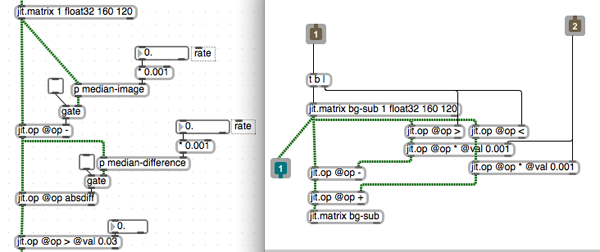
If you don’t have access to a situation that provides the necessary luminance contrast for the above method, a technique called “background subtraction” can sometimes be used to detect a moving shape. In essence, frame-differencing is a form of background subtraction, but in a very simple form. A more advanced technique is to take a median of several sampled frames to act as your background image, and compare the current pixels to this image. Rather than collecting bunch of frames to calculate a median, we can create an “approximate median” using the “median-image” subpatch. We also take the median difference to correct for things like noise and background motion.

Luminance keying can also be a very useful for generating silhouette masks, although it often requires some very specific scene preparations as well.

Other Approaches

Once you’ve exhausted the possibilities of background subtraction, you might find yourself desiring more advanced algorithms for computer vision in Max. For this, I would highly recommend the free cv.jit externals written by Jean-Marc Pelletier. This highly useful set of objects provides a variety of tracking algorithms (blobs, features, optical flow, etc.) in the form of compiled objects and simple abstractions. In addition to that, there is Cyclops, originally written by Eric Singer and sold by Cycling ’74, as well as SoftVNS by David Rokeby. There are also many resources available online for further study.

DISCUSSION

25 Comments

zicarell says:

Interesting.

nicholassagan says:

Holy silhouettes awesome. I would post my patcher based of this but it is HUGE. It’s basically a CV midi controller…

Alex says:

Very nice patches. Have been using “frame-differences” to generate sound, but as soon as I get a bit higher prices from the float connected to jit.3m (the one that triggers sound)the sound gets completely distorted. Being a novice, could I get some feedback?

Andrew Benson says:

@Alex, You might want to check that you aren’t multiplying a signal to values greater than 1. Sounds like you are getting clipping. Check out the MSP docs for more detail.

Alex says:

Thanks for the tip Andrew.
By the way, great patch, really inspiring.

Alex says:

@Andrew, In the end I realized that the prices given from the jit.3m object influence the sound, whether this number box is connected to the sound source or not. As soon as they both open, this distorting influence starts once the prices get higher than 0.004 or something. Do you know how I can avoid this?
Cheers,
Alex

Alex says:

@Andrew, Finally I fixed it. Thanks anyway.
Cheers,
Alex

Carola Dreidemie says:

Magic Andrew! Once again, Thank you! I keep following your teachings! Also, my students here in Texas also follow! Thank you! Glad to have someone at c74 deeply oriented towards video and visuals!
Carola

Making Connections: Camera Data – Cycling 74 | Drakz Free Online Service says:
[...] here to see the original: Making Connections: Camera Data – Cycling 74 Share and [...]

Chienwen says:

Thanks for sharing the interesting patches. But I have no idea what “jit.op@ >”, “jit.op@<”, “jit.op@op* *val 0.001″ are for. It will help a lot if there are some comments added to the patches to explain why those objects are there.

bassfalk says:

I am using the PS3 camera, which is a great tip, thanks Andrew! Actually I bought a second one to get these two cameras together in to the system for a performance project. I basically copied the input and tried to choose the two cameras from the umenus, but when the two cameras are connected, max crashes. Is there a reason for that, is it possible that one cannot link two cameras of the same kind? And help is appreciated!

Thanks

Falk

Andrew Benson says:

Hi Chienwen,
This is used to create an “approximate median” by incrementing or decrementing the accumulated value depending on whether new values are greater than or less than the previously calculated median value. The >, < tests to see if the new values are greater than or less than. The binary (0. or 1.) values are then scaled using jit.op @op * so that it only inc/decrements the value by a smaller value each frame.

Andrew Benson says:

Hi Falk,
It might be a limitation of the camera driver, to have more than one of the same camera, however Max probably shouldn’t be crashing regardless. If this persists, please contact support with a bug report. Another thing to try would be to use a powered USB hub for the cameras, since the USB bus on your computer might not be able to drive both cameras.

Cheng Chien-Wen says:

Hi, Andrew, Thank you so much. I have never learned this algorithm in my high school math class though. By the way, the median-motion patch can create some trails. I would like to know if there is a way to make those trails stay longer ?

razzkazz says:

Total noob to the whole video tracking thing. Info here is gold! Thanks

Zhiwan says:

Gosh that was awesome. Thanks so much for sharing!

Cookster says:

hi bassfalk (and all),

Have you had any joy in trying to cure the issue with using multiple Playstation 3 cams, I am creating a digital video installation and require 4 of the cams to run simultaneously, however every time I attempt to select another source camera Max constantly crashes. I can have the built in isight and one of the cameras running fine yet try and introduce a second playstation cam and max always crashes! :(
I am using a powered USB hub with the cams connected running though Macam (0.9.2) driver software then into Max, on an iMac 2.4 Ghz Core 2 Duo with 3GB ram, I have also tried running the cameras on a variety of frame rate and compression settings but still no joy!!
Any ideas from anyone would be very much appreciated!

Thanks

nicholassagan says:

hey andrew,
i’m using the silhouettes as a base set of components but want to have 3 sets of triggers with 3 different sizes. my issue is that when i set the first matrix size to say, 30/30 and the second to 1000/1000, the trigger only shows up in a 29/29 range. how do i set the size of the trigger while maintaining a 100/100 locator grid?
thanks!
nick
heres a section:
———-begin_max5_patcher———-
3328.3oc6c08iZijD+4Y9qvBkmtif5us8onUYOonK2S6oM4oa0oQFvCwaLXV
vLI6tZ+e+b2UaF2fsowXaLIypMvz17QW+5pptppqp3Ou+tQSS9Z31QN+Cmew
4t69y6u6N0kjW3N836FsL3qyhC1pdYiVE9kjo+5nwvsRC+Zp5xqc9TR510Io
37a8XxpzsQ+Qn71XxDj9xq1sLZUbXp5Si97ES1kleUh9pvkR+80gvDbzuFk9
vxfzMQeczXiQN+O8aYcP5rOEsZwCaBmkBuKpOcBeriOW9nvMah3PPSP6eKx4
4pfkpuiQ+3lnf3bJHZt5ZYj6qwrQE+FB2nQHMDk8oDEG9T3lsQIqTD7X80ed
dfwL42MNahHeB44IeVP7edtjg8KhSl84P0WLJ+hyCe7L+XRVGt542BR9JLdv
7UFsZ8lvsgqRCR0S+he0A6hSen7ESy6+XvrvJeykhv2MZwln4IqjSBi2o7x4
ecYjLPp7hya0qXUv5RdyoIIwSC17Tz1nowgFqFYr1AqhxXZBSif4CAs+8Esb
8lnUoFeVKCSClGjF.SjBqSEEaJvGXH9Xb85DiLEk1Mec1hw7rkXxDrvaBYBw
wkgQEewFqG3IbeN1ysv8Mjxvl2nfjFpvcJQzgvXRgFNGKeBy7NT3odAniDhF
ke4+596y+iwMD.mkrbYFKaoH3adyGd2Gcd+O8wO7e9oO57g+8+8cNu+c+76p
D.elgt8vNOh7S0gBhqDD9xvNRahc0v7s0IMSbp+4zHdJNMrRKMUbYfEk1SnU
bRv7kga2loSkztbWEuyQ6CNx.VJaOOJQgiDW4SdjKCN471DNk3UvhvRwSbS.
QRGAhbphYD6K.rTMPTGH99v3mx1YYVPUJ.aU9xo6RSSLjUaCdqoAqVbZ9KtR
bkQU7WTkQUxGMdeEEHEeiP3DgZqPFWQ3DToBVEHbleaR3OFmjQPsqhFRcXR1
WXPpzVa63JXJYDFBL0FrZy6RDX3801dQO57pGwN+P1iDmzOEtxYPoJRaHFip
dBiXs.zx9Nhyjv.wVjRr0uEfOQewYl4k6DZKirrZYFGW3embORl1fMkO1beE
64kAr8osaJlm9ytMq3U4fQaXvoKApE3U48HuZxZm2l8u+V6p9rVcAlgE5j.L
CPVpPsakKsE.XQeYf7r3vfMic1FlNKLN14UXmWQbdJH1AOYrSS4l6pcsDtJ8
ADevzYWvffKxBZW+9mU9GbdqDgQSvCWdZgmlmFofZh3xYp8v8HTCjpC1QsuN
kjYiCBAO71nUogaV2LCxv8D5qfcJU4UDgzB5r8nWSzmhx9+gOdiAygods.dy
5qfSlQkKVDtwIMwIX1rcK2EGjFlo6d1mWrIY2p4NQKOP6ebzpvYY2J8PbryC
hIEoh8AgAF1wUL1TzEAz7uUBEfKFvFHFHXHZuUGJ.OudRhN0A4nrSnGEfkma
xXs4IVibdTvaV+VP78ZXWvv0b.c3zoPXpvjVvFW+q.BGLc67nGebHiyfvOAz
OhZAbFitB1cMcwq2ta5vcCelNLCDh9n7aAXlzapim5D2iPK3En8fJA4V37Mt
PPkds3cK55fHyyABZvyMSnB37kvsA6LqmP923fQ8XPFTIjgc3IFrRkxZC3zs
mfSkc8gMxTMdyhuq1Ts7+cN.LQ8T6vu1WlSrHy6pgTPwxwRWHgGHs.VlIP9c
9VYDBE7nfzZakgwWgfleCDoQNBbdCNwGLoMz1hI8OV+2GvGPg19.OkgYtsg0
tX1UMXtCcKxHPp9Pvd4G8VK.4s5gBoPjJiyEpYaVURFTW8InifSPWkwK77Gq
LgeJNUyiFp7lCdLwxX+INGzfeyhFVDJd14fDt8AR.TwnVOZ3LtZUmC4.1oIV
uaYhU3cdDq+4PrOmH8xy1nhDoWMoj2ubTXaxtMyx4S0GgyXGy427vsoQq1WV
C+x9yV6vW3mhlO2rLBT.cz70IYNHsMO8+sZc6rm2Tam23A0710214MaPMu4b
Km29RBDOXl2LawapnY3s7bYxjxYfqoTlxB+CFwYvAKvKYDkB4ff53XUi5HjP
POZgobjPPZFRvE.Q6SA0dvg6IG0QTjLp+mAS4vQXR5mrcqEkQh1wVxfDvGSf
nlBYatbTmQS1tSBPSMPEAiygiRGHMeHeFLGg0Ay.28zq0qgxX+1D5c+ZHXMA
Fc7HrGTSAjxF4BZefhcTMpSwB6V6anjHgRg0dRQrvXDFoKy.cQdh6P5UXK8h
wCLMOHqWoFVF7U17opYNafg41qYjLrLx1+rDqIMPr1SqnFTpAGUs4nbwZ8In
zgh0dd1Zat+vaYB2kRFTvHWJBLVUm2rFiHPdKqu3Aizk7FTTfGNpnVa0nNSC
h0xg3glFDxYMywCLs11YkTC08wD5DHlCECMpjQXE2n.xcfCFw0uRnVyki5Lr
vd0otCr8dcsl+C0vUQsUaB+h1vIG0UtCaa.MbanxdN3yEFRXSg.xaEiQDvdc
gmJYNUi5psHr0.cgnY5ODv1yLBD.TP7ybjNwJ4PmIQMpqVas07bAso5bzA2P
odgCGyyAifpJgq8YUNpinVe+yYssQ9do7fjBGsJiBzm4HN3qoFW3cXXrrcqP
9.K.pm07d3rCN2VilXCKihoV6hdC0AjGxVnj8ErRFI01iFqp227QcE0Z89yh
gkTgsdb40PUWd5thCzPgHjRFwfWhtKmcvHHV1fWppQc04B0wVibs2o0aX4wr
0GbvvBsscODZC0ooOzFFTJrxBh4nQbcS4h97nqM0haEhESOdDWqMfy1OpThU
ewLpF52gaCdJb9CYysvYoODjltIZ5tT3H6KP0iVDmLMHV2bD2mjT66yek1e.
6plJXM2pp9Y38OiBpGgEca5GlxDda8WhVMO4KiJqEWhy6ajEZwhFUXYdIUJ8
QDdxn8TZYqwzHM2JuMXBAcDNNIr1iNbgl1jQGM.x+8yDKpr2f9u94e7e5rMc
29Z4xptCJoTHPb1cGzlNpV3TIM4p710C2rlJJmdwMUTJTsCxSORZqF2G5DWz
yqmhZymxKsTzgdKE85kNjx1gljwgZWR.ho2xIFGUuspmucIFmY4RcqQsDvuO
BDPHKnVRePs0j.5+QrylvJaCN9sdt8aU9kqOzIYG8Ek2dSwtMsebJ5wb4eyh
oj3cKCZ.f1OotOU.QbF5ythKDZuBE49q6Od0yEZQPjC3z1.Z6qlP1FmoMp7o
5pLjWaUuvMuAgbIshW12HMOErPmBD7b7n99nZ6VMdc0lkXgNhaD61rjbKaYf
tqhnKDvARIA0UDKnBj3xrzJnqrQPqc9b3u2f8UPM1LQenI93BNRxtrsJnFEL
0ANGaBIU5j7ANJyUp9c.qYEHz9.jUbFVtuxG6urkeXV6xrEtMaiqymz8YKcg
tF2nsyU5S3N8Ibo9jtUWkq004dc4tXe.uzQhdGc+SIBZJFt8.wv5EEqUcU8h
jUpiFhvsma0RkmVx7XkaEu0dEYlJytXjc2xoFsECHX3RncVRbxlbYJOWD2ya
bo+EtDJc5By2tH6+bGW5egq.nZ3hWlY2amE.r5nI90tzRN3tU0DONxVqJqlO
TA9.d6vGP5E9f5kvtL4KTsKBLKWDN9I6WQfGgpm8xWQn0shXpJ7n5t73EpxN
jqRVtN8A3Wy4cQJ80V5YdU+gSdVrf8AkguLJCRdP3WtELj5mxA0RvEtY9w2Y
yQ3cnAU0eTdUdbdmvY61yxjSb6ZOhOST66vHQl63sf0FQhj9RnHKhsbcmLUz
FwKi48B1VvASXKRvMyKFZeILuEgVc4pvakn71msMqeKcxhMASGtmMAnO.B5K
+RQV1se2hABYnsMKF1Mc2hACToK2tPFxIW8Fnh04G8vpzNsdZOrpBXNtayIv
WRh9l08T3CK7l4cNy6FTrE37hNDxHPpNgxMFgE57biqGbsqzAl2MpJnFVSZL
nwDJzsKV28i5JtN2azRSxVkpbx.qrn63d6TWwmXcw5Lrp9faxZlv5cvtMaaY
7FV6C962UZrpMkhNZD7DEq+wLB0YpMssFvvjaxRWqoUDeWozz1RETbaZrvkY
qPdV7qOddiQtvAA5C1Q359Rs.0J0Bj4ubmOGqJUBPTVgujYPsOOybN6q9Ebk
E.TcUqh92XKVw7.v6rKWE+QsHlLKNYa30ETfJaV2bGEMCTXMASL90x1dhOmL
KMSBrsPwJ+GN6xvGuBgoiiNiRbJaJGsLi9TSO9wXlOtIfVZxhEwg0VicVxUT
7H5qt1tfFEAI+wxpRNeRKVkb+1xvzMIO+6tYmITbxEdf9AoCcM8b101lOsHz
ndulgpDPpC26TiWGuUuQmjnp8KMbZ83MKKe+8iV8rcNYrMdU1zROuoDFZrLP
MMnWAJ72v12vOODt77csaLEv86BR.9QTnmHAeZGPBW5bBawbx2nah08yIhsy
o9CmTKKrSLmL6ecmdNI+wAzO6+7F6.GVr72pAzgCzocEMefAkjM3ut++C5Ex
9l.
———–end_max5_patcher———–

nicholassagan says:

nevermind. i figured it out. scaling and then pack/unpacking.

Jake says:

Dude thanks! This was an awesome set of examples!

Jake says:

I really like the [t l l] with the split outputs to ensure that the frame comparisons occur in the correct order, really slick; i’ll have to remember that.

Making Connections: Camera Data – MAX -Jitter « TProArt says:

[...] Making Connections: Camera Data « Cycling 74. Share this:TwitterFacebookLike this:LikeBe the first to like this [...]

faeve says:

Hi everyone,
this is great post!

For Cookster you could try camTwist to connect more than one Cam to Max, it is recognised under Max6

Leave a Reply

Some HTML is OK