
Change values when selected

For a synth I am building, I would like to able to select attack, decay, sustain, release on an [adsr] object with a [live.tab] through a [sel 1 2 3 4]. When attack is selected I would like to change the values with custom + and - buttons (the values are set and are set through message boxes. I’ve used [live.text] for the buttons.
So my question is: How would I select attack and only change attack, switch to decay and only change decay? I only just started with Max a few weeks ago and am a little overwhelmed by all the objects and possibilities.
thanks!

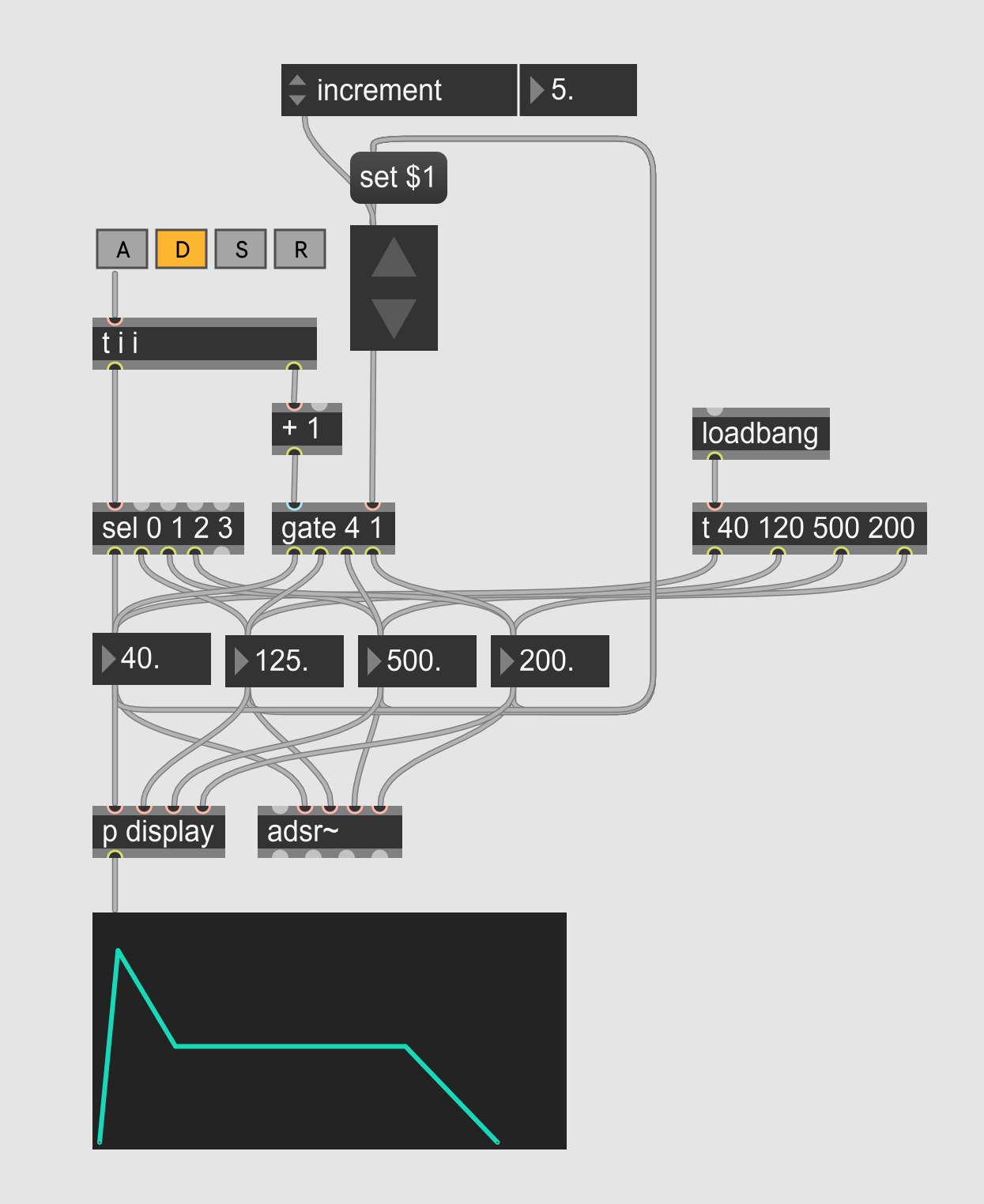
Like so?
The [gate 4 1] directs the big float value to the desired parameter, and the [sel 0 1 2 3] bangs the corresponding parameter to update the value displayed on the big float object.
Not sure if it is the most practical solution to edit an envelop though...
Yo I think this is exactly what I needed! I'll try to implement this when I have the chance. It is definitely not the most practical solution. But I am trying to emulate the experience of using a toy sampler. With a Yamaha VSS 30 you select attack and after that you can change it's values with a different set of buttons. I am always a sucker for stuff like that (lo-fi nerd). Thanks!!
Haha I see.
Now with the old school up-down arrow experience AND a visual feedback reminding the VSS 30 design.
No way! That is so cool!
Is there any way to use custom buttons for this? I’ve created a subpatch which might be a little to complicated to implement as a beginner, lol.
There’s two inlets going into a [button] that go into a dec and inc message. After that there’s a [incdec] going into a [sel 1 2 3 4 5 6 7 8] with an integer [number] in-between that has a min of 1 and max of 8. After the [sel 1 2 3 4 5 6 7 8] are [button]’s and message boxes with the set values. They all join together into a [number] which go into a [s] to route the value to the adsr, which is in another subpatch.
But I have made subpatches for A, D, S and R, but I want to use the same (custom) + and - buttons. Sorry I have ADD and have a hard time focussing on how to get there! I don’t know how to put the code in here so I hope you understand what I’m trying to explain.
To post patchers here, select the relevant objects (or cmd+A or ctrl+A to select everything), then in the menu bar: Edit -> Copy compressed. Then paste the code here.
Alright, this is the subpatch I made for the two buttons. I have set values, but the increment [attrui] might be the better option for it. Controlling the inlets are two [live.text]'s in button mode. I know it might be easier than I have been doing right now, but I just don't see it.
Here are three different ways to output indexed data, that are more practical than a succession of individual messages.
If you use these values only here, then I would go with [zl.lookup]. If you need them in various parts of your patch, I would go with [coll]. [umenu] is here for the sake of completion, but is usefull especially if you need a UI to choose from the list.
Thanks for showing me [coll], it's extremely helpful! And for all your tips. I think I can finally continue creating what I had in mind!