
[groove~] in Max 8.0 and in 8.6 -> different behaviour

I had this part of a metro patch for making a low and a high sound or ommiting when [sig~] is fed with 0.0. It worked well enough in Max 8.0 but gives and "umpf" sound with 0.0. when I open it from Max 8.6.
I guess this is because [groove~] has gotten more features, timestretch and stuff.
How could I get the old [groove~] behaviour back, going silent when [sig~] is fed with 0.0?

you can use any other object to trigger that short sounds,
for example play~
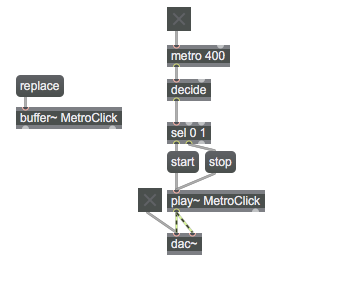
sfplay~ would be just as efficient...
Yes, thank you.
The question was if [groove~] in Max 8.6 can be stopped with a 0.0 message to [sig~] and not making that umpf sound, just as it had been possible within Max 8.0?

I second that. In the old version by setting speed to zero you would stop the increment of the playhead, effectively repeating the last sample value (creating a DC) at the output.
Now groove's output is forced to zero whenever the speed input reaches zero. This is unintuitive and undesirable (in my opinion) because it leads to clicks and pops.
Hm, just checked max 8.0.0 , if that is "old good" version you mention,
compared to 8.1.1, 8.3.3 and few more along the update path till 8.6.2
They all behave the same when sig~ drops to zero.
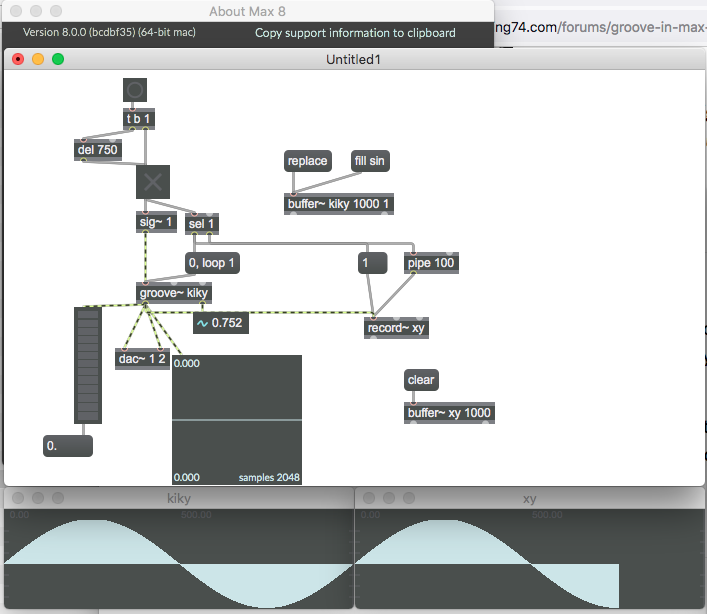
output looks the same on all max 8 versions.
P.S. everything in terms of pitch, stretch, interpolation turned off.
True, I just tried Max 7 and it behaves the same! I didn't realize that it had been bothering me for so long :)
Maybe Max6 is the 'good old' then ...
yes, max objects receive so many updates and often changes
without any notification, which is somewhat understandable with
that huge amount of objects.
that makes it s hard to keep fresh mind about changes, in first place
when one diggs old projects to do some updating or changes
and many things work different.

i see use cases for both behaviours (if i´d use groove~)
and the change probably happend because of all the timestretch options (which value should be held on stop when one of them is on? the one of the output or the last actual sample value?)
difficult and cpu intense to even make a custom workaround (==~ 0, sah~ 0.5 (including reverted negative values), delay 1?)
So I guess I'll have to go with [sfplay~] then. One has to find the good amount of stubbornness.
wave~ is more close to groove~