
help syncing host transport to sequencer in max

hi there. I asked earlier on forums but got no response... really need help with how to get transport from a host to max for a sequencer. please see other post for more elaborate explanation. I've pasted the patch here

As first use dac~ with set numbers instead of that ezdac
And what is question really ?
There is no sequencer or sync or anything there
in the patch you posted.
What do you want to sync to what exactly ?
Max as master for other software, or oposite ?
Simple sync could be midi beat clock or midi time code
Audio i/o from - to other software should be set using rewire
https://cycling74.com/forums/hostsync~-object-help-how-to-sync-rewire-host-transport-with-max-msp-objectsdevices - this is my original post. I'm not sure why you say that there is no sequencer or sync. I have included a screenshot in this message.
I'm not having any issues with audio, so there's no need for me to change to dac instead of ezdac. It works well for me.
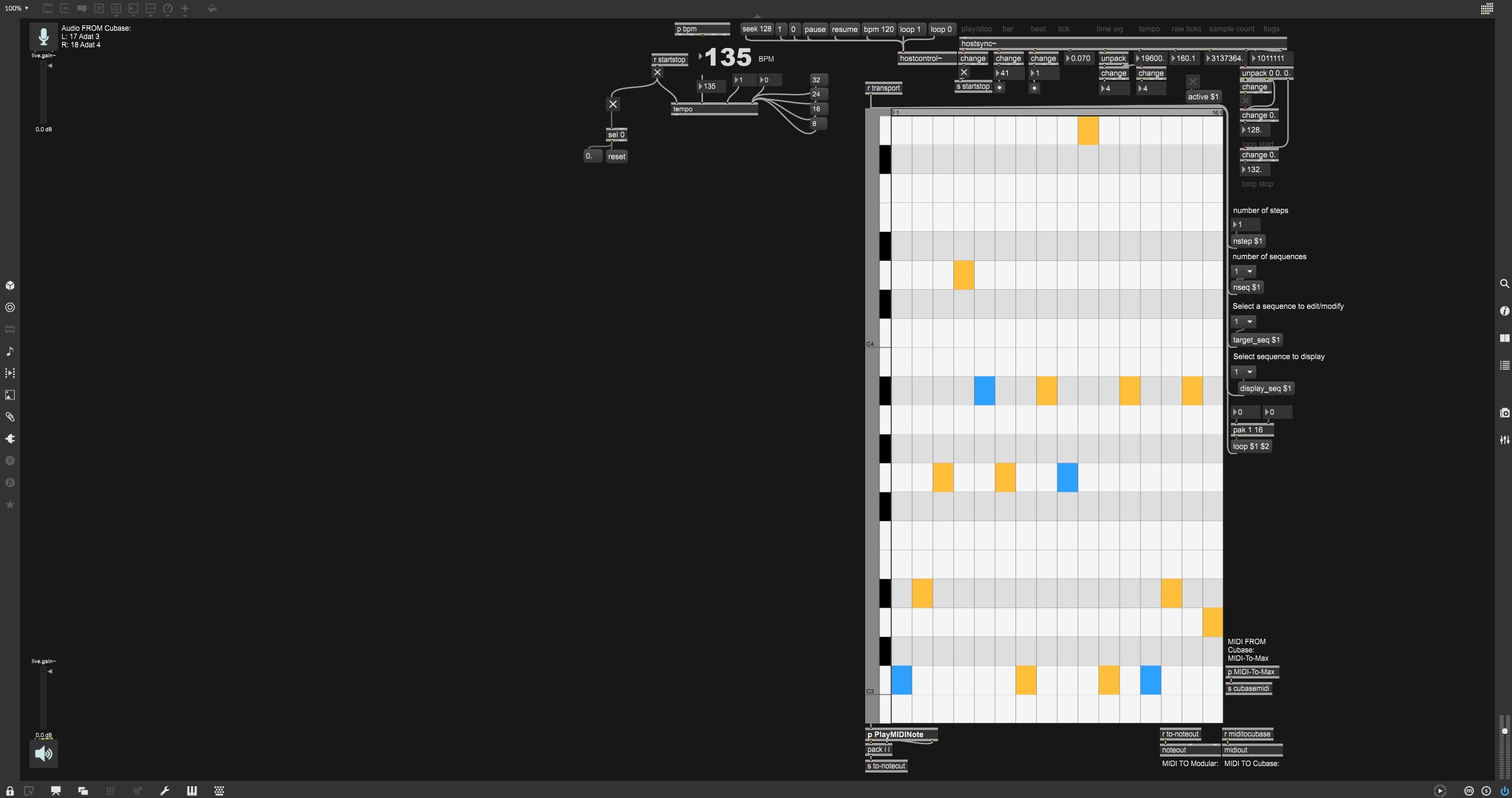
The patch you posted has only ezdac with some comments about cubase audio inputs.
What has that to do with hostsync?
if looked into live.step file, this seems to be
one option to drive it
P.S.
I did not expand the whole patch you posted,
using very small netbook in the train...
did not think that anything else was hiding in the
very distant patch coordinates
Hey, thanks.
That is strange, it shouldn't have. I must've done something wrong with copy-pasting.
Ignore the patch I've posted. Please read what I said in the original post instead that I linked.
I tried out the patch, and it's half working. It's skipping notes and stepping at a completely different rate to the hostsync. Any advice?
If i take away the multiply object it clocks, but only every beat. It skips all the 'orange' steps in the sequence and only hits the blue.
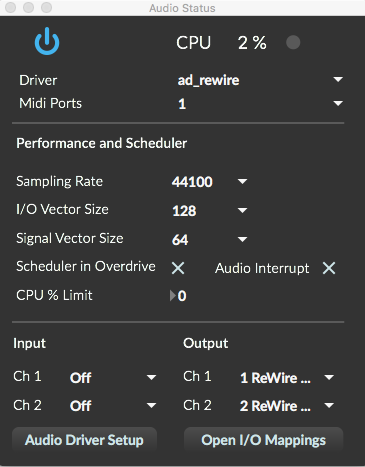
Try setting IO Vector 128 and sig vector 64,
audio scheduler on, in audio interrupt on
in audio setup.
Overdrive on,
also try to change pack 0 0 0. 480 0 0
to pak 0 0 0. 480 0 0
that was my mistake
Thanks.
Nearly there now, it's clocking, but very glitchy and tons of random repeats. I tried replacing the pack with pak as you stated, and it actually made things sound significantly worse, so I'm leaving it on the pack object. Anything I'm missing?

Ah that's hilarious, tbh - Source Audio couldn't see the patch because it had that big gap on the left? Classic :) I've definitely done that, too.
Nick: If you use the beat outlet it will step every, well, beat. You're probably looking for 16th notes?
The key is the "raw ticks" output. It will be 1920 steps per bar, so if you divide that down by 120 you get 16th notes. But this is an absolute number across your entire timeline, so you'll probably want to % 16 to fit your sequence. (this is also where you'll inject the "nstep" value down the road, btw) and then a change objects, because this patch would otherwise output a value every 1920th-note ;)
You *can* use "((beats*4)+(tick beat fraction * 4)) but it's a bit messy, in my opinion.
good luck
I don't use hostsync~ actually, It never worked well for me.
If you change for example from 4/4 to 6/8 it will mess the bar - beat count etc.
So I actually prefer midi clock instead.
I captured output of metro based transport for live.step.
it outpits ticks quantised to 10 fractions-
so that would have to be done as well to hostsync~ output
I'll take a look into it and post the solution as soon as I get home
where I have "normal" size mac .
I think this should do
The problem with hostsync~ is that it does not work if one changes bar metric.
going 4/4 for few bars, changing to 6/8 brings it out of proper elapsed time.
Even samplecount will fail.
If one wants also to sync different lenghts of steps,
like looping 7/16 note seq over 3/4 bar, one will not be there where one expected to be
if one really wanted to rely on elapsed 16th notes.
All this stuff is actually useless compared to beat clock and song position pointer
Same applies to plugsync~in live, even that one would expect it would be better
than that old fashioned midi
thanks. it's working. however the clock is really slack and barely usable. going to have to keep trying to find a way to get a stable clocked transport...
here is patch with raw ticks as counter.
I think it's better, but every start is shity
due to the nature of hostsync~ which outputs som time leftovers ...
I tested using Digital Performer and max 8.1.3
If one could filter start jumps timing would be ok.
really simple fix :
Thanks alot for all this! This works. Got to say that I agree with you that hostsync is not very accurate and has issues. My next plan is to see how I can convert MIDI clock signal from my DAW to Max. Any patch ideas ?
Sure, midi clock and song position pointer is not that complicated.
here is a patch that can both send or receive Midi Clock.
One could even use rewire~ in Max if audio has to be sent to DAW,
but sync to Midi Clock, and still send hostsync~ messages to DAW.
See what is best for You
This is great!!! Thanks so much man. This is defs what I was looking for all along... Timing is much better than using hostsync! Will let you know if I run into any issues, but this looks like it's gonna work great!