
How to smoothly increment a number based on joystick position (−1 to 1)?

Hey, I am using my gamepads joystick and I am trying the following:
I have some value z and I want to increase this value by pushing the stick to the right side and decrease it when i push it to the left. In it's starting position the stick's value is 0 on the most right its 1 and on the most left its -1. All values are floats.
Any ideas how I can realize that?
Do I need some kind of feedback?
Thank you very much in advance!

you need a sort of stepper that picks current value
and inc or decreases it depending on axis travel from the middle.
is value "z" also limited to -1. ~ 1. ?
here is joystick emulator that does that.
you can use slider or buttons for stepping

You indeed need some kind of feedback, as well as a way to regularly trigger your joysticks axis value (using a [qmetro]).
Here is one way to do it:
https://cycling74.com/forums/how-to-smoothly-increment-a-number-based-on-joystick-position-1-to-1#reply-692dbfbaa620167021ac1618
https://cycling74.com/forums/how-to-smoothly-increment-a-number-based-on-joystick-position-1-to-1#reply-692dadd9a620167021abf47f
First of all thank you guys very much for your fast responses with patches (like wtf). I looked at both of your patches and they work as they should but when i connect my gamepad, I have the same issue in both patches. When I push the stick to the most right or left (doesnt matter) it increases/decreases until I hit the end and when I am at the end it stops and when I bring it back to the starting position it moves again.
No value z is not limited to -1. and 1.. I want to adjust a samples starting time with the stick. so "z" is going to be somewhere between 1 ms and 180000 ms
Thanks alot
you should capture your joystick to see what stops the stepper.
and your z value is not a float but int ms ?

maybe it helps, i share by thanks to TFL i found a solution for joystick-> MIDI, in gen~:-)
maybe clip 1-180000 ?
When I push the stick to the most right or left (doesnt matter) it increases/decreases until I hit the end and when I am at the end it stops and when I bring it back to the starting position it moves again.
This sounds like the expected behavior. When you reach an end (a limit of the range), you need to put your joystick in the opposite direction to make the output to move the other way.
I adjusted my example to make it run in the range 1-180000 just by changing the clip and speed values. I also made a small addition to stop the qmetro when not needed, like in Source audio patch.
Thank you guys for your patches.
@TFL When my Joystick reaches the maximum position or stands still in any position the outputting value of the p emulate_return is 0. It is not the same with the slider, because the slider is just perfect :)
Just making sure I do it the way I should - I connect my gamepads outputting x axis value (it is a number object) with the subpatcheres inlet and the left outlet of the subpatcher with the inlet of the numbers object?
Thanks alot
When my Joystick reaches the maximum position or stands still in any position the outputting value of the p emulate_return is 0. It is not the same with the slider, because the slider is just perfect :)
[p emulate_return] is here to, well, emulate the automatic return to 0 of a real joystick.
To adapt my patch to your case, you need to remove everything in the yellow box (both the slider and [p emulate_return]), and just plug the output of your joysticks X or Y axis in the number box.
Another issue you might be facing is that many real joysticks have a bit of drifting: they don't return to an exact 0. and stay to some low value instead, which in our case would result in a slight drift of the final value over time even if the joystick is at its resting position. That's why in many videogame preferences you can set a deadzone for each joystick: a threshold below which the output value will remain 0.
In this thread from a while ago you can find a few examples about how to implement such deadzones in Max.
Here is my patch from above with deadzone handling added, and two red bubbles telling you where exactly to plug your joystick output in:
Thank you very much, you are my chatgpt <3
Everything is working now. But I actually dont need the dead zone, my controller works fine.
Thank you!
in such case I would want joystick to step faster or slower depending on position.
0 180000 is quite a range.
for that reason I would scale speed and step size.
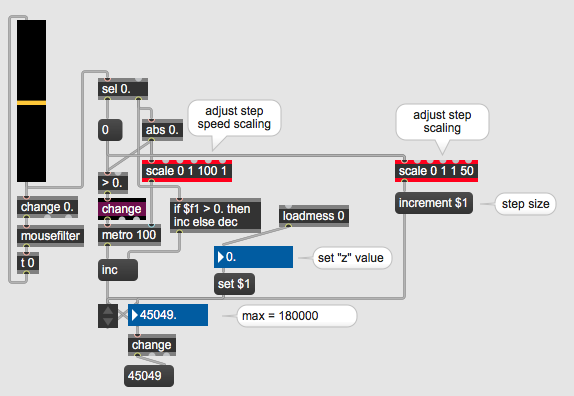
one could optimize it further by for example jumping to 0 or 180000
if joystick holds at it's min / max position for a certain time, like 2 sec.

zl stream 40 + zl median