
jit.gl.sketch coordinate transforms -- can or cannot accumulate rotation?

Another one for today... In Pd/Gem, I really enjoyed the way that coordinate transformations accumulated. (There were things not to enjoy in Gem, but this is a cool way to build structures.) For instance, loop-drawing a shape multiple times, with translate-rotate in between each one, produces a spiral.
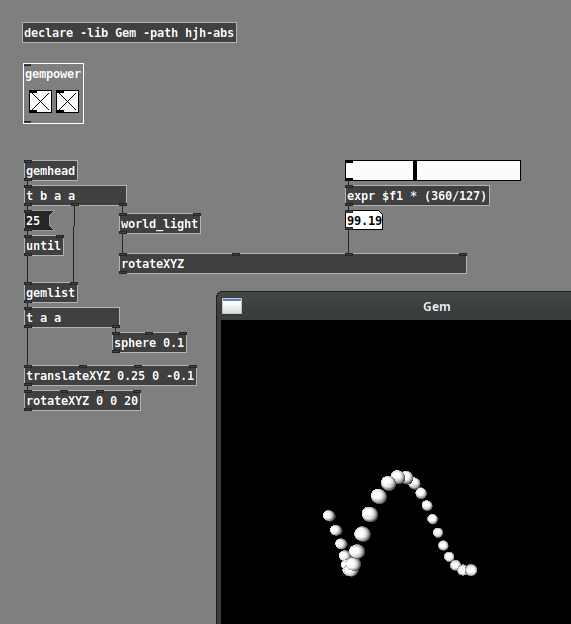
jit.gl.sketch "move" accumulates, but ignores rotation, so the same effect seems to be harder -- a similarly structured patch places the spheres in a straight line across.
Is there a mechanism to include rotation in the coordinate transform?
hjh

with Jitter we have the jit.anim.node object to build complex transformation hierarchies. Search the file browser for anim.node and a few examples patches will come up. Here's a basic starter patch to achieve something like in your screenshot.
> with Jitter we have the jit.anim.node object to build complex transformation hierarchies.
That's helpful, thanks.
The Pd example is more like jit.gl.sketch though -- those spheres are not trails from animation that weren't not erased. There are 25 real spheres being drawn. The initial [rotateXYZ] causes the whole complex to rotate as a unit, with no leftover junk from past render cycles.
I suppose it would be possible to precalculate 25 rotate-translate results into position and rotation matrices, and feed those to jit.gl.multiple. But the students in this class are not highly technical -- they are definitely not going to understand affine transformations. I'll abandon this idea rather than subject them to that. Was really hoping that Jitter would have some nice user-friendly way to do it.
hjh
That was just my attempt to interpret your screen shot. You can use jit.gl.multiple for this kind of effect if you order your arguments to the glparam attribute appropriately, e.g. rotation prior to translation.
You can use jit.gl.multiple for this kind of effect if you order your arguments to the glparam attribute appropriately, e.g. rotation prior to translation.
I see -- I suspect it's mathematically slightly different, but close enough. Thanks!
hjh