
poly~ inputs not working?

Hey everyone,
I'm new to max and I'm following a tutorial to build a granular synth. My grain generator is inside a poly~ object, but I'm having some problem to establish comunication with it.
After some experiments I figured out I have a problem with inputs and outputs not working. I can establish an input with the send/receive objects, but not with normal in and outs. I don't know what I'm doing wrong

before doing that grainy stuff, learn how to use basic max objects in first place.
and what messages in max mean.
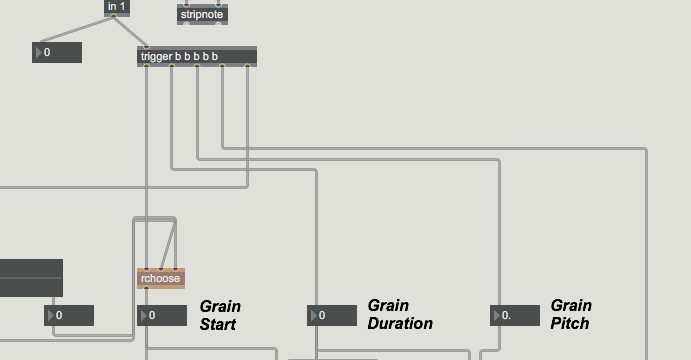
here you route input to trigger object that only triggers 5 bangs, whenever it receives something.
that input should instead be a list with values, routed to several parameters,
which can not be generated only by midi note alone. If you know what midi note is.
where is that tutorial you are talking about ?
I can't believe that it does not show how to form and route messages to poly~ instances.$
P.S. about that poly subpatch :
you should not insert range sliders into it, but set that globaly and send to all instances.
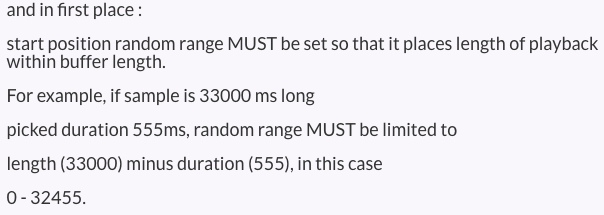
and in first place :
start position random range MUST be set so that it places length of playback within buffer length.
For example, if sample is 33000 ms long
picked duration 555ms, random range MUST be limited to
length (33000) minus duration (555), in this case
0 - 32455.
Thanks for taking the time to take a look at this, I really appreciate that! I'm not completely a stranger when it comes to using Max, I've been through some of the basics.
that input should instead be a list with values, routed to several parameters,
which can not be generated only by midi note alone. If you know what midi note is.
I know what a midi note is. What baffles me is that the patch works fine if I bypass the input system and use the send and receive objects instead. That's what made me think the problem is the input.
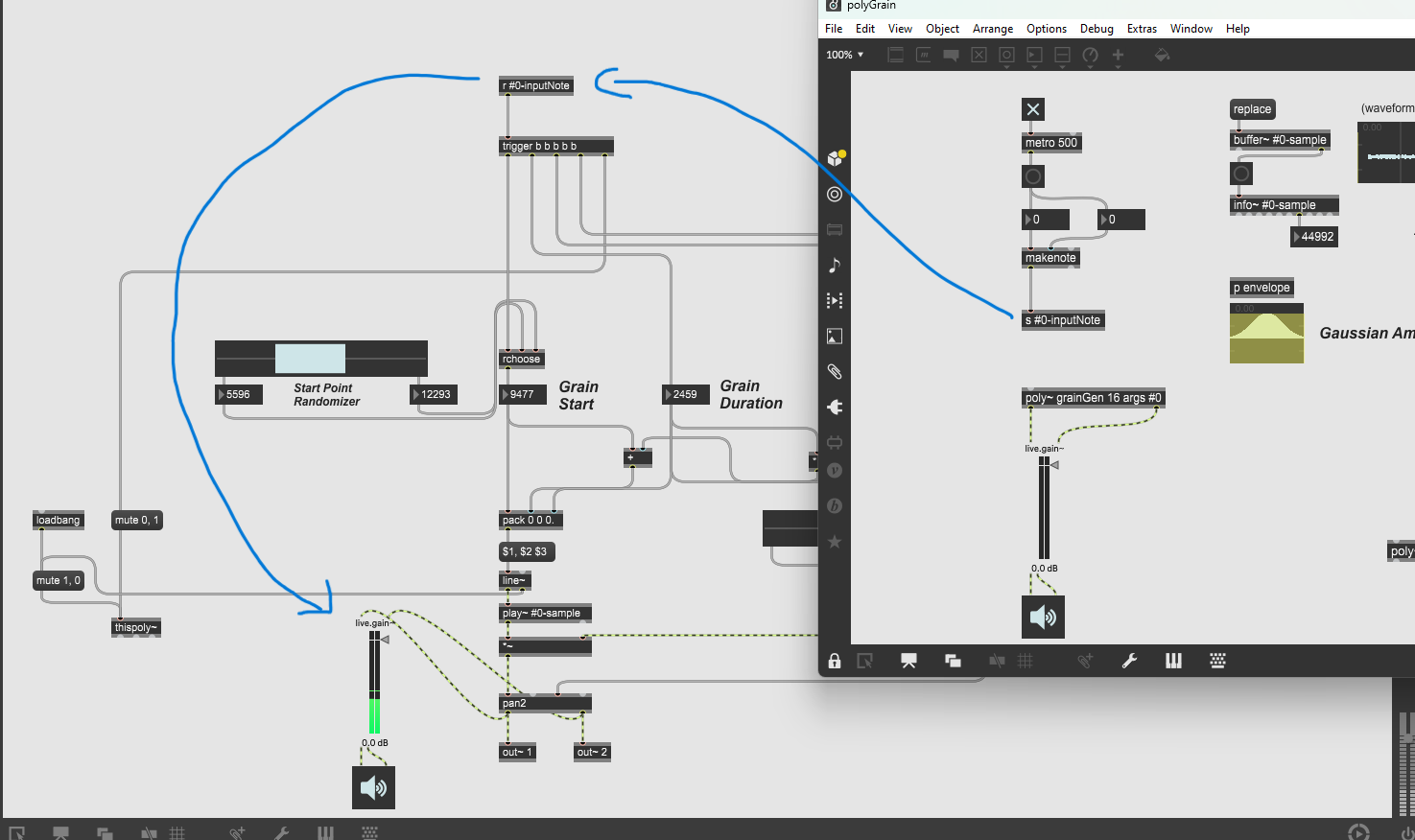
Also, if I open the poly~ Help, the example patch has a midi note fed into the poly~ object and than into a trigger. What's the problem with midi notes?
I tried to copy the patch section that should be fed into my input into the poly "sub" patch, and everything works fine.
EDIT: here's the link to the tutorial
P.S. about that poly subpatch :
you should not insert range sliders into it, but set that globaly and send to all instances.
and in first place :
start position random range MUST be set so that it places length of playback within buffer length.
For example, if sample is 33000 ms long
picked duration 555ms, random range MUST be limited to
length (33000) minus duration (555), in this case
0 - 32455.
You are right. I started off building and testing that poly subpatch as a standalone, that's why it still contains parameters that should be global.
The start position, grain duration and pitch values need to be set everytime I open the patch, I haven't set proper limitations yet
"What baffles me is that the patch works fine if I bypass the input system and use the send and receive objects instead."
I don't think that it can work fine.
main thing about poly~ is to deal with voices and voice stealing.
targeting voices (or instances) of poly~ using note or midinote messages
combined with note on / note off messages does not work in your patch,
because you have no relation of notes to anything in your synth.
you only use 2 values - duration and pitch, the rest gets banged
on input to create random values.

video 20:00-22:00 (Laugh out loud loudly or W*F)
[midnote $1$1] -> poly -> (inside poly) -> [unpack] -> [stripnote] -> [t b b b b b b]
//
also around 35:00 he starts making [send / receive] -
because teaching how to do it properly with [inlet] actually requires some brian (or brain if you prefer)
I would never loose time watching any you tube shit.
any ass can post any shit nowadays and title that rubish as tutorials.

did you know that more than 50% of all people new to max attempt to build a complex granular synth as their first project?
my first project was a midi fader and 25 years later i still got room to optimize it.
ROMAN THILENIUS - I used Max first time in lieu of Powerpoint for my Doctoral defense
a single page with 6 bpatcher that were filled with more bpatchers
include music scores with hand written analysis and precise page turns to follow audio
descriptions of each composer
philosophy from each composer
bunch of shit
I though it was so great to be able to interact with a program where you we not 'forced' to go from slide 1 to slide 2 to slide 3...
file was 2gb so none of teacher would wait long enough for it to open (haha)
infinite ways to begin using Max
granular synth maybe year 3 or 4
actually I added grainflow~ to recent work . never used it. don't like it. still after **years haven't found or built preferred granular patch
targeting voices (or instances) of poly~ using note or midinote messages
combined with note on / note off messages does not work in your patch
because you have no relation of notes to anything in your synth.
But why does it work as a standalone if I feed the subpatch with midi notes? I have succesfully tested it, and it works as intended. It works in the tutorial too. My poly~ patch may have nothing to do with notes, but it accepts a midi note as an input and behaves as I want it to when the midi note comes directly from within the patch. The problem comes when I try to send the midi note from outside the subpatch.
[midnote $1$1] -> poly -> (inside poly) -> [unpack] -> [stripnote] -> [t b b b b b b]this is NOT feeding midi notes into the patch - it's just converting a bang to a midinote and back to a bang
what Source Audio said
before doing that grainy stuff, learn how to use basic max objects in first place.and what messages in max mean.Look. I agree with you, I understand that it makes no sense to use a midi note and convert it into a bunch of bangs. I understand that I should probably learn more about Max before diving into this kind of stuff.
On the other end, I understand what's going on in the grain generation patch and I'm just trying to make it polyphonic.
I'm trying to expand my skills building something new without spending hundreds of dollars on plugins pumped by marketing.
I'm just having some fun learning Max, I didn't mean to sound as an insolent newcomer.
PETER - the problem here is that shitty video
you can't just put a single function patch inside poly~ and expect it to work -
all the answers about poly are in the help file - trust me on that
poly, gen, rnbo all have their own unique subtle way to of implementing 'other' ptaches
if you want - send your fully functional grain patch (not poly version and I will have a look
wil.pertz@gmail.com
Thanks Wil, that would be very instructive. I appreciate that.
In the meantime, I'll try to find a solution myself looking carefully into the poly~ help file.
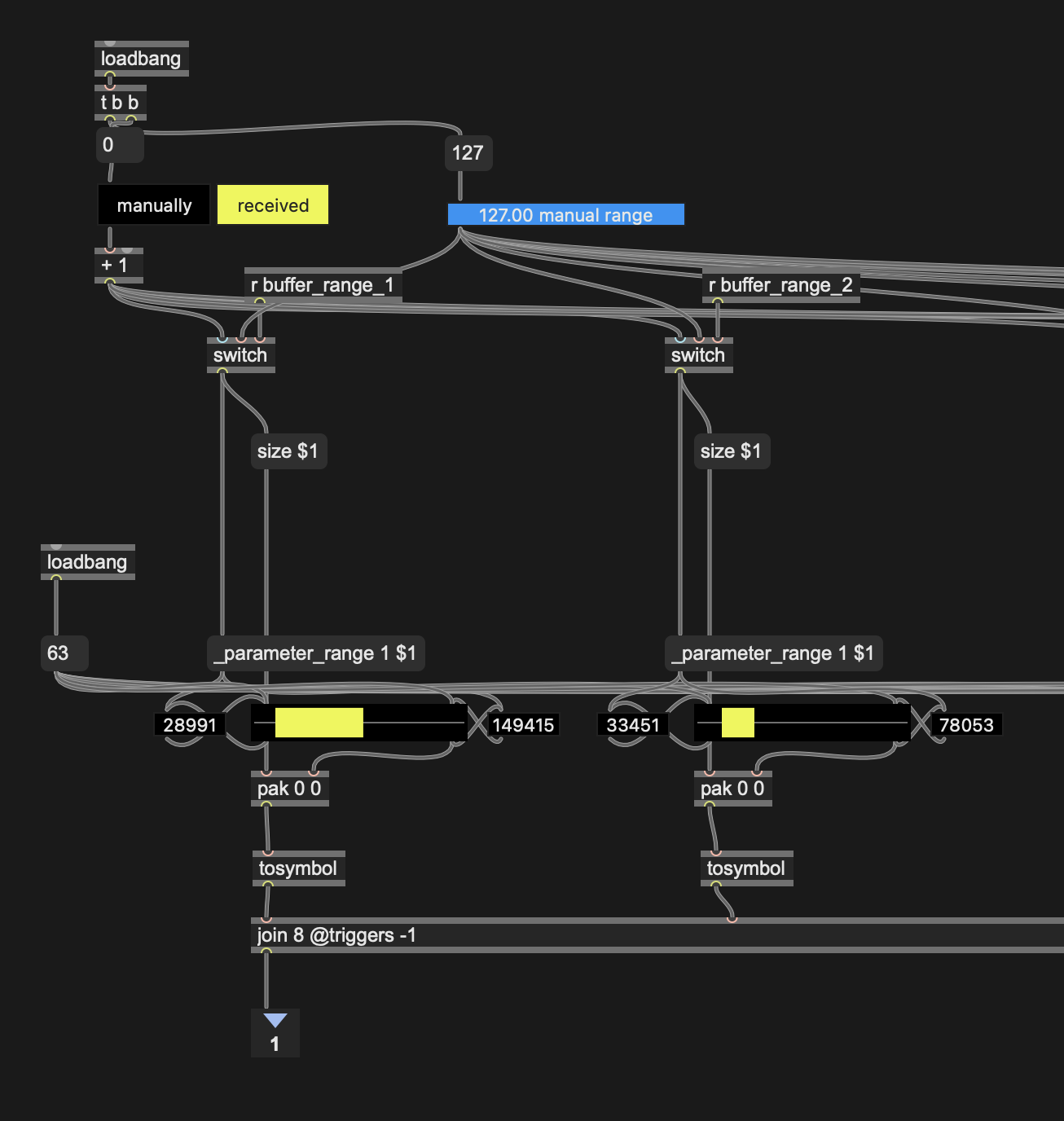
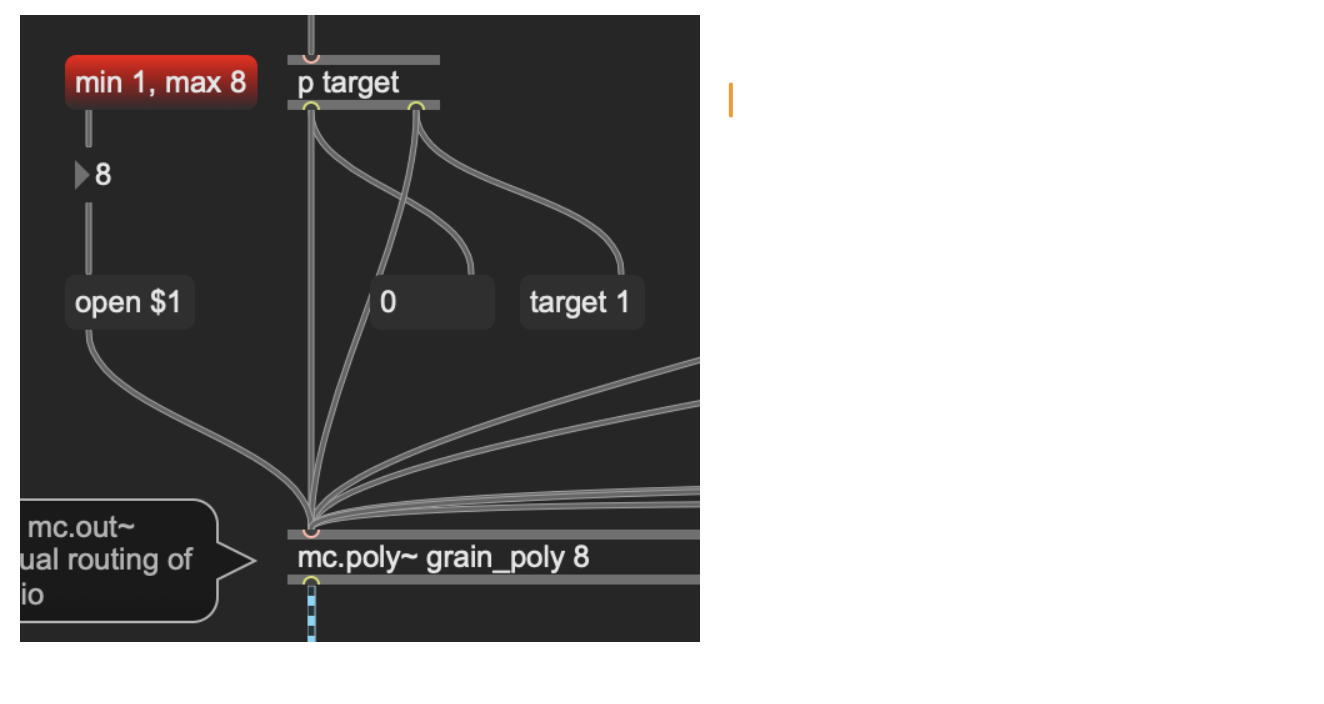
here is the patch you sent me
put into poly~
please study it
there are many ways to do poly~
for this I target each voice individually
so you can play any or all voices at once
use mc.poly~ and mc.out to route audio out
I didn't spend any time dealing with buffer~ // so you have to load audio file 6 times
(didn't touch anything from your original grain - except add ins and outs)
BTW - your original patch has 'pitch range' plugged into pan2 - think about that
I might use it now :0 thanks
Thanks a lot for the help!
hi PETER
here is some updated information for poly~
I moved the buffer outside of poly~
now you can address each buffer different with audio file - or load same audio into all buffers
also - buffer length is sent to 'start/stop' multi-rslider to resize them depending on buffer size
hope this helps
few comments beside big thanks to Will for that extensive help
1~
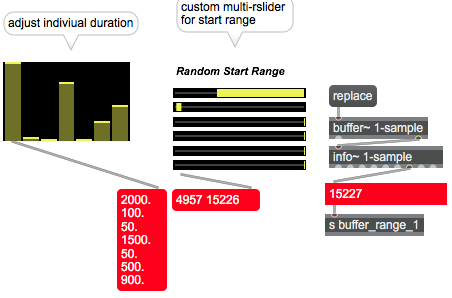
2~ allways limit GUI objects range to allowed range or disable them if not meant to be used to set values
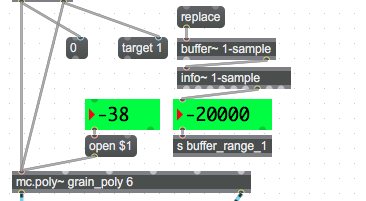
3~ that rchooser patch is obsolete now that random object accepts range arguments and messages
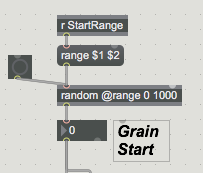
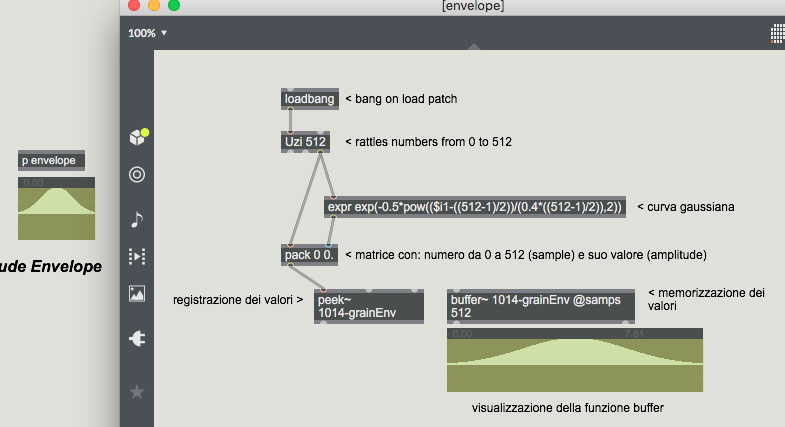
4~ this here in every instance of poly ?
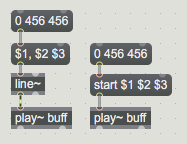
5~ play~ needs no line~ to do it's job
.......
here is a little player , just for fun
It divides buffer length into duration slices and picks one slice
randomly.
you can add fade I/O to avoid clicks
1~ yes already updated rslider module to update buffer length (and it can be used for multiple circumstances)
2~ yes professor!
3~ okay- will check out random @range in lieu of rslider (but it will still need high and low values)
4~ yes every instance -no need to change this [#0-grainEnv] should adapt to each instance-- each instance has different range - correct?
5~ don't ever use play~ , but good to know thanks!
***thanks for the fun player- will have a look !
that grain envelope is simply 512 samples long fade table.
and it does not change per instance.
is this the simple logic behind that windowing?
512 samples = between 10-11ms
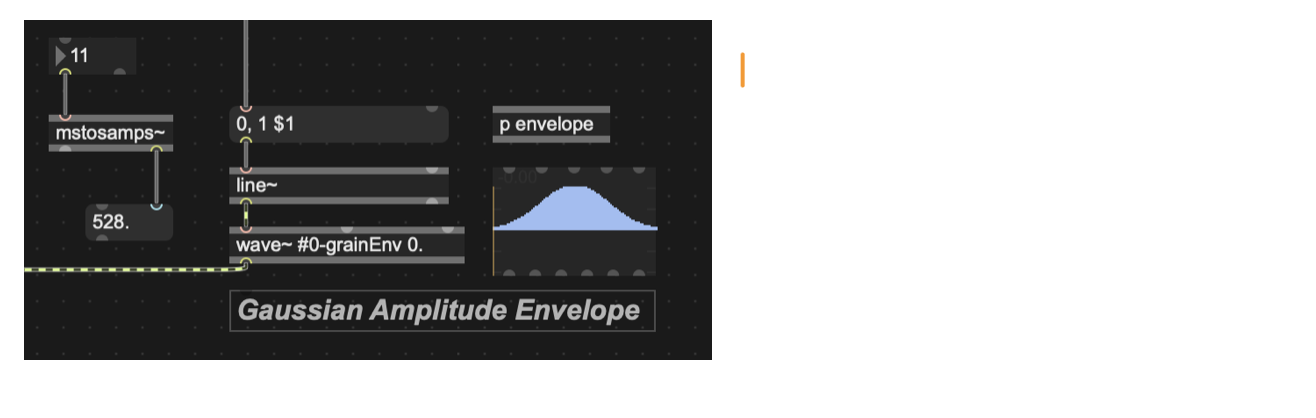
its curving the 0, 1 $1 -> line~ wave~ then multiply by main signal
if the $1 is more than 512 samples - example 2000ms - then it is stretching the 0 -1 ramp to longer fadein and fade out, and adding a curve up and down
correct?
its just a little nudge to get rid of pops and clicks
wouldn't it be better to get rid of that windowing and just use line~ , or curve~?
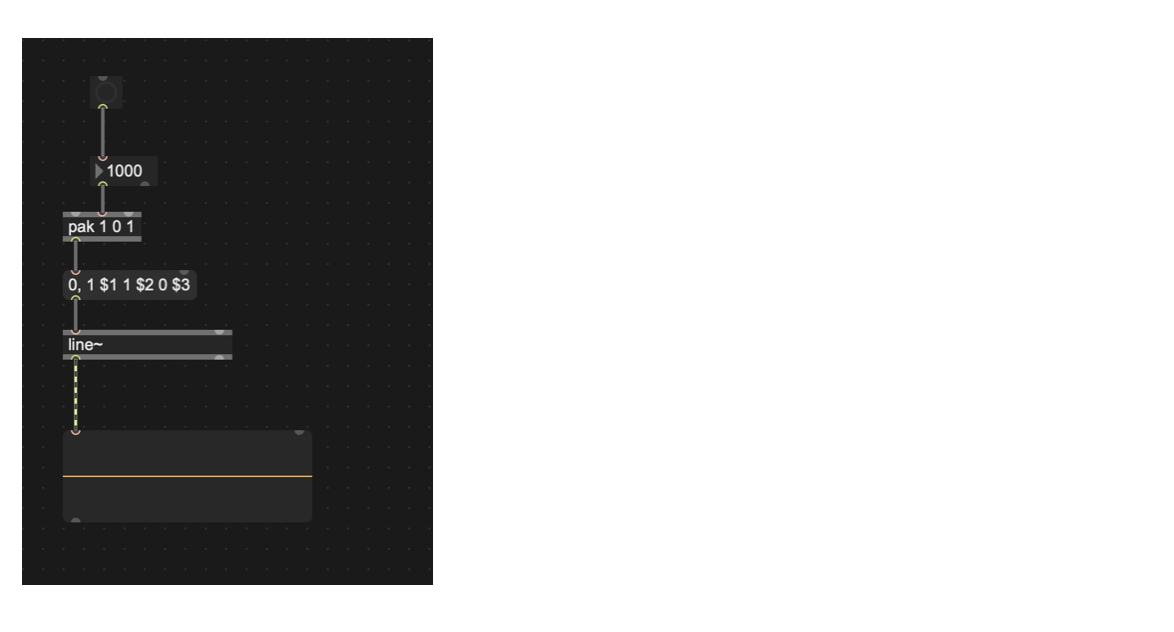
or shape~ ?
I have already built shape~ controls that can precisely shape any length of signal
just plug those in instead?
please excuse my ignorance in this matter
@ Will , you are right about that.
Typical tutorial ... such fade in-out construct might make sense for very short
playback, but is useless for longer "grains" or whatever one calls them.
in that example line~ amplifies the signal with set wavetable over entire grain length.
I would use matrix~, or curve~ or similar instead with fixed (or adjustable) fade in-out times.
another problem is that retrigger of running playback should first fade out,
then trigger fade in & play.
Which costs time.
That is why poly~ with voice stealing should be used for.
another problem is that retrigger of running playback should first fade out,yes - I explained to a non-musician today - if you fill your mp3 player with 20 or 100 , 1 second long notes - and start playing them - each track stops before the next can play
on a piano - you can play a note and let it ring when you play the next note
that is what poly is mostly designed for
//
I never use it that way
I use it for weird stuff like have a bunch of performers or gadgets stuffed into a small room that you can turn on and off and - importantly - mute
and the fact that it automatically assigns mc.whatever to different instances
//
I guess if you forward to later in that video he explains about voice stealing and parallel processing -
and this post was about using inlets instead of send/recieve
that video is using #0 to send/receive
a bit heavy to convert the [#0 send] to [inlet]
tabs of poly~ help file that use inlets - multithreading / MPE / notemessages
but tab 2 - I think explains how to input messages without inlets in lieu of that #0 (although the target explanation is not conclusive)
//
anyway - going back to [mute] -> [p [mc.rnbo.custom.eternal @chans yay!]]