Radio like interface using Arduino and MaxMSP

Ok, I have to begin somewhere and it is with this simple project .
I want to make something that looks like a car radio. I use a potentiometer with an Arduino code that send a value between 0 and 13 only if the serial reading is different from the previous readind. This is working.
But in Max, with route anf sfplay, I can't make it work properly. It doesn't toggle on and off when the value change or it toggle in a strange way.
Someone can help me? Thanks!

Could you provide the Arduino code as well ? I have difficulties understanding what you really want to achieve.
an Arduino code that send a value between 0 and 13 only if the serial reading is different from the previous readind=> Why do you want to do that ? I don't see any instruction that would correspond to this requirement in your patch ?
=> What messages do you want [route] to route ?
=> Why do you have several [sfplay~] ?
=> a simple toggle cannot turn on/off looping, you have to insert a message (loop $1) between the toggle and [sfplay~].
=> [toggle] is de-activated when it receives a 0 and activated when it receives anything different form 0 : sending 1, -1, or 500, for instance, makes no difference.
OK it is resolved. I've made it with something else than «route» . I've used «if» and the appropriate value for everysfplay.
Can I close this ?

real deal would be to use single sfplayer and just load files depending on input from arduino.
would also sound as radio button, you could even
make noise between stations if you send full range analog readout from arduino.
(also only if values change, not to flood serial port)
Thanks for your replies Sébastien and Source Audio.
With some help, I've make it works as I want. I may add some noise as you suggest to make it more realistic and kind of more appropriate for this, somehow, old technology
Here is my Arduino code:
[code]
const int potentiometerPin = A5; // Pin analogique où le potentiomètre est connecté
int previousValue = 0; // Variable pour stocker la valeur précédente du potentiomètre
void setup() {
Serial.begin(9600); // Initialisation de la communication série
}
void loop() {
int currentValue = analogRead(potentiometerPin); // Lire la valeur actuelle du potentiomètre
int soundlist = currentValue * (0.013);
// Vérifier si la valeur a changé par rapport à la valeur précédente
if (currentValue != previousValue) {
Serial.println(soundlist); // Envoyer la nouvelle valeur via Serial
previousValue = currentValue; // Mettre à jour la valeur précédente
}
delay(10); // Un petit délai pour éviter la lecture trop fréquente
[/code]
And my Max Patch:
here is one example
it scales arduino input 0 - 512 into 40 steps,
randomly spread between 13 radio stations and noise
int radio = 0; int EXradio = 0;
void setup() {Serial.begin(9600);}
void loop() {int radio = analogRead(A5/2);
if (radio != EXradio) Serial.println(radio); EXradio = radio;
delay(10);
}
Thanks Source Audio! It works fine. ÙI've just made a little change in the Arduino code because I was getting a constant value around 267.
Now, can you help me adding a second potentiometer to control the volume of this radiolike instrument?
Sure, I am out of home now, but tomorror I’ll
post added code.
can you post which arduino board you use and which analog inputs to use for radio and volume control
Usual boards have 10 bit resolution 0 - 1023
I have an Arduino Uno and I've used A5 for radio, let's say A4 for volume? If i understand correctly
int radio = 0; int EXradio = 0; int vol = 0; int EXvol = 0;
void setup() {Serial.begin(9600);}
void loop() {int radio = analogRead(A5) / 2;
if (radio != EXradio) {Serial.print("r "); Serial.println(radio); EXradio = radio;}
int vol = analogRead(A4) / 2;
if (vol != EXvol) {Serial.print("v "); Serial.println(vol); EXvol = vol;}
delay(10);
}
..........
for only 2 values it is simplier to read each separately and
prepend ID, in this case "r" for radio and "v" for volume.
For multiple values one would rather use array, but that is another story.
Ho! That's fantastik! Now I only have to work on the harder part for the long term: understanding what is going on.
Thank's a lot
it is not that complicated as it looks like.
arduino input 0 - 511 gets scaled to 0 - 39, makes 40 values.
you wanted 13 radio stations, I thought 13 out of 40 would give ok
ratio between stations and "empty" space between them.
random created list of 13 values from 0 - 39,
gets stored into coll, which outputs 0 - 12 when arduino input matches
and so recalls sound files from populated umenu.
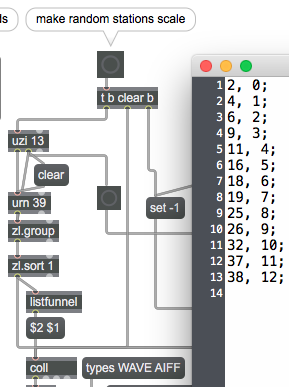
this list of 13 numbers gets filtered by zl.filter, and all other values trigger noise.
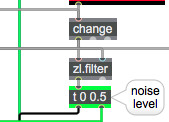
so when input matches one station, it plays audio.
if not, audio stops, and noise gets output.
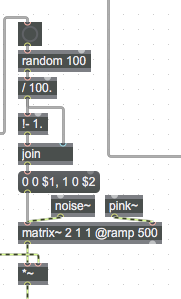
to make it a bit more realistic, every time noise gets active, it mixes
randomly between pink and white noise.