
Strange visual behaviors...

A couple of issues...
1) When I load a patcher, it looks empty, no objects visible just the background.
...until I zoom in or out just 1 Click, then everything appears, as normal.
2) A patcher loads, all my stuff is in the Top Left Corner, but the screen is panned a long way off to the Bottom Right Corner, as if there was something down there, but the patch has nothing down in that corner. So I have to pan all the way up to the Top and all the way to the Left to see my stuff.
I have selected just the objects I want, and copied them to a new patch, but the new patch does the same strange behavior.
I have tried Select ALL, and there is nothing down in the bottom right, but the patch thinks there is something there.

I have no idea about 1). But 2) sounds a lot like your objects are in a negative X and Y position.
The way object coordinates work is that by default 0 0 is the upper left corner of a patch. As you move an object to the right or further down, its X or Y position, respectively, will grow. The thing is: objects position is not limited to positive values and can be set to negative values as well, but when you open a patch, the origin (0, 0) will always match the upper left corner of your window, making objects with negative X and Y hidden further up left.
For example, if you open that patch, it will look empty, but there's actually a [button] at position -300 -300 that you can see if you scroll up and left.
You can solve this by selecting all of your objects, and move them down and/or to the right until the upmost leftmost object has positive coordinates.
You can check objects coordinates in the inspector:
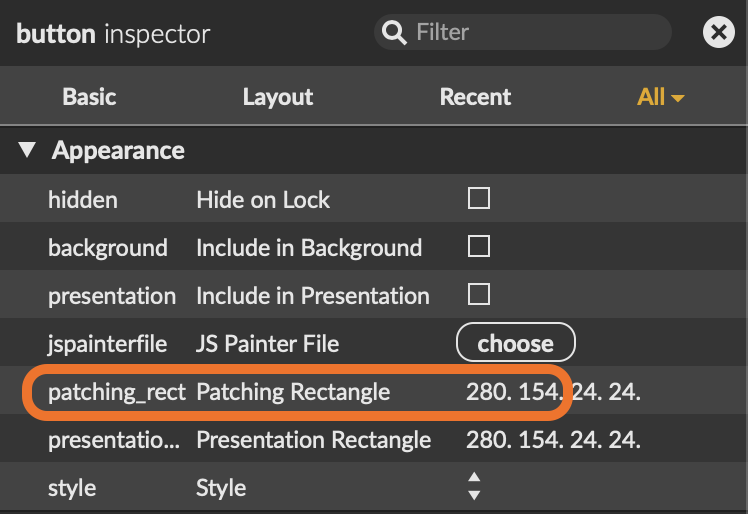
or the line below for position in Presentation mode. The two next numbers are the objects width and height.