
Basic step sequencer delay half the time

Hi,
I'm studying with basic step sequencing. Using phasor~ and counter.
The accuracy is perfect in live, but :
Half the time the sequencer is delayed by one step.
Every tutorial video are skipping this problem.
Is it a transport problem ? or ... any suggestions will be appreciated as I'm struggling on this one for hours.
Best

I run into the same problem. Now I use subdiv~.
So it's more like a bug / optimisation ?!
yes is saw this solution. (Just missing the direction selection then (easy to invert, but for palindrome I don't know how to do it ??))
Problem when setting a loop the first beat is also skipped.
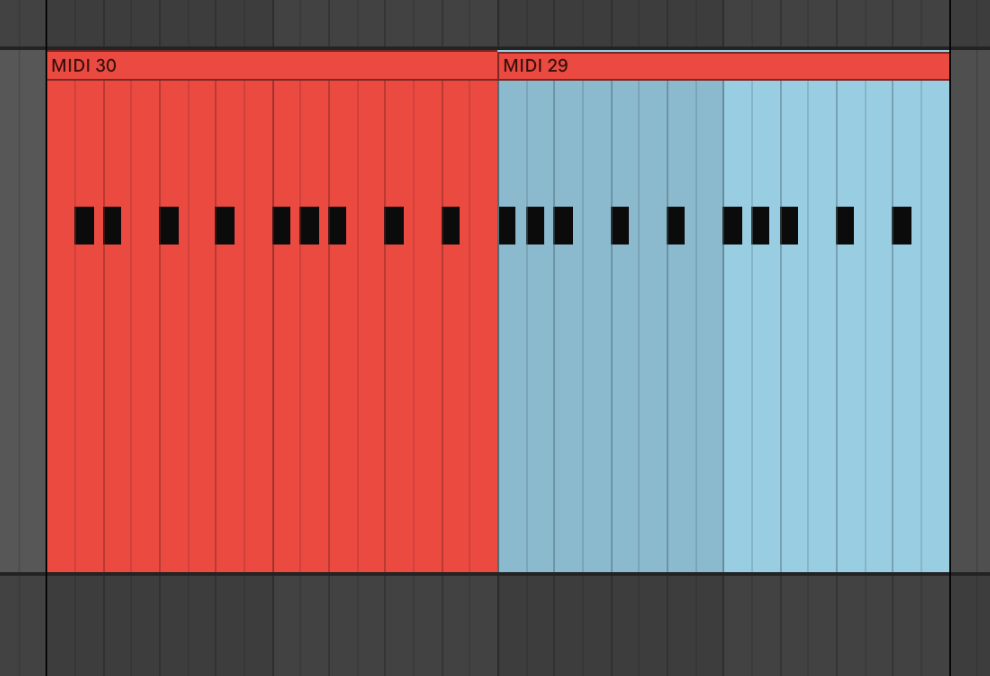
skipped

that is due to phasor to counter conversion, also subdiv wil fail to bang on first beat after
you rewind and start it.
so there's no solution at this problem ?
I am sure there could be, but I am not interested in Live and anyway to run sequencer
using phasor~
for you it depends what you want to have .... in general the problem is when you use signal
to either divide it's ramp into slices ( seq steps) or to bang using it's phase that you need a change inserted , otherwise it will bang all the time.
maybe phasor locked and quantised to a beat ???
do you want your steps to be in sync with live transport ? then use maybe plugsync and grab raw ticks ?
What do you use to create sequencer ?
Yes the live transport should drive the sequencer. I'll check what is possible with raw ticks, but it seems to be a bit heavy solution for a problem that should be solved at another level.
The cohabitation between live and max is sometimes a bit frustrating ahah.
heavy solution ?
using synced phasor, metro or whatever has nothing to do with timeline, so in case you need something like beat clock sync with song position pointer, that follows transport
you must use plugsync,
on I say heavy, I mean that this synchronisation should have be simpler and already documented.
ok I'm already using plugsync, now I have to found how to connect it to manage different time division etc ...
Hope to find a stable solution ...
plugsync gives you float 0. ~ 1. for one quarter note.
so you need beat selector that counts passed beats as ints.
for quarter notes just use int, for 8th note 0.5 fraction, for 16th 0.25 etc.
you could as well multiply raw ticks by 1. 2. 3. 4. 6. 8. etc.
then convert to int , so if you multiply * 3. , you get quarter note triplet
pong gives you wrap and fold modes if you need palindrome
Thx SourceAudio
This is the the best and only reliable solution.
Also, the loop problem was caused by the fact that until you save, freeze, and close the device (if you're still in edit mode in Max), the first beat is skipped.
Here is my current version using plugsync~
glad you solved your problem.
I would add a gate to prevent triggering when you rewind live transport.
you can use plugsync~ play status for that
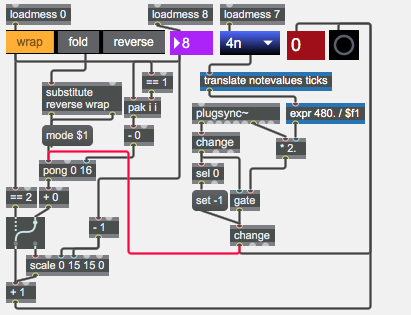
I identified a problem with pong in fold mode and setting a loop in ableton.
So here is a new version with a v8 object that handles the problem.
I've added the play statut you suggested!
there is one more thing one should take care of - when live stops and continues playback,
and one resets change object using set -1 message , beat triggers even if it was in the past.
I don't use live but remember that it is a bit stupid with pause and resume: if one scrolls transport counter manually, on resume it jumps to that last set value...
okay I'll test this.
But right now, the use of plugsync~ in sequencer context is the best solution so far.
Actually best way to fight this step problems is to detect very first float coming from raw ticks outlet / beat multipler when you start transport.
if it is not perfect match to your beat , you must ignore it and wait for next int change.
if it is perfect match, you reset change object and trigger the beat.
all that is needed only because Live does not offer access to position from which
transport starts on resume.
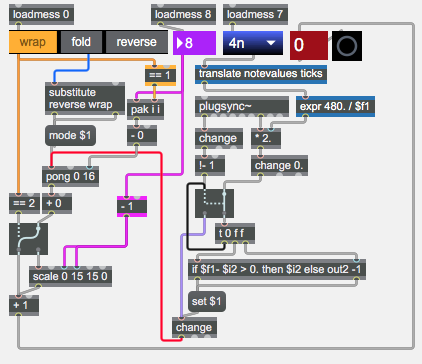
Hope that this thread helps other users !

been there. :-)
the problem is:
delta~ only recognizes a big change of value at the end of a cycle of phasor~.
a simple solution is: negative inversion of the phasor signal.
like so:
phasor~
!-~ 1.
%~ 1.
delta~
<~ 0.5
edge~
what I also discovered is that rate~ and subdiv~ only initialize or "lock in" to a phasor~ after the 2nd cycle. that means, that the first time thru, subdiv~ wont "fire" all the steps as intended if used in prob.
workaround is:
create a smal pulse of two cycles from a line object. fire it into the rate or subdiv object but close a gate at the end of the patch to prevent output. I do this at initialisation of the patch. works like a charm.
hope this helps as well.