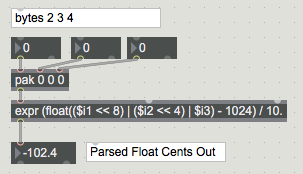
binary to float

On a Yamaha Motif sound module, general tuning can be adjusted from -102.4 to +102.3 cents. (The question why these values are not integers running from -99 to +99 is another matter.)
The value is represented by a 4-byte sequence, where only the low nibble of each byte is significant. The value of 0.0 is represented by the sequence 0x00 0x04 0x00 0x00.
In the course of developing a routine to convert the sequence to floating point and vice versa, I ran into the obstacle illustrated in the patch attached, which is that when converted to binary (or hex, as here) for the purpose of cobbling the bytes into an Fp, the output does not include the fractional part.
How does one get from -102.4 to 0xFFFFFFFFFFFFFF9A back to -102.4?

P.S. that 4 bytes are simpler to explain like this :
4 nibbles are set so that from right to left each byte step is 16x previous one.
409.6 25.6 1.6 0.1
only that byte 2 is offset by 4x -25.6 = -102.4
For Yamaha Master Tune parameter each byte has range 0 - 15.
byte 1 is allways zero for range -102.4 ~ 102.3
byte 2 1 step is 25.6, but has offset -102.4 (4x -25.6)
byte 3 1 step is 1.6
byte 4 1 step is 0.1
summ 4 bytes
one could ignore byte 1 as it is allways zero and simplify parsing
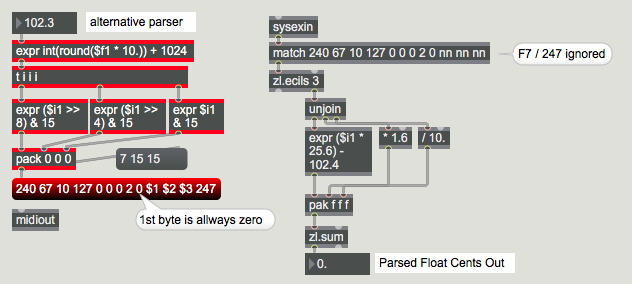
or using single expr