
UDP data from sensor causing Max to lag/freeze on Windows 11

Hi all,
I'm receiving UDP data from a sensor in Max at 200Hz, and the patch becomes very laggy and seems to get stuck while data is streaming in. As soon as the sensor stops sending data, Max goes back to running smoothly.
System specs:
Windows 11
Intel Ultra 7 265
32GB RAM
I've run the exact same patch on a different machine with very similar specs, and it runs fine there — no lag or freezing. So it seems specific to this machine or its configuration rather than the patch itself.
Any idea how to solved it?
max specs:
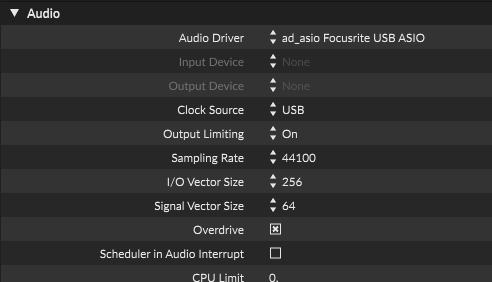
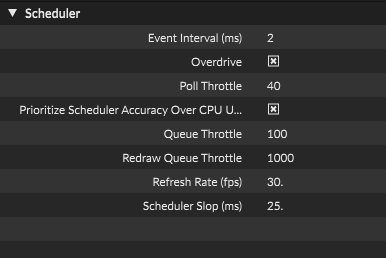
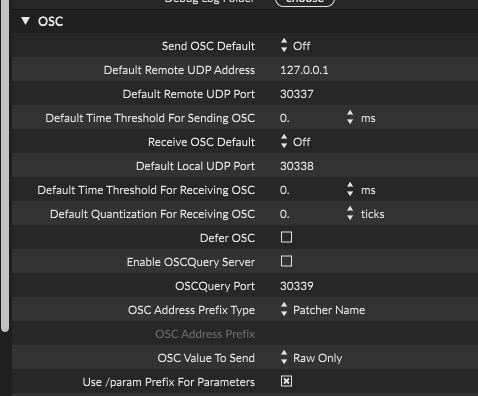
So I think it was related to the quality of the 4-camera recording. I changed the jit.grab to 1280x720, and that's what caused Max to lag. When I changed it back down to jit.grab 320x240, it started working smoothly again.

what happens to the camera feeds after getting out of jit.grab? There is possibly room for improvement there. Typically doing any image processing with jit.gl objects, enabling output_texture on the jit.grab, and avoiding sending the textures back to matrix world, but it's hard to give better advice without seeing the patch.
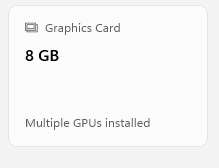
Also, your laptop doesn't have a dedicated GPU, right?
what happens to the camera feeds after getting out of jit.grab? There is possibly room for improvement there
it is going into [jit.vcr @codec h264 @fps 15]
Also, your laptop doesn't have a dedicated GPU, right?
No, just integrated Intel graphics.
patch:
The worse issue is the unique id changing even after computer restart! this is not possible to keep track of cameras as needed. Any idea how to get this solved? is there maybe a way to prevent windows from changing port ids on reset?
I assume encoding four h264 video streams simultaneously hits the CPU hard, but you can probably get slightly better results (ie. less stressful for the CPU) by doing a few things:
use [jit.record] instead of [jit.vcr]. The latter is meant to record video with audio. I don't know how it behaves when no audio is connected to it, but maybe it is recording and encoding silence which is unnecessary here. On the other end [jit.record] just record the video with no audio channel at all
make sure you are using viddll video engine (check in the Max preferences)
use more lightweight codecs, such as mjpeg or huffyuv, although it will produce bigger files (especially for huffyuv since it is lossless compression). mjpeg could be a solid contender
I'm not sure for this one but maybe you have access to some hardware-accelerated codecs even without dedicated GPU. Open the help file for jit.record, go to the VIDDLLE-specific tab, click the
getcodeclistmessage and check the available codecs in the [umenu] below it. Maybe you will see something like h264_qsv (qsv stands for Intel QuickSync Video, which is a part of your CPU dedicated for media encoding/decoding) which should give you better results, if that's supported by viddll at all.since viddll uses ffmpeg in the background, you can also pass options to jit.record to get more efficient recording, like by choosing a faster encoding profile for h264
So first I would try h264_qsv if it is available, and if not or if it doesn't work then I would try mjpeg.
But since you are apparently fine going from 1270x720@30fps to 320x240@15fps, what will you end up doing with those videos? Because if you're fine with 320x240@15fps why trying to record at 1270x720@30fps first?
The worse issue is the unique id changing even after computer restart! this is not possible to keep track of cameras as needed. Any idea how to get this solved? is there maybe a way to prevent windows from changing port ids on reset?
You already asked this question multiple times in multiple threads. Let's keep issues separated (and I don't have better answer than Rob or Source Audio on this topic).
You already asked this question multiple times in multiple threads. Let's keep issues separated (and I don't have better answer than Rob or Source Audio on this topic).
True. I finally solved it with pyton script that run before and sending the right index of each camera.
make sure you are using viddll video engine (check in the Max preferences)
indeed.
But since you are apparently fine going from 1270x720@30fps to 320x240@15fps, what will you end up doing with those videos? Because if you're fine with 320x240@15fps why trying to record at 1270x720@30fps first?
the 320x240 YUY2 was bad quality. I now changed to this which is ok:
