
Control nfilters on Filtergraph~

Hi everyone,
I would like to know how I can control each nfilter coefficient and resonance on this patch.
I didn't find any explanation.
Thank you!

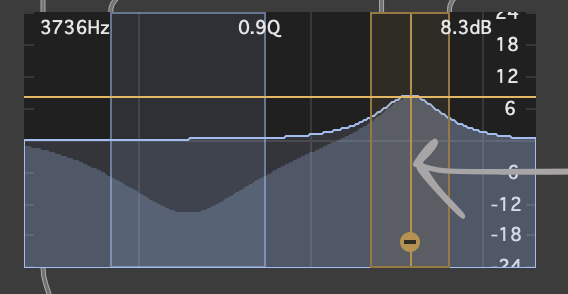
i feel like i'm not quite understanding your question: did you get this patch from someone else? it seems you already have control going to the inlets of the filtergraph~, and controlling the coefficients directly by number is not the most intuitive, anyways, might be much easier to just use the UI itself by locking the patch, and then dragging with your mouse over the center of each filter graphed within filtergraph~ to control cutoff and amplitude, move right/left for cutoff, and up/down for gain:
and drag over the enclosing 'sides' of each filter graphed in filtergraph~(showing the bandwidth boundaries) to control resonance:
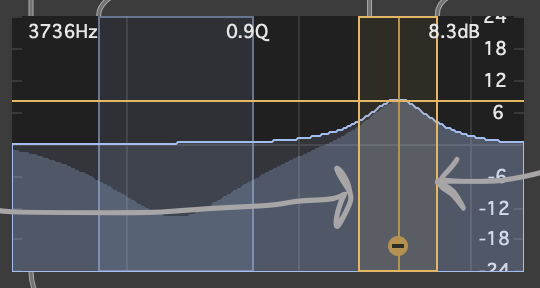
hope i understood, if not, feel free to explain further what you need and i or someone else can try and explain from that context. hope this helps.
Hello!
Thanks a lot for your reply! I would like to control each filter within the filtergraph with numbers and not the UI. Do you think it's possible?

@WYND
I am just trying to do this as well starting today.
Searched all the way back to around 2007-2008
Haven't found any soldi solutions for what you/we are asking
//
So I will take a stab -
To make similar to Ableton EQ Eight
But with probably just 5
Mine will work like this (only one right now)
//
there's an 'edit_filter' attribute in filtergraph - but its a bit dodgy (7th outlet)
I think 5 sepatate pictcontrolllers
with filter selection menu -> bring to front
make nfilters 5
put all 5 filters in coll - so don't forget where left off
select filter to change from selection menu and bring pictcontrolller to front for that filter
//
1 thing I do not think possible
highpass peakamp peakamp peakamp lowpass -
hmmm... maybe
Probably the reason nothing in the help file about this
because more than a nightmare
-- although the edit filter number DOES change to different modes
Ok!
Do it with messaging!
colors for nfilter selected?
cool.
ill be back tomorrow with full solution using pictcontrollers
Hello!
Thanks for your replies and also to share your experimentations. I will try new ways to achieve a morphfilter soon but I guess it's possible through gen~ as well.
I finally began to use svf~ for that matter.
Here is nfilters 5 (EQ5VE)
using 1 pictcontrool , 1 slider, and 1 live tab