help with mute function for step sequencers

hey! i'm super new to max getting to grips with it.
i am trying to sonify a sculpture but before i do that i want to be able to make all the code in max work so it should be simple enough to tell the electronics what to do. The variable in the sculpture i am trying to build is a light sensor either covered or uncovered.
So - when the light is covered there would be one set of samples running and when it is not there would be another set of samples running. so two alternative soundscapes. happy for this 'covered/uncovered' to be a button or something similar right now.
i have managed to build to step sequencers with buffers, but i am struggling to find a way to go between them whilst both are playing continuously? struggling to google the right thing... / it come with answers that make sense... so hopefully this forum can help!
thank you in advance!

Maybe the object Gate can help you.
Or Switch
Or Selector~

depending on you idea,
one could run both soundscapes in a loop and fade between them
following light sensor.
I guess it would sound better than restarting playback of one or the other.
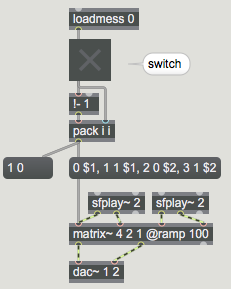
here is one option with 2 players and short crossfade 100ms
using single matrix~ object.