
How to sync ms and min:sec:msec inputs with carry-over in Max?

Hi,
I want to create a counter console. For example, if I pause the playback midway and manually change the min/sec/mili sec number box, or change the "unité ms" number box, I want them to change in sync with each other, so that I can specify the playback point from either side. Also, currently, even if I move the mili sec number box in the min/sec/mili sec section, it doesn't move within the range of 0-999, nor does it increment the value in the sec number box. How can I create a structure where, if I raise mili sec after 999, milisec becomes 0 and sec becomes 1, and if sec is 59, it becomes 0 and min becomes 1? Please give me your opinion.

I would suggest you use something like this:
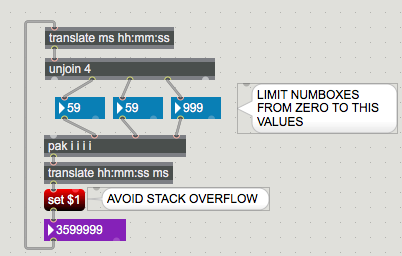
to enter anything into mm:ss:ms numboxes
and keep min sec ms range
you will need some complex interaction between them.
and hidden input elements.
better give it up.
Thank you for your valuable feedback. I'll think about it a bit more and try it, and if it doesn't work, I'll consider other methods.

I think I found a way
Thanks to the helpful structure you provided, I was able to achieve almost what I wanted, but there's one issue. When I manually change the number box for "miliscond," the value of the second number box doesn't change even when crossing the threshold from 999 to 0,0 to 999. I think this is a processing speed issue in the structure after the bucket. The number box under translate hh:mm:ss ms responds accurately to hh:mm:ss no matter how fast I manually change it...
I've tried various structures around the bucket, but I haven't gotten good results. I would be grateful if someone could provide a good solution.
As I allready mentioned, what you want needs more elements
in order to avoid stack overflows.
no matter if you use modulo and dividers to form MM:SS.MS and ms
or vexpr, or translate - which allready has built in modulo wrapper.
here is your transport based on translate wrapper.
seconds and ms numbers are doubled
blue ones are limited to range, you can type into them or scroll.
arrows are numboxes behind without any limits.
you can use them to adjust time as you wanted.
Violet numbox - ms absolute time is limited to 1 hour.
you can also use it to set time.
To jump anywhere during playback,
would need more objects...

Here is another possible path forward using javascript for the down-and-dirty work, it could work for you as long as the timing in your patch leaves room for the trip from MSP to the JS environment and back at runtime (and as long as you're ok with javascripting).
Basically, the patch just keeps a copy of the translated ms value passing through (the v8 object), and allows you to add or subtract aribtrary amounts of hours, minutes, seconds, or millis to the stored value then outputs the updated (stored) value.
The code works (AFAIK, YMMV) as long as you don't get too crazy with your change amounts. But I don't know your use case. If a movie is playing and feeding its "position" property value (in hh:mm:ss units) to this patch and you stop the movie, change the position, then restart the movie from the new position, the new position data should feedback into the patch and correctly display the updated position info as soon as the movie restarts. If you change the 'playhead position' while the movie is running, you will likely get unexpected results.
In the end, while you can edit from ms to hh:mm:ss on the number box, the reverse, hh:mm:ss to ms, is impossible. For example, if each number box in hh:mm:ss is ss, it will become 0 or you can only edit up to 999, right? In other words, you can't carry up or down for mm.
The content of @embed 1 in v8 timecodeRoll.js is empty. Does this mean that it will be useful once I learn JavaScript and can write content in it?
I'm a complete novice when it comes to JavaScript, so I find it very difficult to understand....
Sorry, I thought "@embed 1" attribute would embed the code file so it would "copy compressed" with the patch. I changed the v8 object to a v8.codebox object in this patch.
I hope the code is not too difficult to understand. Only one value is stored, some number of milliseconds (the rawTime message input value). That number can be added to or subtracted from in "chunks" of hours, minutes, seconds, and milliseconds. Every time the stored number is assigned a new value, the stored number is output as raw milliseconds and also decoded to be output as HH, MM, SS, MS units. It's basically just a weird little calculator that only does addition and subtraction in "time units", until you do something with the possibly altered hh:mm:ss data stream. You can ignore the rollingTimecode Dict named "timecode" for now, but it means the timecode output values are available anywhere in your patch using a Max dict object given the same name, "timecode".
The giant caveat has nothing to do with javascript per se, it is the need to feed altered data back around to the input if you need your alterations to persist. I mean if the translate input object is receiving a steady stream of hh:mm:ss data from some clocked source (translating to ms data) and you "subtract 30 seconds" to alter the output data going to the comsumer of the re-translated hh:mm:ss data, that "subtracted 30 seconds" will not persist in the data stream unless the change feeds back to the hh:mm:ss data source before the next "clock tick".
you did not read what I wrote.
the arrows left to blue sec and ms numboxes let you set time freely.
min one has nothing like that as you had limit to 1 hour in your patch.
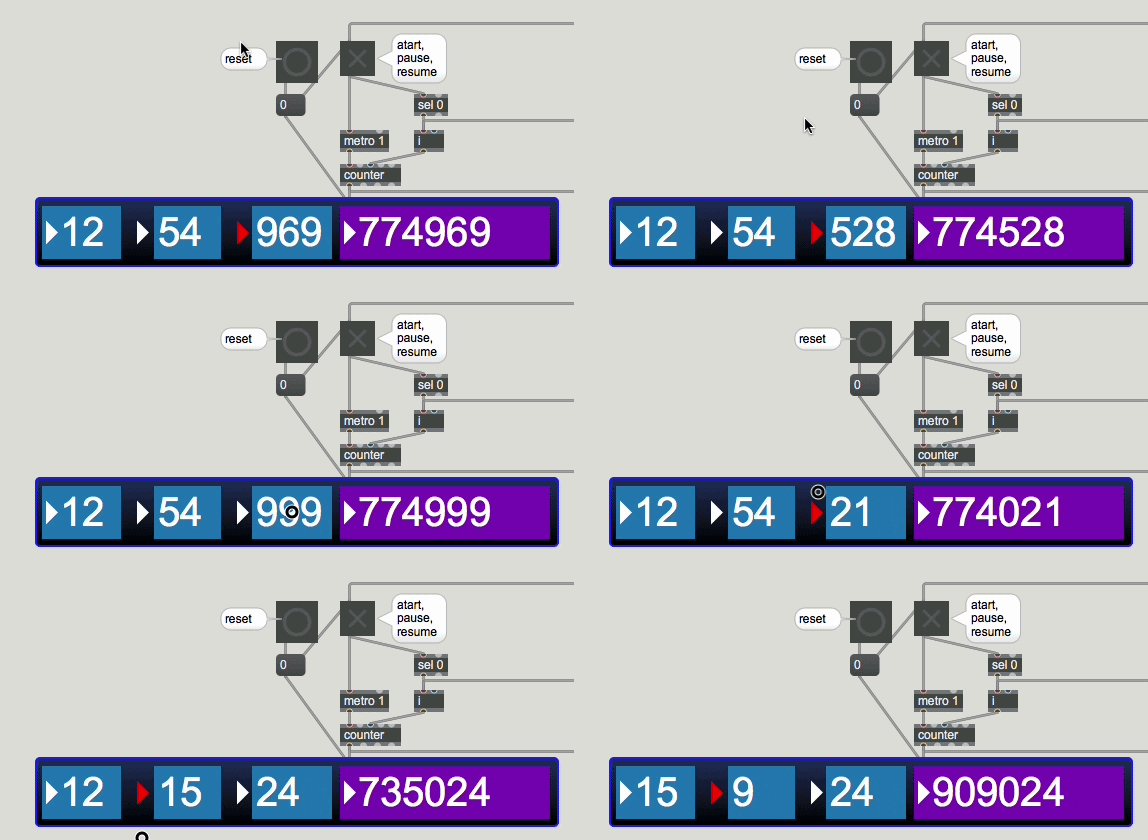
@Source Audio, I suspect at least part of what @Teppei Sengoku said (the can't carry down part) was your patch doesn't zero out all the way from the mm position. That's one of the things I discovered when I tried your suggested solution to see what you two were talking about.
To recreate, start the counter after a fresh reset and immediately try dragging up on SS (middle blue), it takes a while for some reason before you can add any SS, then once the SS number starts going up with your drags, you can add a few MM units every 60 SS. But then switch to MM and start dragging down. The MM "zero" does not "carry down" to the SS position, only MS.

My suggestion doesn't have a floor at zero, nor a ceiling at 1 hour, and I skipped the "live feedback" part entirely.
Edit: Here is an updated version of the javascript patch with "running feedback" and a floor at zero. But it still doesn't implement "carries" in the num boxes while you drag. You add, 58, 59, 60, 61, 62 seconds for example, and the "carry" only appears on the output side.
A bonus feature is that you can move to a non-zero "start position" value before starting the clock.
My patch was not intended to manipulate running counter.
Nor to be full range HH:MM:SS:ms adjustable counter.
To do so one would have to stop receiving count,
set new position and then jump to new location.
Same as if you would want to scroll audio playback using a slider which
both shows and sets position.
I did not add endless scrolling into minutes by purpose.
original patch did not need that.
it was actually limited to 16 min 40 sec max running time.
You can reset counter all way down with reset - zero all.
I don't use max 9 and so can't try your js code...
Yes, I saw the reset switch in your patch and yes that will zero all. I was just "interpreting" what I thought I read and understood from the conversation, how it got off the rails.
I'm not sure if you are actually interested in seeing the patch I shared using the older js engine "style", but somebody might be?
For some reason, the forum is telling me .zip is not an acceptance file type for upload, same for .js (which makes more sense to me) remove the .txt file extension (after checking for malicious additions?) and place in the same folder as the patch above. The only difference between this and the v8 version of the javascript code is this code usesvar instead of let. The 'plain js' patch above has an additinal couple of "jump by 30 seconds" fwd or back buttons implemented. But no "scrub bar" that both displays and alters the timecode stream, running or not.
Thank you all for your various opinions. Based on the feedback I received, I have completed what I wanted to achieve. Next, I plan to combine this with waveforms to enable playback position display, large skips, and range selection for loop playback. However, if you have any suggestions for areas where I can further improve efficiency, please let me know. By the way, the duration of the audio source I am currently working with is 405200ms, so that's why it's specified that way here.
@Teppei Sengoku, Nice Work! Accomplishing exactly what you set out to do isn't always possible.
I'm a complete novice when it comes to JavaScript, so I find it very difficult to understand....
It seems you are a quick learner of "difficult" material. :)
@Jon
Sure I am interested in the code, every new idea is welcome !
I tried it , but it somehow goes against my logic about this.
instead of accumulating added/subtracted time I would
prefer to see real scroll to definite position,
or at least to reset numboxes after adding time again to zero.
And by all means limit input to file length.
In real world, one needs counter like this to set
absolute time for next start in fastest possible way, best by typing it in one go.
or then to fine adjust current position by manipulating numboxes.
or then to execute jumps < > in time by set value, like 2 seconds
or beat based.
once you want to switch over to waveform for time & range selection things will change a lot.
That's exactly the problem I'm running into. I would like to be able to manually jump to a rough position using waveform after pausing, and then fix the playback position by changing the number boxes in the console. This is because if you only use waveform, there will always be slight deviations due to the difference between sample units and millisconde units. What I am currently worried about is setting the mode of each patcher next to the two waveforms to mode loop, creating a vertical line to select the location, identifying the playback start position, and pressing the replay button → There is no problem with this flow, but when you press the play button normally (starts from 0), the waveform's vertical line starts to move. Then, when I press the stop button, for some reason it selects from 0 to the stop position, as if I were selecting a range on the waveform, and it is no longer a straight line. In order to avoid stack overflow due to the relationship with various places, when the r collect_wave connected to the start ms and end ms of the waveform is stopped, 0. is sent via msg "set $1", but a straight line to 0 is not in the waiting state. Then, if you press the stop button again or press the msg "0" (integer, not float) that is individually connected to the start ms and end ms of the waveform, you will see only a vertical line at 0, which is what you want. What is this happening?
Please upload your patches copy compressed.
I don't use max as high to run that v8 java.
You worry about ms to samples conversion ?
That is your least problem.
As first I would suggest to use play position outlet
from audio player, and not the opposite.
then describe what exactly you need.
in meantime take a look at this short video of player-recorder I made a while ago.
numbers are totally irrelevant here, one adjusts play points by visual orientation
and by hearing start - stop points.
you store loop points and recall them.
@SOURCE AUDIO,
Yes, the weird little "time unit" calculator I concocted isn't very usable in real world situations as it stands. But it wasn't meant to be. I was just trying to answer part of one question with a little example. And the example seemed to have sparked an idea or something...
I didn't read @Teppei Sengoku's javascript very closely, but I think they "[preferred] to see real scroll to definite position" also. The new/introduced code mainly seemed to be related to tracking 4 or 5 individual unit values versus the one monolithic total my javascript tracked. My code box had 5 inlets and 5 outlets. Their codebox has 1 inlet and 11 outlets.
I can't help with "waveform time selection" now. But I'm interested in the conversation.
here is modified java code from Teppei Sengoku
with loop option that also limits setting of HH:MM:SS:MS
values based on length of file that needs to play.
and has few unneeded things removed, but structure is kept the same to match individual outlets to max patch. (beside doubled gate out 5 & 6)
you can easilly use that in v8 , for that few functions it makes no difference.
inlets = 1
outlets = 10
var hh = 0, mm = 0, ss = 0, ms = 0;
var timeMillis = 0;
var running = 0;
var end; // could set init value in case it does not get received from max patch
var repeat = 0;
function MaxTime(v) {end = v;}
function loop(v) {repeat = v; }
function bang() {if (running) tick();}
function tick() {timeMillis = timeMillis + 1; emit();}
function play(v) {running = v; }
function setHH(v) {hh = Math.round(v); rebuild();}
function setMM(v) {mm = Math.round(v); rebuild();}
function setSS(v) {ss = Math.round(v); rebuild();}
function setMS(v) {ms = Math.round(v); rebuild();}
function goToZeros() {rawTime(0);}
function rawTime(t) {timeMillis = Math.round(t);
if (timeMillis < 0) timeMillis = 0;
if (timeMillis > end) timeMillis = end; emit();}
function rebuild() {timeMillis = hh*3600000 + mm*60000 + ss*1000 + ms;
timeMillis = Math.round(timeMillis);
if (timeMillis < 0) timeMillis = 0;
if (timeMillis > end) timeMillis = end; emit();}
function emit() {var t = timeMillis;
if (t == end && repeat > 0) {rawTime(0); t = 0;}
if (t == end && repeat < 1) {running = 0; rawTime(0); timeMillis = 0; t = 0;}
const H = 3600000, M = 60000, S = 1000;
var nh = Math.floor(t / H); t -= nh*H;
var nm = Math.floor(t / M); t -= nm*M;
var ns = Math.floor(t / S); t -= ns*S;
var nms = t;chh = nh; mm = nm; ss = ns; ms = nms;
var aboveMS = nh + nm + ns;
var aboveSS = nh + nm;
var aboveMM = nh;
var minMS = (aboveMS > 0) ? -1 : 0;
var minSS = (aboveSS > 0) ? -1 : 0;
var minMM = (aboveMM > 0) ? -1 : 0;
var minHH = 0;
outlet(5, 0);
outlet(6, minHH);
outlet(7, minMM);
outlet(8, minSS);
outlet(9, minMS);
outlet(0, nh);
outlet(1, nm);
outlet(2, ns);
outlet(3, nms);
outlet(4, timeMillis);
outlet(5, 1);
}
But in this case that is not really a solution,
because audio player should dictate current play position,
and not this kind of counter.
Counter should only display current time, and offer to modify it.
When it comes to setting play/loop points for audio playback
it becomes more complex, as we have 3 positions to deal with:
current play position, selection start , selection end.