
Matrix > Gen > Matrix Feedback Loop: Particle Trails / Continuous Lines

Hi there. I have a "chaotic attractor" patch, based on the one in this awesome Hearing Glass tutorial but using a different formula in the Gen, the "Nose-Hoover" attractor instead of the "Thomas" attractor. (Thank you so much Umut Eldem, I learned a lot!) Everything else is, essentially, the same. The jitter preference is switched to GL2 instead GL Core, which I'd prefer to avoid in future versions. For now, though, using GL2, what I can't quite figure out is how to make the particle motion into solid lines.
I turned down the alpha on @erase_color in the jit.world to a point I like, where it makes a trail but goes completely away in a reasonable time frame. However, the look is still "dotty" and I'd like a clean line so the overall shape of the attractor becomes clear but fades away before it turns into a solid block.
I tried a couple other things that I saw in older posts, like the smear effect and reducing the FPS. Neither of them really worked as I wanted. (Actually, reducing the FPS doesn't seem to have an impact on the practical speed, I reduced the attribute but it still seems to output at the same rate, perhaps I'm doing something wrong there? I left it like that in the uploaded patch.) The jit.gl.mesh @draw_mode does something totally different, so it's not that, I don't think.
My questions are: how might I create solid lines out of particle motion in a matrix>gen>matrix feedback loop using GL2? And then, how might that be done using GL Core instead of GL2? I might be, probably am, making a dumb mistake, but I can't figure out what that is. Any thoughts are highly appreciated. Thank you!

If you want the trail to look as an actual trail instead of a succession of dots, you either need to move your points more slowly, or get more fps! Doubling your fps and halving your delta_t (to get the same perceived speed) will give you two times more points so more seamless trails.
If you can't increase the fps, it's probably because you need to set the @sync attribute of [jit.world] to 0.
After some experimentation, it seems that the reason why your patch doesn't work with GL Core is due to a bug with [jit.gl.camera] which doesn't work as expected for some reason. I just reported that bug.
Alternatively, you can capture the scene using [jit.gl.node] and create the trace with a simple custom [jit.gl.pix]:

The reason your patch doesn't work with glcore is because it doesn't support the erase_color low alpha hack to make trails. you have to do it with texture feedback as TFL demonstrates above (the bug he is referring to is unrelated to this limitation) or with the pass smear effect, as you alluded to.
This doesn't alleviate the issue with seeing "dots" instead of solid lines if the particles (or camera) are moving sufficiently fast. The simplest solution I can think of is to use jit.gl.mesh lines or jit.gl.path to draw a line or curve between the previous and current points. This won't help with fast camera movements but maybe that's fine.
here's an example of drawing lines instead of points to fill in gaps when the particles are moving fast. It also shows another way to to the smear feedback effect by using a jit.gl.layer as the feedback.
From here you could draw with a custom shader that maybe did some fading along the line, or use a geometry shader to draw a quad, modify the jit.gen to draw a quad, or...
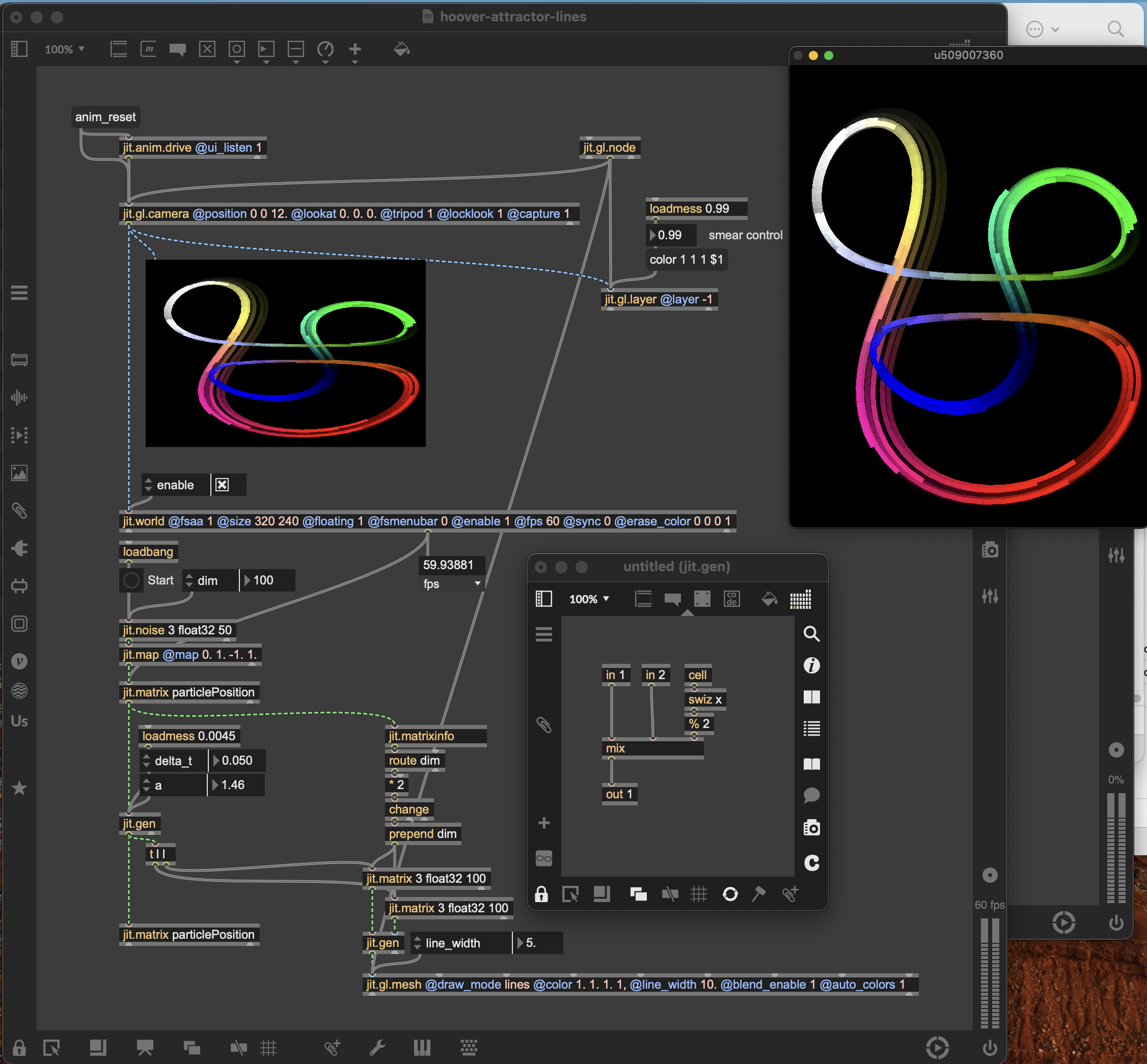
Yes! I thought the frame rate was limited to the refresh rate on my monitor (new 27" Mac Cinema Display) and didn't realize it could be overridden. Doubling it and compensating by halving the delta_t speed made a huge difference on its own, and it stayed good in glcore.
I did want to play with the variables, delta_t speed and, in this one (I've been trying lots of attractors to learn how the math works), the constant a, as part of a more interactive thing with external inputs that I haven't figured out yet, MIDI, audio, Arduino, or something. It still gets "dotty" at higher values but your suggestions really help, both immediately and in giving me things to think about, tweak, and work with.
Thanks for catching what might be a bug in the jit.gl.camera in glcore. I also noticed that it didn't seem to consistently respect a defined Z position attribute, if that means anything other than me being silly. I did think it was weird, though. Thank you so much!
I'm sorry, I hope that the copied link makes the appropriate direct reply. This is great Rob. It's looking much more like I would like it to, and gives me a bunch more to think about, tweak, work with, and learn from. As we all know, Max can be kind of hard. I appreciate y'all's willingness to share your expertise. Given previous threads, I'm sure other people are trying to sort out something similar and plan to share the results when I get there. Thanks!
Hi there. Reporting back, for what it's worth. It took a while as I don't get a lot of time to play with my toys. I applied a couple of the things that people showed me, particularly TFL's solution, and I'm super grateful for everyone's willingness to share. I made an amendment or two. Largely that since the frames per second can be released, unsynced, from the refresh rate of the monitor, if I understand that correctly, I tried doubling that again to 240 fps and, while it's not perfect, have been happy enough with how it's working. I'm not seeing performance issues at that speed, at least not yet.
I also put in a basic Arduino interface that controls the speed with a physical knob. I want to thank Oliver Thurley for the awesome tutorials about how to make that happen. Very, very helpful and informative. I know I could just use an easy MIDI input for that, but I want to play with different kinds of physical inputs going forward. I've included the complete patch here, in case it's helpful for anyone else. Thanks!