
[param] object's @steps attribute not allowing floating-point steps sizes in JUCE UI

Here's some strange behaviour:
I have 3 [param] objects each with a range of 0-100 with different values for the @steps attribute:
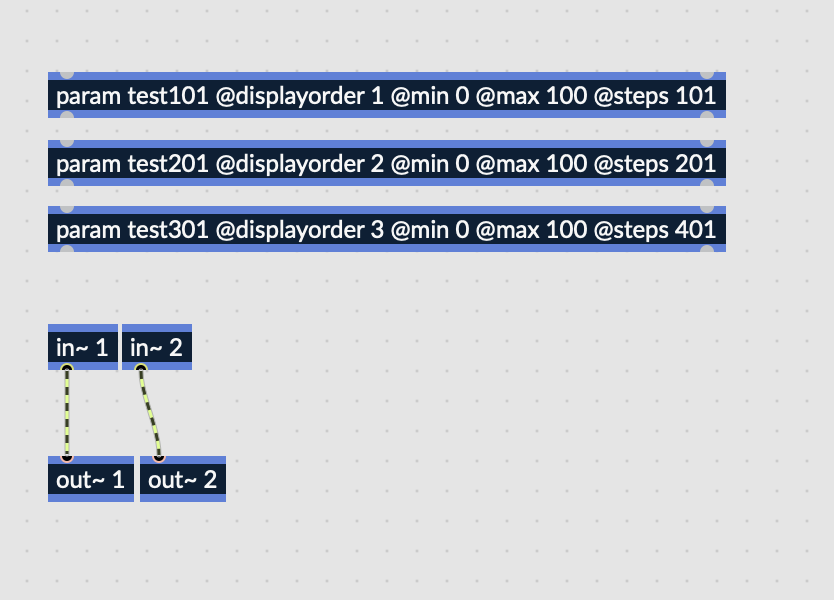
After compiling this as a VST, using the JUCE UI I'm only able to dial in values that are integers. I would expect step sizes of 0.5 for @steps 201 and 0.25 for @steps 401. Curiously this is possible using the default Plugin UI of the host:
Tested in Reaper and Bitwig. It's the same for [param] and [param~]. Looks like a Bug to me, but what confuses me is, that when e.g. I use @steps 151, then I do get floating point values in the JUCE UI.

if JUCE sees a @steps attribute which matches the range, it treats the parameter values as integers - only the 100/150 situation will lead to juce:: AudioParameterFloat.
i have no idea if this is wanted (and if yes where it could be useful), but all you can do against it is not to use @steps.
this "steps" thing is something which exists in the plug-in APIs, too, and there it is either/or with having float resolution (and therefore float datatypes.)
and while you are on it, if you have to use custom range scaling anway why not use normalized ranges mi 0 max 1 for all parameters?
those which do not need scaling will in this case have the same range as the VST host also uses...
Thanks for the reply,
I also wonder if this behavior could be intended. Still it is inconsistent with how the parameters are handled when not using the JUCE UI, wich makes it look like a bug to me.
With "normalized ranges" you mean using the right outlet of the [param] object? Thing is, I would like to read the correct value of the parameter in the UI, e.g. when setting the frequency of a filter (@min 20 @max 20000 @unit Hz) or the level of a volume control (@min -60 @max 12 @unit dB). That's the main reason for me to use the min/max attributes. Otherwise I could just scale the output of the first outlet using some math objects or [scale]. Or did I miss something here?
Anyways I contacted C74 support and they asked me to file a ticket, which I did. So let's see :)
the question is how realistic it is that you really need to have the same behaviour in "RNBO/juce/VST" and "Max/RNBO" situations. but we´ll see what the say.
yes, it is far more work to do all the scaling for input, output and displaying yourself.
but i am doing this for 25 years with pluggo plug-ins now (where you also had a parameter object with built-in scaling) and i can assure you that it does not hurt to leave all of them jat 0-1. :)
built-in range scaling is only useful when you only need linear scaling.
as soon as you want to display decibels, control something with Hertz, allow MIDI input or inverse the direction, you have to do it with custom scaling math anway.

We have this fixed in the main branch of the rnbo juce adapter, should be in the next RNBO release: https://github.com/Cycling74/rnbo.example.juce/issues/31
great new! Thank you!
I haven't done my own builds but only used the cloud compiler so far. I will give it a try though. But do you know, when the next RNBO release is scheduled?
I'm not sure about the schedule for the next RNBO release.