
Please help: Preview mode On = great performance. Preview mode Off = CPU maxed out.

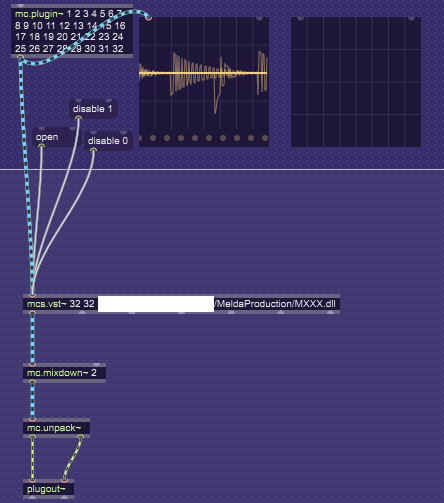
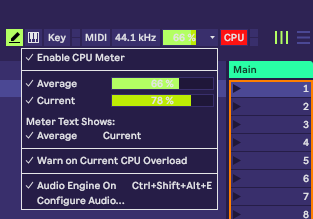
The patch in the screenshot below is running perfectly with Preview Mode On. Preview Mode Off completely kills the performance to the point of the patch being unusable - audio crackles and drops out. What is going on?
bump bump bump.

Are the CPU spikes occurring before you select "Edit in Max", then everything works fine until / unless you stop "editing in Max" or disable Preview Mode in Max (and CPU spikes return)?
Does that behavior occur in any song/track with the device loaded?
Do you have a full Max license or only Max For Live through Live Suite or separate purchase?
It's usually helpful for me to take what I think I know about what broke my patch and use it to create another (minimal) patch from scratch that duplicates the problem. If you can duplicate the problem with a minimal patch, you can share the minimal patch here along with your question and likely get a better unbumped response rate. If you can't duplicate the problem, keep going, keep adding "mocked" behavior to your minimal patch until you can duplicate the problem or you understand why your first patch broke (or sometimes, your 'minimal' patch blazes right past the problem spot for some reason and gets promoted to the real patch you're developing).
Are you the developer of the (semi-secret) mcs.vst~ target "multi-channel vst" named "MXXX.dll"? The pictured patch appears to be a simple wrapper patch / M4L device around that vst dll.
is this a "test harness / development" patch or something to distribute with your vst?
Does your vst ever spike CPU on its own Track in Live, outside the Max environment?
Does your vst ever spike CPU in any other "vst host" application?
How many different ways have you tried providing 32 channels of
mcs.vst~input?Does every different way also spike the CPU?
Does spiking activity always toggle with "preview mode"?
Can you recreate the issue when
mcs.vst~loads some other multi-channel vst like the Kontact Player?
Sorry I've got nothing but questions for you today.
Are the CPU spikes occurring before you select "Edit in Max", then everything works fine until / unless you stop "editing in Max" or disable Preview Mode in Max (and CPU spikes return)?
Yes, the device simply runs poorly in any state outside of the preview mode on. Meaning, it runs poorly as a normal, unedited M4L device too - the way one would expect it to run the best.
Does that behavior occur in any song/track with the device loaded?
The behavior occurs in an empty project. I didn't see the point of trying it in a larger project as the performance is already abysmal.
Do you have a full Max license or only Max For Live through Live Suite or separate purchase?

Are you the developer of the (semi-secret)
mcs.vst~target "multi-channel vst" named "MXXX.dll"? The pictured patch appears to be a simple wrapper patch / M4L device around that vst dll.
MXXX is a mature MeldaProduction plugin. I am not the developer. The plugin runs without any performance issues in normal circumstances (such as a 32 channel plugin inside Reaper).
How many different ways have you tried providing 32 channels of
mcs.vst~input?
I am not sure about what you mean exactly. I am not an expert on handling multichannel audio in Max MSP/M4L. Can you clarify?
Does spiking activity always toggle with "preview mode"?
Yes, but it is not just spiking. It is a massive CPU load overall as you can see in the OP screenshot.
Can you recreate the issue when
mcs.vst~loads some other multi-channel vst like the Kontact Player?
I don't have Kontakt. I was thinking about simulating a similar CPU load without VSTs at all to see if it also triggers depending on the preview mode. Any ideas how to do it in the most conclusive way?
Sorry I've got nothing but questions for you today.
That is perfectly fine, Jon. I need to figure it out and your questions help.
The main point is:
What is going on in M4L itself when you switch the preview mode on/off? Why is there any performance difference at all? And why is the effect the opposite of what I would expect? That is, I would expect preview mode off to have better performance rather than vice versa it currently is, because the device doesn't have to deal with it being edited at any time.

for me it looks as if Live itself can't cope either with your device
or maybe that many instances of Melda Plugin.
Max alone seems to be ok with both.