
PNG as Texture in Shader

Hi,
I am trying to use a texture inside a shader but I have two different Problems with that.
I am using this patch:
And this shader:
The source PNG for the texture is:

At first i have a matrix where i import a PNG file with transparency inside. When i use this texture inside a shader transparency does not work correctly:
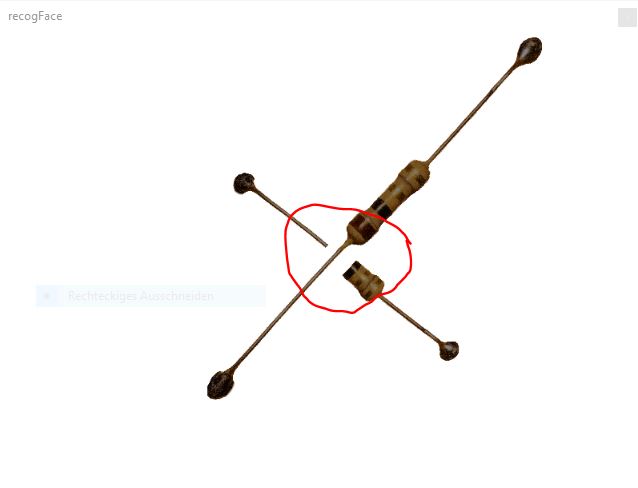
The second point is: Insede the shader i am using this code to draw the rectangles with the texture:
	void main() {

			vec2 p0 = toScreenSpace( gl_in[0].gl_Position );
			vec2 p1 = toScreenSpace( gl_in[1].gl_Position );
			vec2 v0 = normalize( p1 - p0 );
			vec2 n0 = vec2( -v0.y, v0.x ) * 30.86;

			gl_Position = toWorldSpace(vec4( ( p0 + n0 ), gl_in[0].gl_Position.zw ));
			color = jit_in[0].color;
            texcoord0 = vec2(0., 0.);

			EmitVertex();
			gl_Position = toWorldSpace(vec4( ( p0 - n0 ), gl_in[0].gl_Position.zw ));
			color = jit_in[0].color;
            texcoord0 = vec2(0., 1.);

			EmitVertex();
			gl_Position = toWorldSpace(vec4( ( p1 + n0 ), gl_in[1].gl_Position.zw ));
			color = jit_in[1].color;
			texcoord0 = vec2(1., 0.);

			EmitVertex();
			gl_Position = toWorldSpace(vec4( ( p1 - n0 ), gl_in[1].gl_Position.zw ));
			color = jit_in[1].color;
			texcoord0 = vec2(1., 1.);

			EmitVertex();
			EndPrimitive();

		}
I am not sure how i should deal with this line of code: vec2 n0 = vec2( -v0.y, v0.x ) * 30.86; Instead of a fix value 30.86 i would like to use the same ratio between width an height like in the outpult like the original ratio of the PNG.

Hi!
The first issue comes from the rendering order.
To give a bit more context: in rasterization, triangles are drawn to the screen in an unpredictable order. What ensures that only the fragments visible to the viewer remain is a mechanism called depth testing. If a new fragment (pixel) is closer to the camera than what has already been drawn, it replaces the previous pixel color. If it is farther away, it is discarded. This is what keeps the final image consistent, regardless of the order in which triangles are rendered.
However, transparency makes this more complicated. A fragment that lies behind the transparent portion of another triangle should still remain visible, but it may be discarded because it fails the depth test.
A quick workaround is to disable @depth_enable, which turns off depth testing. Doing that makes the issue disappear, but it also means visible objects in the scene are no longer guaranteed to be the closest.
A better solution is to keep depth testing enabled (@depth_enable 1) and explicitly discard, in the shader, the fragments that fall within the transparent areas of the rectangles:
void main() {
   color = texture(tex0, jit_in.texcoord0);
   if(color.a == 0){
      discard;
      return;
   }
   color *= jit_in.color;
}
For the second issue, you need to calculate the image’s aspect ratio in the patch and pass it to the shader as a parameter (with ratio = dimY / dimX, if you want to use it with a multiplication). Also, if you want to preserve a consistent width, you should take into account the distance between the line’s endpoints, and make the width proportional to that as well:
vec2 diff = p1 - p0;
float dist = length(diff);
vec2 v0 = diff / dist;
vec2 n0 = vec2( -v0.y, v0.x ) * dist * ratio * 0.5;
I’m multiplying the offset by 0.5 because it is used to thicken the line in both directions. For that reason, the offset needs to be halved.
Here's the full code:
Looking at this again, it's maybe better to use a different threshold for the discarding process, as the alpha value of your image is a bit jagged at the edges:
void main() {
   color = texture(tex0, jit_in.texcoord0);
   if(color.a < 0.5){
      discard;
      return;
   }
   color *= jit_in.color;
}
color.a < 0.5 seems to better cut the silhouette
Thanks a lot for your help.