
Sample-accurate Ableton Live transport sync within gen~

Howdy all,
I continue to chip away at my looper project and have learned a ton in the process, especially in regards to gen~. While the core functionality of said looper resides in the gen~ environment, a lot of the control and clock synchronization exists in the MSP realm, including my rudimentary Live transport sync. And this brings me to my question...
Is there a way to create sample-accurate Live transport sync entirely within gen~? Along the lines of what [phasor~ @lock 1] does?
And the why:
I am currently using a phasor~ object in MSP, locked to the Live transport, which I am piping into my gen~ subpatcher where I convert the phasor to pulses - giving me a clock - and then execute certain actions on these clock pulses. The actions need to be sample accurate.
For the most part it is working, but there is some inconsistency in the clock that I am deriving from the phasor~ output. These inconsistencies correspond with the vector size in max4live - 64 samples. Thus, the actions I am triggering in my gen~ patch are occasionally 64 samples late. This is a deal breaker.
From what I understand, audio signals going from the MSP environment into a gen~ subpatcher are still bound by the vector size of the host, and I suspect this is the explanation for the occasional 64-sample inconsistencies, as the phasor~ signal exists in the MSP environment and needs to be passed to the gen~ subpatcher.
I could create the phasor entirely within gen~, yeah, but then I still rely on plugsync~ to tell me when the transport starts or stops (and what beat I am on to track downbeats.) Therefore I will still be at the mercy of the vector size, for if plugsync's "transport started" signal is delayed by the vector size, so will the sync of my phasor. Square one.
I am kinda stumped here. Is there a way I can read Live's transport info from within gen~?
Thanks in advance!

There is not a way to create the equivalent of [phasor~ @lock 1] within gen~, but even if there was, it would be identical to piping a [phasor~ @lock 1] into a gen~ inlet.
Audio signals are sent into and out of gen~ in blocks of samples at the vector size, just like any other MSP object, but this in itself should not be adding latency (you would only get latency if you need feedback loops around MSP objects, or cross over between audio and message-processing realms). Note that modifying [param] values in gen~ is also message-based, so only updates at vectorsize -- use audio inputs and outputs only if you want sample accuracy.
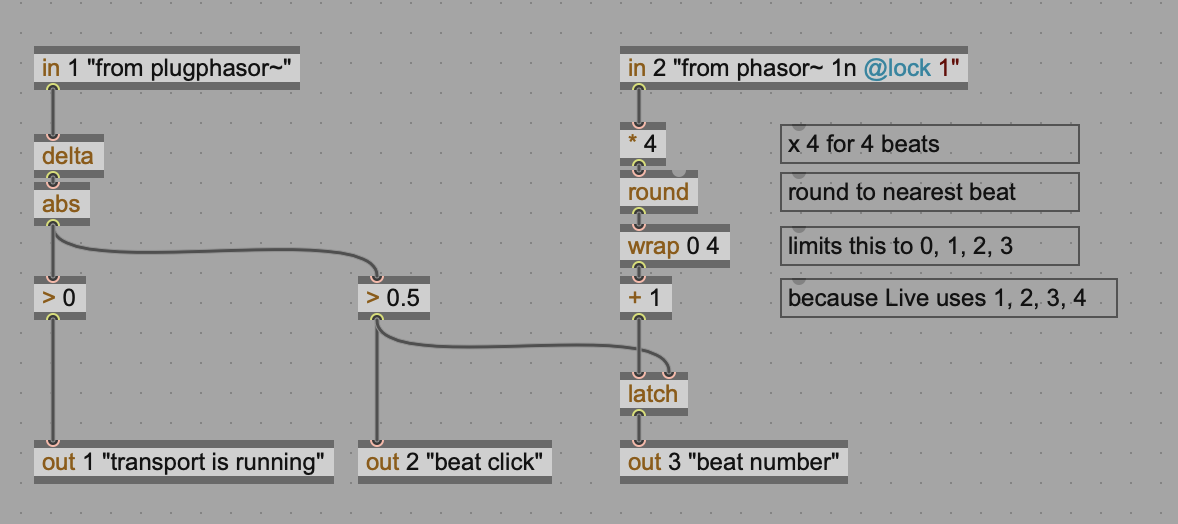
As a quick verification, you could output a click on every beat just by looking for the ramp transition. Send [phasor~ 4n @lock 1] into gen~ and inside gen~ do [in 1] -> [delta] -> [abs] -> [> 0.5] -> [out 1] and then send that back out to Live, and record it into an audio clip. In theory that clip should have single sample spikes aligned to the beat.
Hmm, actually I just tried that, and the interesting thing is that actually it seems to come in early on some beats, and on time in others. However, if instead of using [phasor~ 4n @lock 1] I use [plugphasor~], it seems to be perfectly aligned to the beat in a consistent way.
So, use [plugphasor~] routed into [gen~] :-)
The other caveats apply: if you want sample accurate, do not use any message-rate processing.
Unfortunately, that means that [plugsync] is not viable for sample accurate purposes. But I can think of workarounds for some of this.
For example, if you need to know if the transport is running within gen~, you can simply check if that ramp is moving or not. I.e. send [plugphasor~] into a gen~ inlet, then [in 1] -> [delta] -> [!= 0] will be 0 if the transport is not running, and 1 if the transport is running. That should also be sample accurate.
To figure out what beat you are on, here's an idea: since phasor~ @lock 1 seems to be either accurate or early, you could use a [phasor~ 1n @lock 1] to get a bar loop and process this signal to derive the beat, like this:
Thanks for the comprehensive reply, Graham, as usual. Much appreciated. I'm glad you corroborated the challenges I face with phasor~. Admittedly, even though I said my clock was occasionally late by 64 samples, I can't actually confirm that; it could as easily be early by 64 samples. But that seemed very unlikely to me. Your surprise echoes my sentiment. We're probably experiencing the same behavior.
Really great suggestions re: plugphasor~ and phasor~ @lock to reverse engineer transport status. I'll try to implement some of this right away.
Cheers!
So I implemented your suggestion, Graham, and unfortunately it would seem that plugphasor~ also suffers from a random +/- 64 samples. At first it seemed solid, but as I tested it more the problem reappeared.
Re: not using messages (vs signals)... my understanding was always that you cannot rely on messages for timing critical applications because of scheduling limitations/edge cases. But, it's still okay to use messages to set parameters within my patch at large, right? Or can they not be present at all?
For context, I'm working on quantizing the recording start/stop of my looper to the Ableton clock. I use a message to arm the recording (not timing critical) and then use the clock pulse to trigger it (the recording). I also use messages (in a non-critical way) to change beat divisions to quantize to. I don't think this could be the cause of the issue, but I figured its worth clarifying with you.
If this is the case - that my use of messages is okay - do you think this could be a bug with phasor~ and plugphasor~?
Thanks in advance!
P.S. i'm also using sends/receives in my gen~ patch to send the clock pulse places. Problematic? Testing says no, doesn't make a difference