
Are settings in an external bpatcher saved in the pattrstorage root patch ?

Hello,
I have a patch that embed several instances of the same bpatcher with a grid inside. I can see in the pattrstrorage the pad on and off but when I save the patcher and reopen it this settings are not recalled.
I have named the grid with "#0-grid" but this does not work too.
I tried with an embeded bpatcher and the grid is properly saved and reloaded. But apparently not when the bpatcher is created outside.
Is it normal ?
this is the working patch:
The one that does not work is bigger. So I am not sure I can copy it but this is the subpatch I try to embed:
I guess the problem is that I try to have several instances of this last one in one single patch. Let me know.

I highly recommend downloading my new Touch Objects package. It solves all your problems. Download from GitHub and drop in /Packages folder.
Just drop touch.staus in any patch. Name it and connect to [pattrstorage @savemode 0]--you dont even have to name the [pattrstorage] && (get rid of the obnoxious #0 in your scripting name). Add an autopattr and any object with a scripting name will be found (or use [pattr name] Everything else is built in. It will create a unique json file for each uniquely names [status] in a bpatcher, and automatically store/save and recall when you load. (I think you should ACTUALLY save before closing to be safe)
below is your bpatcher
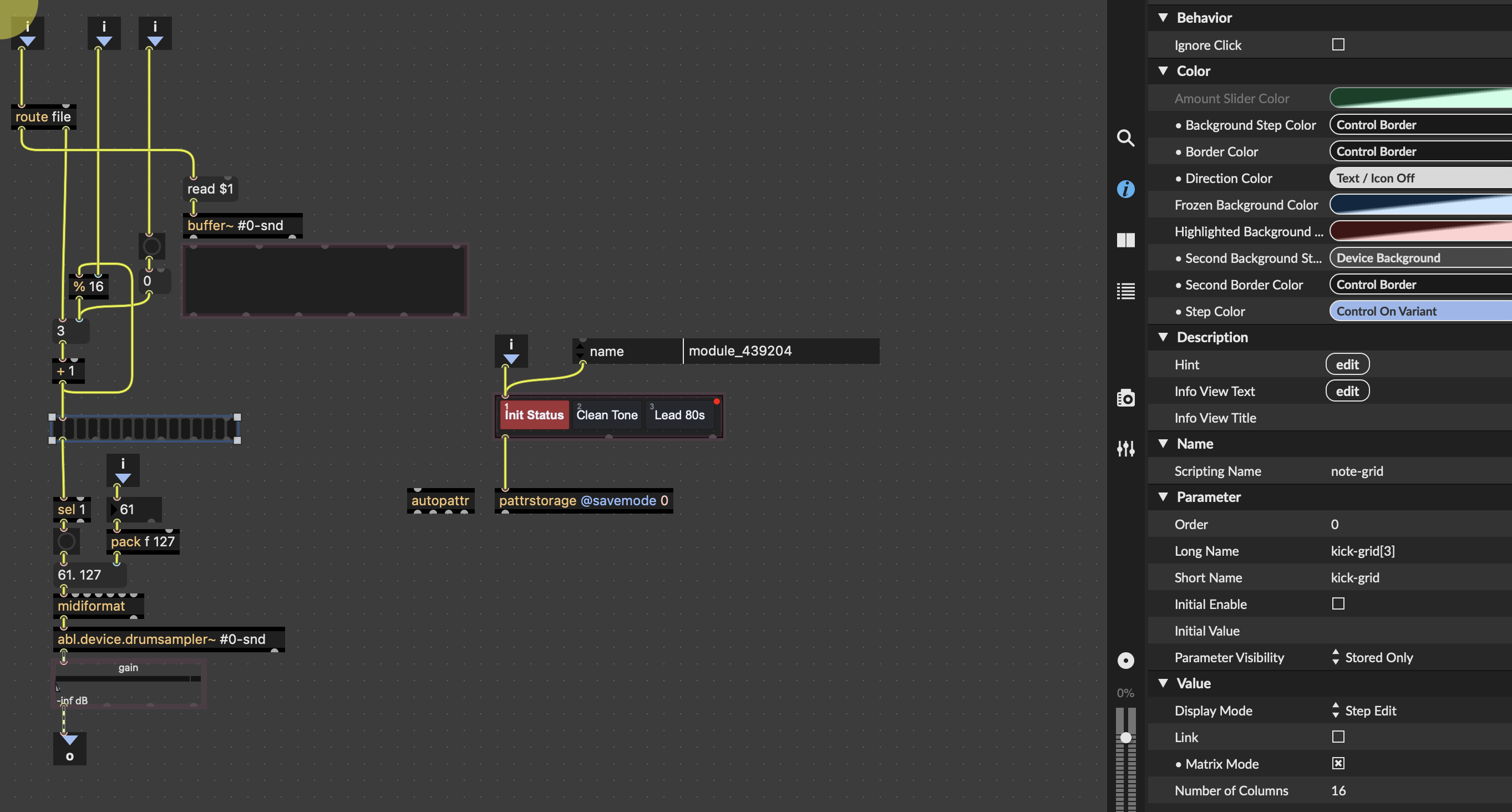
you can also rename [touch.status] from outside bpatcher.
Then, open a [touch.statusmanager] and your newly named batcher status show up instantly. you can control either on of them in "Palette" menu OR create "Palette Banks" -- have fun!
***look at the [touch.status] help patch - it shows how to rename slots
Sorry, I don't want a package. I want to understand how it work
If there is a package it is possible to do that. How ?
for your current situation , [preset] object woks great. You already have #0_names which make each bpatcher unique.
You can use exacltly this and ADD pattrstorage. Pattrstorage have the same name as [preset] , then use 'read' and 'write' make a .json file.
If you want to understand - then get behind a very long line who have struggled with this over the years. Basic difference is {preset] is just local in one patch, like your bpatcher, while pattrstorage manages large amounts of data, stored in json, and can be pointed to look inside bpatchers and specific objects more easily. Best to start with the help file, but even that will be very confusing, also search on forums for specific answers , or continue to ask questions here.
Here are 2 bpatchers using your patch with [preset]
***the very difficult part about pattrstorage (beside stuff like bindto:) is the savemode, read ,and write messages. Those are a literal horror story. Thats why I made an external to eliminate all of it.
Thank you @WIL I will look. Indeed I read all the documentation I could find and I am not still sure to understand. I tried to add pattstorage in the subpatch and the root patch. I can see the state of each grid in the pattrstorage of the root patch so I guess this part work. This is the load that seems does not work. Do you mean I need on json by instance and trigger the load for each instance from the root patch ?

No need to add #0 prefix to your objects scripting names since the bpatcher scripting name already helps differentiating them from the pattrstorage perspective. It is even a source of troubles since the #0 changes each time you open the patch, resulting in presets not working across sessions (you would save a state for 1234-note-grid, but then when you re-open the patch it gets called 4321-note-grid, for which you have no data stored).
So remove the #0 from your scripting names (but keep it on your buffer names/references).
Once you do that, you will be able to properly store presets in [pattrstorage].
The behavior you expect isn't clear. I assume you want your grid and other pattr-exposed objects to be restored at the same state they were when you saved the patch. This is indeed easy with all objects in the patch (or embedded bpatchers in the patch), but not when you use abstractions. That's where presets become handy. Here is a small example showing how you could automatically save a preset when you save the patch, and recall that preset when the patch loads:
Note that this requires to save the presets in a separate file from your patcher (unless you are making a M4L device).
Another, more portable way, to achieve a similar result is to use snapshots, which allows to store/recall the state of objects with Parameter mode enabled (which is the case for all live. objects) and embed them into the patcher. Last saved snapshot is automatically recalled when the patch opens. In your case, it's just a matter of adding those 3 objects to the main patch:
It will save a snapshot in slot 0 every time you save the patch, and make that snapshot embedded into the patch (so no extra file). No need for any [autopattr] or [pattrstorage].
EDIT: I would argue against the suggestion of using [preset] to store data here. [preset] is fine for objects at the same patcher level, but breaks as soon as you use multiple instances of the same abstraction. In WIL's example, each bpatcher has its own [preset], but saved preset won't survive after closing the patch. The only way to edit those bpatcher presets would be to save the abstraction itself with its new presets. But then all instances of bpatcher will share the same presets.
for the past 100,00 or so years, I have been using 'read' and 'write' messages to save and recall json in pattrstorage. IF IF IF your json file is stored in a very "narrow" discrete location, any max patch can find it using just the file name 'write patch_name.json' and 'read patch_name.json instead of the long file path.
You can see my 2 'global' storage folders are different - the one that says /misc/honey_chicken.json is a Max file/folder path that all Max's can see. The one called /states/honey_chicken is a folder I created a tried to automate max to find. But the ONLY way max can find it is if I define its path in the Options/File Prefences window - So I decided this was a bad idea and directed my touch.status object to use /misc folder to automatically read and write files.
And finally like all max , files can be easily created in various ways, put inside a folder, like RNBO are created on a cloud and put in RNBO folder, and I can autocreate and store audio and video recordings with exact date and time, and these json, but it becomes VERY difficult to scan and remove files when test files start piling up. I literally have 100's of 'test RNBO files I have no Idea what they do and have to open each one to decide keep it or trash it --- So it is IMPORTANT how to name and store these files .
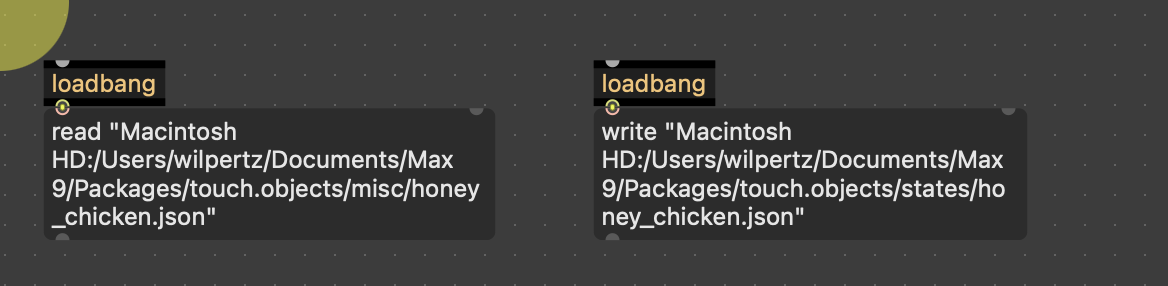
since I am currently in testing mode with touch.status, I will put together a small helpful explainer patch for pattrstorage- it will help me with my work as well.
Ah I see TFL explained things before I finished
In WIL's example, each bpatcher has its own [preset], but saved preset won't survive after closing the patch.It did work after closing using #0. Thats why I posted. Now it does not work. Thats why I try to build a new 'child proof' system :) Good luck Wil!
Thank you TFL
I assume you want your grid and other pattr-exposed objects to be restored at the same state they were when you saved the patch.
Yes...
Another, more portable way, to achieve a similar result is to use snapshots, which allows to store/recall the state of objects with Parameter mode enabled (which is the case for all live. objects) and embed them into the patcher. Last saved snapshot is automatically recalled when the patch opens. In your case, it's just a matter of adding those 3 objects to the main patch
Did not see that in the documentation where is this documented ? What is Parameter mode and snapshots ?
I have a patch that embed several instances of the same bpatcher with a grid inside. I can see in the pattrstrorage the pad on and off but when I save the patcher and reopen it this settings are not recalled.
I really don't understand what is unclear.
I think snapshots are fine. The only issue is the lake of interpolation between settings but for the grid that's not a problem.
I really don't understand what is unclear.
[pattrstorage] stores and recalls presets, and by default does nothing by itself when you save or open a patcher, beside maybe writing and reading the presets file (without recalling preset). So when you say "when I save the patcher and reopen it this settings are not recalled" it wasn't clear if you were talking about the presets themselves, or the actual state of the object (as if they were stored in one preset). That's what my first example patch addresses.
But since you're apparently not interested in storing multiple presets or interpolating between them, snapshots might indeed be a simpler solution. As you might have read by now, snapshots work only with UI objects that have Parameter Mode (an attribute of those UI objects) enabled. live.* objects (like live.grid or live.gain~ you are using) have that attribute always on, so your abstraction already ready to work with snapshots.
Thanks for the clarification. Indeed I call to the specific settings in each embedded grids. What are puzzled me was I saw the change in the root pattrstorage when I inspected it (with double click on it). The explanation about the ids that change along session is something i suspected indeed.
But since you're apparently not interested in storing multiple presets or interpolating between them, snapshots might indeed be a simpler solution.
Well not exactly I am interested in interpolation. But this is point less for a grid I would say. But I have other project where I will need that.
Well not exactly I am interested in interpolation. But this is point less for a grid I would say. But I have other project where I will need that.
Then you'll probably want to work your way with [pattrstorage]! It's a long but rewarding way.
For info, for objects like live.grid that cannot be interpolated (it's either one state or another), you can define how they belong with interpolation (whether they should change their state at the begining, in the middle, at the end or anywhere else during an interpolation). The easiest way to deal with this in my opinion is to attach a [pattr] object to those UI objects that cannot interpolate and set pattr's @default_interp attribute there. For example [pattr @default_interp thresh 0.2] with its middle outlet attached to a [live.grid] will make the [live.grid] to switch its state when an interpolation reaches 20% of its way. (like messages to pattrstorage recall 1 2 0.0 to recall 1 2 0.2 will preserve the live.grid's preset 1 state while anything above 0.2 will make it switch to its preset 2 state. By default, all objects interpolate linearly, and objects that cannot interpolate will change state at 0.5.
Hope it makes sense!
Yes I see. I don't see the point to much to interpolate if the change occurs plainly above some threshold. I would prefer to interpolate the position in the grid but it seems harder to achieve (if not impossible)
As far as I know, grid interpolation can be achieved, by you'll have to bypass pattrstorage interpolation for that object and program the interpolation logic yourself... Not easy!
yes i guess so. anyway for now i will try to interpolate between a set of continuous controls of synths. Not related with this patch. But I have another with gen wavetable where that could be interesting.