
Is it possible to synchronize two metro objects in Max/MSP without drift?

Hi everyone,
I’m experimenting with polyritmic in my patch and I’m having a problem synchronizing metro objects.
I have two separate metro objects connected to the transport. I start them simultaneously with the same toggle.
The first time everything seems fine, the bangs coincide.
If I change the BPM of one to create polyrhythms, or if I stop and restart both metros, the bangs no longer coincide and are slightly off.
The two metros are connected to a global transport. When I stop them together and restart them together, they are always slightly misaligned. The only way I’ve found to make them stay in time is to start the second metro with the first bang from the first metro… but obviously I’d like to avoid that.
I’ve tried the different attributes of metro, but I can’t figure it out.
My question is: is there a way to have two metro objects perfectly synchronized, sample-accurate, when starting them together or stopping and restarting them?
I know it’s generally recommended to use a single master clock with a counter, maybe, but I’d like to understand if this is an intrinsic limitation of the metro objects or if I’m doing something wrong in my patch...
Thanks so much to everyone!

>> The two metros are connected to a global transport
why? that makes things unneccesarily complicated imho. if you really need transport, link only one metro and the other ones to the first or main metro.
we don´t know what exactly you are doing, but to resync two free running #whatever you need to reset both (as opposed to having a pause/continue function). are you changing the speed of some of the metros while they run?

the best way to do what you want
regardless if you want to do it this way
is use ONE phasor
and [rate]
sample accurate and easy to reset/resync with one phasor
you can have as many polyrhythms as you want!!
//
and if you want to go down the rabbit hole..

What Wil said.
[phasor] with [rate] also allows for smooth tempo drift with perfect resync anytime you want.
we first should find out why this does not work for him, because normally things like that work out of the box, since longer than audio exists in max. :)
"My question is: is there a way to have two metro objects perfectly synchronized, sample-accurate, when starting them together or stopping and restarting them?"
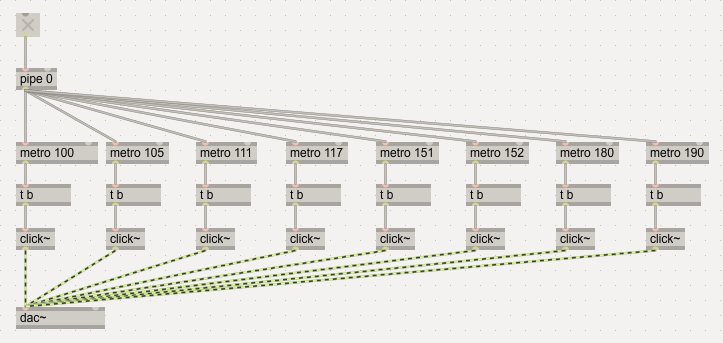
sub-sampleaccurate, that is.
Thanks a lot for the suggestions. I’m currently trying the method proposed by
WIL using phasor~ and rate~, but I’m still having trouble keeping them synchronized.
When I change the value of rate~ via its right inlet and then set it back to 1, it ends up phase-shifted relative to the phasor~.
So even when both are nominally back to the same rate, they are no longer aligned.
Am I missing something about how rate~ handles phase or synchronization?
Thanks a lot in advance!
[rate] has multiple options. Read the "sync" section in the documentation:
https://docs.cycling74.com/reference/rate~/
I have altered your patch accordingly, Livingston.
sub-sampleaccurate, that is.
I think the question was how to resynchronize metros properly when you change some of their intervals while running.
EDIT:
Nevermind, OP indeed mentioned a sync issue even when restarting metros.
This works for me for the metro resync:
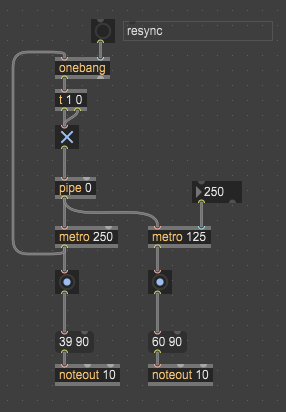
Also this is relevant:
https://docs.cycling74.com/userguide/sample_accurate_messages/
Am I missing something about how rate~ handles phase or synchronization?Try rate sync lock:1
rebang click after setting poly rate
yeah!
"how to resynchronize metros properly when you change some of their intervals while running."
yeah, that was a common math problem and can only be solved if you know how the time value has been changed while running (for example by a linear ramp from interval 1 to interval 2).
otherwise turning it off and on again should properly restart things of course.
patch by baek above shows how easy it also works for a possible "main" metro during operation.

The thing to keep in mind with metro is that its default behavior is to output bangs at an interval relative to when it was started. So by default, even if a metro is set to 4n, if you start that metro when the transport is 8n to the beat, the metro will start playing 4n at that offset i.e. at "1 1 240, 1 2 240...". If you want the metro to always start on a quarter note, you need to use the quantize attribute. If you set the quantize to 4n first, then change the interval to 4n, it will update to 4n on a quarternote. So if you want two metros to sync, you can leverage this in order to keep them in sync. The simplest way to do this would be to use a message like "quantize $1, interval $1" and then put your time value in it. Another way to do this would be to just ensure that the metros are getting updated on the beat, at the same time.
Keep in mind that if you set the quantize interval to be longer than the metro interval i.e. interval 4n, quantize 1n, the quantization will "win" and the metro will only output bangs at 1n.
The other thing that can make things "fun" is that if your metros dont have quantize enabled and you reset the transport's time, the metros will now be off beat. You would need to stop/start the metros on the desired beat to get them back in sync, or use the quantize attribute.
Here is a little playground to test this stuff:
The TLDR version is use quantize to sync metros to the transport.
Keep in mind that if you set the quantize interval to be longer than the metro interval i.e. interval 4n, quantize 1n, the quantization will "win" and the metro will only output bangs at 1n.
This is why I don't consider quantizing to be a universally good solution, although it can be useful for simple or well defined cases.
For flexibility, use phasor with rates or properly manually resynced metros.
I don't consider using sync'ed phasors/rates to be a universally good solution either since it doesn't scale well across a large system. I like to have lots of independent sequencers and tie them together via the global transport. Some might use metro or a phasor etc. I'm presenting information on how those work so the original poster knows what the options are.
I see. That makes sense.
I'm presenting information on how those work so the original poster knows what the options are.
Of course! All good!
Hi everyone, greetings to all of you, and thank you very much for the time, ideas, and suggestions you’ve shared — I really appreciate the help and the discussion.
Over the last few days I’ve been working quite hard trying different strategies.
I noticed that two metros tend to drift out of alignment, especially if their values are changed while they are running. It seems very difficult to change their rate and keep them phase-aligned without stopping and restarting them. Even then, when using very large tick values, I still notice small phase offsets after a restart.
Because of this, I started exploring a phasor~ + rate~ based approach. However, I’m seeing a similar issue there: if two rate~ objects receive different values live while they are running, sometimes they stay in phase and sometimes they don’t. The only reliable way to bring them back into phase seems to be resetting everything.
Am I missing something here?
I spent quite some time observing the patch and looking through the documentation, but I couldn’t find a clear explanation. I don’t understand why sometimes the rate~ objects end up in phase after being updated, and other times they don’t. It seems to depend on the point in the phasor~ cycle at which the rate~ value is changed.
So far, the only approach that seems to work reliably is to use an additional rate~ connected directly to the phasor~, set to a very large value (very slow), and then drive the other rate~ objects from this slow rate~. With this setup, changing the rate values seems to keep everything consistently in phase.
In the next few days I’ll also try the approach using multiple metros with the "quantize $1, interval $1" message. For now, though, the “large rate~” solution is the only one that behaves reliably for me.
Thanks again to everyone for the support and insights.
Best regards,
Because of this, I started exploring a phasor~ + rate~ based approach. However, I’m seeing a similar issue there: if two rate~ objects receive different values live while they are running, sometimes they stay in phase and sometimes they don’t. The only reliable way to bring them back into phase seems to be resetting everything.You need to put @sync lock
upload "small" test patch if you need more information
Thanks a lot, WIL. I’m currently testing this approach using @sync 1, but I’m still seeing that the rate~ objects often don’t return to phase.
They do realign if you send them a value of 1, but if you try other values — or if you change the rate~ values at different moments and then send the same value to both (other than 1) — they don’t seem to re-align. Re-sending the same value also doesn’t reset or re-sync the phase.
Am I missing something here? Thanks so much again.
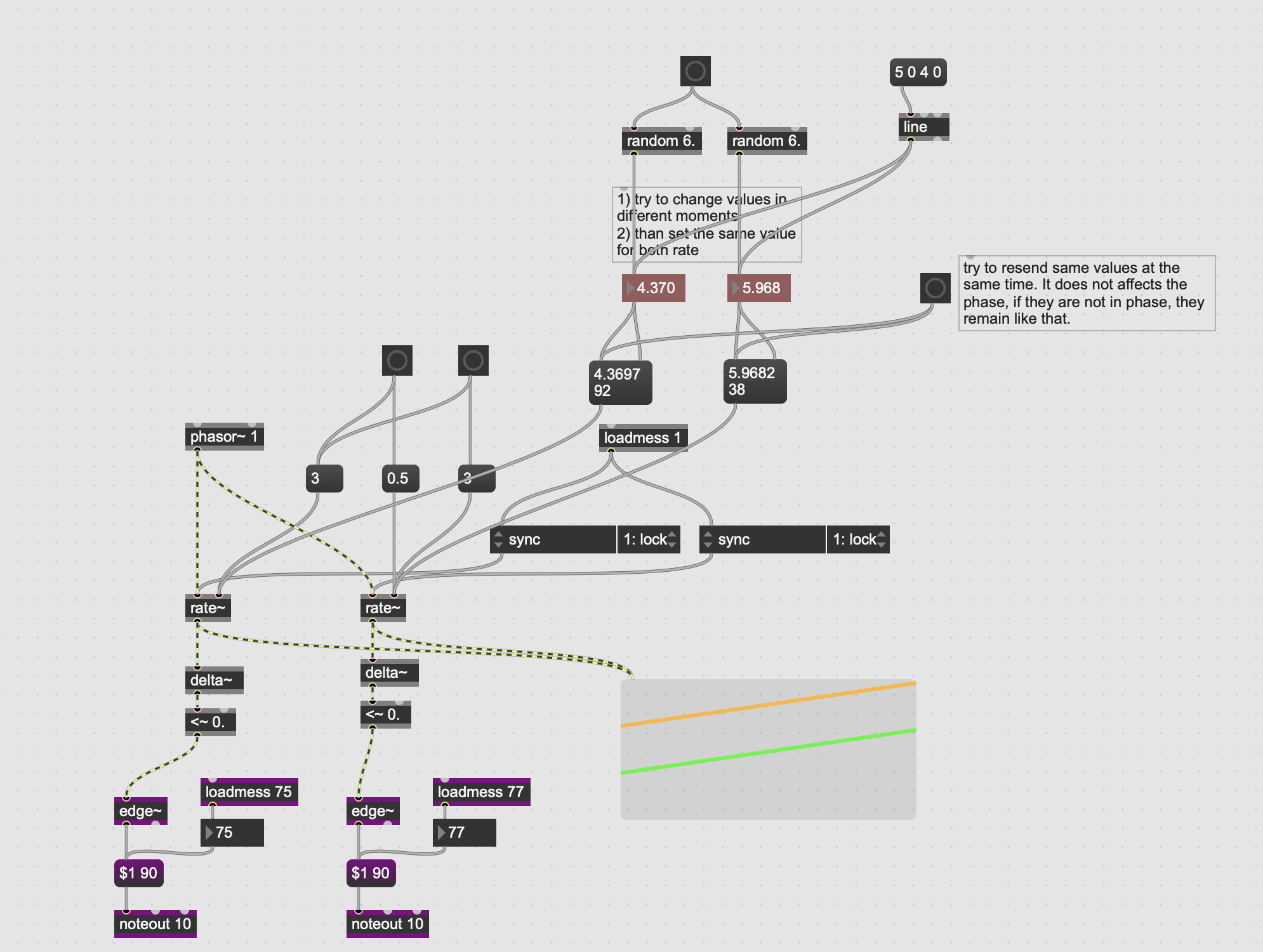
Try clicking the large yellow button that sends random values to the rate~ objects, and then click the two yellow message boxes that set an equal random value for both rate~. Try this a few times. You’ll see that sooner or later they go out of phase and never re-align.
Even sending the same value at the same time does not always bring them back into phase, unless the value passes through 1 first, as you can see with blue buttons.
Try it a few times, since it doesn’t happen every time.
try cycle, not sync
please use copy compressed when upload patch
I did not understand. Cycle?
Ok sorry you are right! I just discovered now how to do that...