
Prioritise a process that is (by default?) low priority

Hi all,
I am using a time-code display (metro + transport) with an external monitor to avoid the need for a click-track in a piece of mine. The output from the transport object is sent to a group of ints (bar number, beat, etc.) which update on each change, allowing the performers to follow along visually. Among other things, I use a panel covering the whole screen which should flash on every new measure. The problem is that, although the CPU is only running at around 20%, there is a huge lag on the elements of the time-code updating on the display, most notably when changing the bgcolor of the panel object (which seems to occur almost randomly). Everything else that is dependent upon the time-code for triggering is working fine... This led me to conclude that these types of display update messages are, by default, treated as low priority by Max. I can understand that in most cases, this would be a good idea, but given that I am using a time-code which has to be very precisely in time, I was wondering if anyone knew how to make this kind of process high priority? (...assuming that this is the cause of the problem.) I have searched for answers on here and elsewhere on the internet but to no avail. Help very much appreciated.

not exactly low priority, GUI objects run in their own thread and will ignore scheduler rate anyway.
but i would exclude the possibility that a numberbox is noticable slow or inaccurate because of non-.optimal patching. it might be something else which casues the trouble.
under windows it might be a background process which slows down you GUI.

In a similar situation I opted for JSUI. Depending on OS and Max version you may also want to try mgraphics/jitter.

https://cycling74.com/articles/event-priority-in-max-scheduler-vs-queue/
Thanks for the suggestions! I should have mentioned that I am running Max 7.3.5 on OSX 10.12.6. JSUI would be great, but I have to have this working in a couple of days for a performance, so don't have time to learn it :-) I might try with Jitter though...
It's not that difficult in JS. An example is included.
By the way, Max8 has improved graphics performance.
Save this as flash.js:
var black = [0., 0., 0., 1.];
var white = [1., 1., 1., 1.]
function loadbang() {
reset();
}function set() {
draw(white);
refresh();
}function reset() {
draw(black);
refresh();
}function draw(color)
{
with (sketch) {
glclearcolor(color);
glclear();
}
}
Save this patch in the same location:

My guess is that the problem lies in you drawing the Max GUI with very large areas (big int boxes, panels, etc).
Test your patch with a Jitter approach and see if the performance improves. I bet it does.
Drag the Jitter window to the 2nd monitor and press the Esc key to go fullscreen.
@PEDRO SANTOS Yes, you are right about that. I wouldn't have guessed that the *size* of the panels would make a difference, but it does! It's true that it was running SLIGHTLY more smoothly in Max 8, but still not so good as to be reliable. I redid it all with Jitter and now it is working like a charm.
@JVKR I see what you mean! On this occasion I used Jitter, but I think that I will use JSUI in future. Thank you very much for your help.
panel is old and/or does something "wrong".
try if [lcd] is faster than panel.
i use lcd to display time-critical stuff with up to 50 fps on 20 years old computers and it works fine.

[lcd] is older than [panel] and its use has been deprecated.
Unless forced by a very specific situation, generally I wouldn't use [lcd].

not exactly low priority, GUI objects run in their own thread and will ignore scheduler rate anyway.
but i would exclude the possibility that a numberbox is noticable slow or inaccurate because of non-.optimal patching. it might be something else which casues the trouble.
under windows it might be a background process which slows down you GUI.
Does this mean that I don't need to use [deferlow] in front of GUI objects (numbers, message boxes) if I wanna make sure the display process is non-critical?
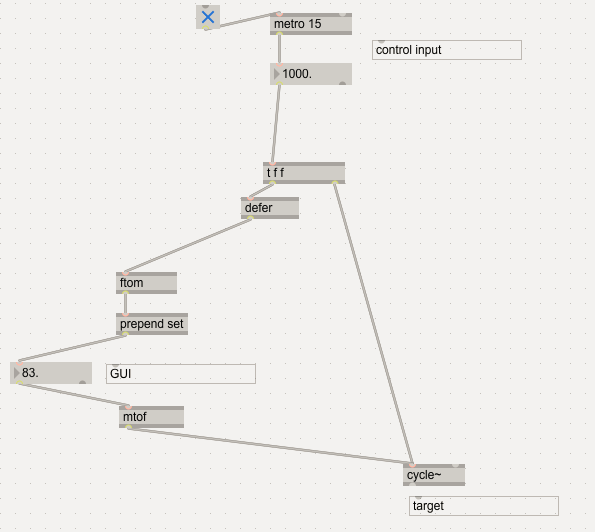
simple example where you would want to use defer:
metro
[t 7 7]
[defer]
[mtof]
[number]
for the number it does not make a difference what it gets, but mr. mtof is now put to the main thread.
it is quite common that you have to scale values for GUI stuff in a different way as for other targets of a control input, and even where superflous, [defer] itself will not harm.
i see no need for deferlow, but that might be different in a jitter context.
for the number it does not make a difference what it gets
Thanks Roman but it's still very vague for me, I am not sure I understand.
What do you mean it does not make a difference for the number? Are you saying the display of number is already defered or that the processing and passing of values in/out the number is defered?
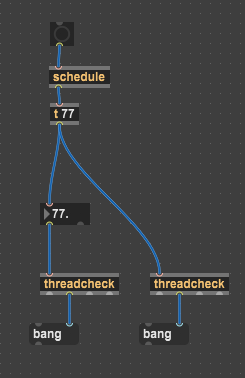
i am not able to give a valid technical explanation. but that GUI externals run in their own thread basically means that it is irrelevant how something is sent in - it will not put additional stress on the scheduler.
yes, this is for displaying things. if you want to trigger output with the input to a GUI object, that is something different of course.
decide yourself if this is good practice, though. i hated the idea to put the GUI object between the parameter and the target since VST 2.0 times, where many people thought it is cool to have it there, and i dont do it in max either.
if you create a custom numberbox using lcd, the draw commands, logic and math of that can easily include 50+ objects. that´s where it makes a difference if that stuff is triggered in overdrive or not.
Thanks Roman, I am also a fan of parallel GUI objects.
However, check this bit in the official threading tutorial I've just watched. The timestamped part of the video (from 19:58) shows a qlim method in front of a number object even if it is just for display purposes without any output. So what gives?
More useful info under the video:
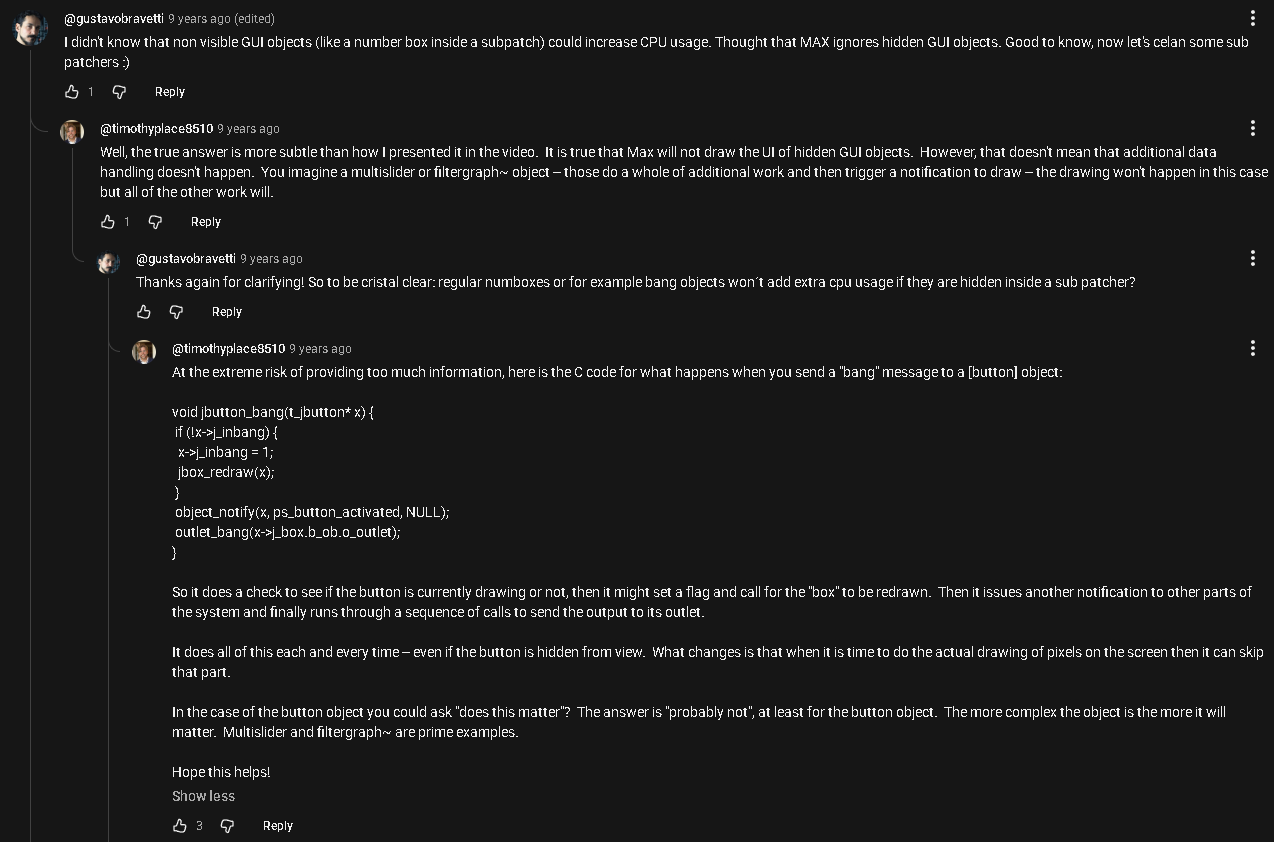
maybe it makes actually a difference if a GUI external has to output data on input or not? which can be avoided by not giving it hot input as suggested above. if you do not use its output capability that way, you do not need to care whether or how input influences the output.
Timothy Place can surely give you a correct answer - i can probably not.
and you have no guarantee that all third party GUI externals always do it the same way.
however, no matter if [qlim] or [speedlim], but limiting the data rate is surely the other important strategy to optimize stuff around GUI objects.
for many things 20 FPS with an accuracy/jitter of 1-2 ms is totally enough for the eyes. you can still use max() or averaging those lesser values where required ("peak meter"?)