
Raspberry not showing as online in target export window

The Rpi 4B I am using does not show in the target export window. I manually added the address of the pi, but it still shows it as not connected. Wireless connection is otherwise working on the pi.
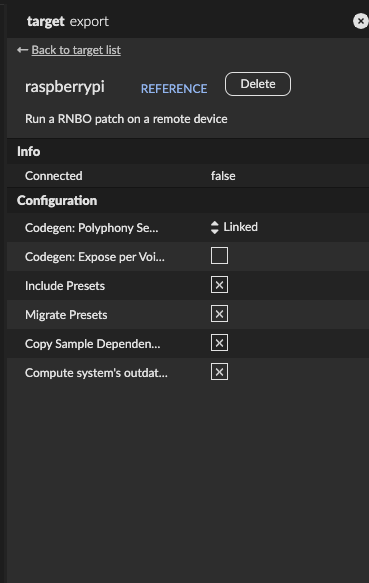
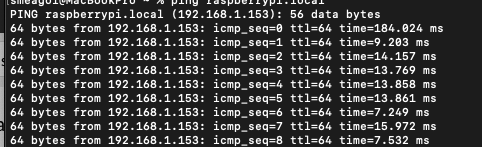
Other things I've tried to troubleshoot this issue:
Verify connection: I verified everything is correct in setup from the tutorial. Username is pi, hostname is unchanged, updated through terminal. I can SSH into the pi from my laptop and send and receive files, etc.
Updates and installing dependencies: I suspect it might have something to do with the way the raspberry is configured. I ran into an error for "sudo apt-get install jack_transport_link rnbo-runner-panel," which gives the error:
"E: Unable to locate package jack_transport_link
E: Unable to locate package rnbo-runner-panel"
I have used "sudo apt-get install" as well as "sudo apt update | sudo apt upgrade" and rebooted the pi. I'm at a loss. If anyone can tell me why the pi will not show up on the target window, that would be amazing. I have puzzled over this for several days.

It looks like maybe you haven't installed our custom image, which comes with a user "pi" and by default is called "c74rpi", unless you've named your device back to the default that raspberry pi's base image uses "raspberrypi"
Check this out to get our custom image:
Here is info on how to install it, FYI, we've learned that the latest Raspberry Pi imager doesn't support customization (changing the password, hostname) with our images, so if you need that, you'll need to use a 1.x version of the imager.
Thanks, Alex! That is helpful! I formatted and reinstalled using your directions. I still haven't connected. However, your instructions helped me make some forward progress.
1) I successfully run updates to Jack and Runner packages (yay! - last time apt-get didn't even register those as real), so at least I can get off the ground.
2) I can also access the web panel by using the device IP.
3) I can also ping the raspberry from my laptop terminal,
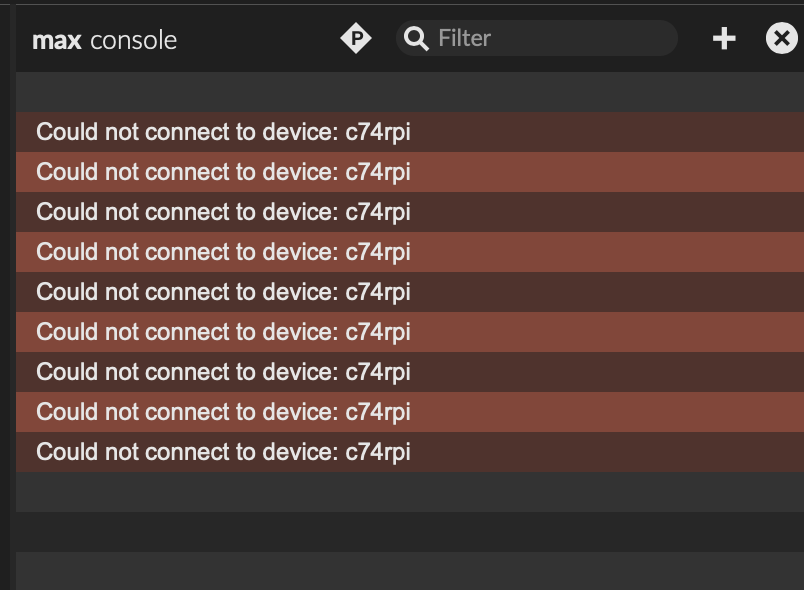
The connection to Max still fails, though, sadly. But, I can at least see feedback. Namely: now Max is showing an error in the console that reads "Could not connect to device: c74pi," continuously. I didn't have this error message before, so the good news is that it recognizes and attempts the connection.
So far I have tried to troubleshoot this with some basics - power cycle; sudo apt-get update and upgrade, sudo apt update and upgrade, double-checking default usernames and hostnames, using a wired connection to the router, toggling off Firewall. Nothing so far has affected the issue, but we shall see.
Happy to hear you've made some forward progress, sorry you're still not connecting though..
I'm curious, how are the computer running Max and the PI connected? Are they on the same WiFI network, is one of them connected to the network via ethernet, are you doing a direct ethernet connection between the 2?
If you're doing the last one, direct ethernet, that doesn't work right now unfortunately, we have a ticket to resolve that in the future but for now, you need a switch or router between the 2 computers.
The second one: laptop is wireless and the raspi has a wired connection via ethernet. I activated using "sudo nmtui". I don't have an ethernet adapter for the laptop at the moment but will find one and give that a try. The same issue is happening even with a wired ethernet connection. "Could not connect."
Hmm.. so you're able to connect to the web interface by its IP, but, can you via http://c74rpi.local ?
Can you connect to the pi via max if you use the "+" button and add the device via its IP?
Can you share your support info from max?
Thanks for the replies and helpful feedback, again!
As for the web panel: http://c74rpi.local ? No. http://c74rpi.local:3000? Yes.
In the max export window, no success with the manual add "+". So far, I've added the hostname "c74pi," the IP that I use to access the web panel. Even with trying to format it with the port name. So I've tried manually adding "c74rpi:3000" as well as "192.168.1.154:3000." All of them seemingly have no effect. Just an empty panel with connection "failed" and the continual error message in the max console. It appears that when I have one or more of those entered in it struggles to find which one to address. So my process each time is to delete everything I manually added other than the one I want to attempt to connect to.
Support info dump:
{
"version" : "Version 9.0.2 (83cb2a65145) (x64 mac)",
"platform" : "mac",
"arch" : "x64",
"osversion" : "Mac OS X Version 15.6 (Build 24G84) x86_64",
"samplerate" : 44100,
"iovs" : 512,
"sigvs" : 32,
"scheduler_in_audio_interrupt" : "off",
"audio_drivername" : "Core Audio",
"audio_driver_subname" : "",
"license" : "permanent full",
"machine_id" : "1eab2892e36bca94f27a70b5f4dca6e0",
"eventinterval" : 2,
"overdrive" : "on",
"pollthrottle" : 40,
"queuethrottle" : 100,
"sysqelemthrottle" : 1000,
"refreshrate" : 30.0,
"schedslop" : 25.0,
"eventprobing" : 1,
"mixerparallel" : "off",
"mixercrossfade" : 0,
"mixerlatency" : 30.0,
"mixerramptime" : 10.0,
"videoengine" : "avf",
"gfxengine" : "glcore",
"packages" : {
"Ableton DSP" : "1.0.0",
"BEAP" : "1.0.4",
"gl3" : "0.3.3",
"hap" : "1.0.6",
"jit.mo" : "1.1.8",
"Jitter Geometry" : "1.0.0",
"Jitter Tools" : "1.1.0",
"Max for Live" : "1.0.9",
"max-mxj" : "8.2.0",
"maxforlive-elements" : "1.0.12",
"Mira" : "1.2.2",
"Node for Max" : "2.1.3",
"RNBO" : "1.3.3",
"RNBO Guitar Pedals" : "1.0.2",
"RNBOGenerated" : "",
"SuperVPMaxMSP" : "",
"VIDDLL" : "1.2.9",
"Vizzie" : "2.2.2"
}
}
can you try adding the IP without any port designation? 192.168.1.154
Yes. I've tried combinations of IP and IP:port and it is same story each time. I have also experimented with the idea that maybe it can't recognize the connection unless the audio interface is actively connected to the USB of the pi. Both with and without that connection, it makes no difference.
Here's a complete response to hostname on pi.
pi@c74rpi:~ $ hostname -I
192.168.1.154 2600:1015:a122:15ae:9c94:b7ad:459a:e49a
Again, I can view it on the web panel but nothing I have tried to add to the export sidebar so far has worked. Sorry to keep going back and forth on this.
I see you're running an old version of rnbo, 1.3.3. Can you update your RNBO package to the latest 1.4.2 release?
I updated the package to 1.4.2. It fails to make the connection; then I updated Max to 9.1.1 also. Still fails.
What's interesting this time is that RNBO won't let me manually add the address. I get an EHOSTUNREACH message when I try.
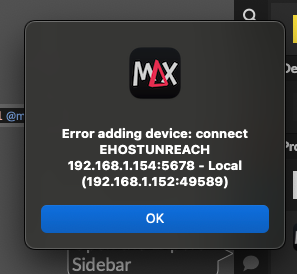
Again, I'm not able to test a wired connection so far. I ordered the hardware when you pointed out this as a potential fix. Cables arrived, but still waiting on the dongle and the switch. Since I can ping and access the web panel (only on Duck and Safari, but not Chrome), I think the pi is working but maybe it's a socket or security issue? When the switch arrives, I can confirm.
I'm wondering if mac OS 15 has some changes we need to be aware of. I'm checking with my co-workers to see if anyone has that setup so they can try to reproduce it. Really sorry that this is such a pain, thanks for your patience.
I have an older machine that I can also try to set up with Max and RNBO if it is the newer OS that causes issues. Lucky for me I didn't get rid of it yet. I appreciate you. I expected a learning curve, anyway.
EDIT: Thanks for that suggestion! I tried my old machine, which I just recently wiped and rebooted with Monterey 12.7.4. I can supply other details if needed. A quick install of Max and RNBO adds the pi to the list on its own, shows a connection, and successfully exports to target, all on the first try. I guess there could be a hitch with how it runs on Sequoia. Security features perhaps?
okay, this is very helpful information, thank you so much. We'll have to look into Sequoia.

Hi, any updates? Im running the same here.
I did all the procedure described here:https://rnbo.cycling74.com/learn/raspberry-pi-setup
but i can't log in with ssh nor can see (and add) a target in the export sidebar
Raspberry PI 3, mac osx 15.7.4, max 9.1.2, RNBO 1.4.2
Update: activated the network manager (needs monitor and Keyboard connected to the raspberry) and now is running.

If your Raspberry device isn’t showing as online in the target export window, it’s usually due to a connection or configuration issue. First, make sure the device is powered on and connected to the same network as your computer. Then verify that SSH or remote access is enabled on the Raspberry Pi and that your firewall isn’t blocking the connection. Restarting both the device and the software can also refresh detection.
I ran into a similar issue while setting up a small project and found that checking network visibility tools helped a lot. By the way, while troubleshooting and testing setups, I like using handy online tools like https://highyieldcdcalculator.com for quick calculations—it’s a simple example of a clean, responsive site that loads reliably across devices, which is actually useful when testing connectivity environments.