
Five-Chime Train Horn Synth (Nathan K5LA-style)
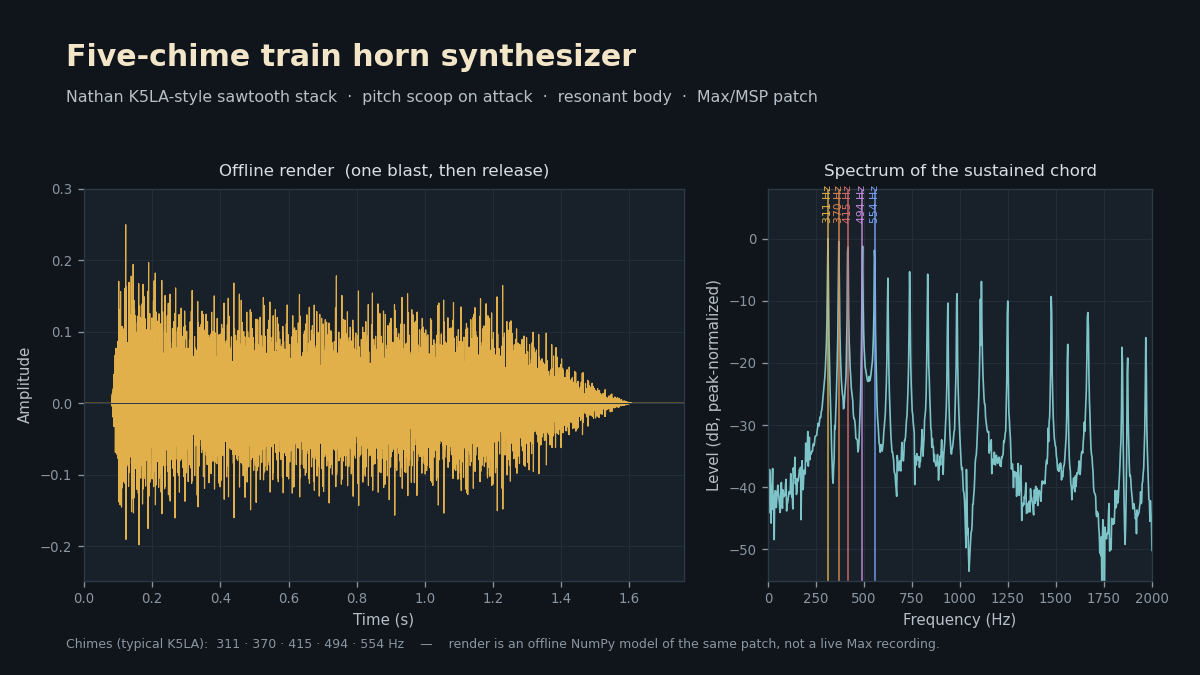
This patch synthesizes a five-chime train horn, modeled on the pitch set commonly cited for the Nathan K5LA locomotive air horn. It is a sound-design / teaching patch, not a sample player: every partial is generated in MSP, and every stage is labeled so you can see how the tone is built.
A locomotive horn is a chord, not a single note. The K5LA is a five-bell horn; published tunings cluster around 311, 370, 415, 494 and 554 Hz (roughly D#4, F#4, G#4, B4 and C#5). Real horns drift with air pressure, temperature and wear, so these values are a typical starting point, not a factory specification. Each chime is a slightly detuned sawtooth: a phasor~ ramp is scaled with *~ 2 and offset with -~ 1 to make a bipolar saw. The harsh edges of a sawtooth, plus a little cents spread, are what make a stack of pure tones start to feel like metal and compressed air rather than five sine waves.
The other two cues that sell an air horn are the start and the body. On the attack, a line~ pitch scoop briefly starts the whole chord sharp-flat of its target (default: 0.84×, gliding to 1.0 in 50 ms), which is a simple way to mimic the pressure rise in the bells. Amplitude is a second line~ used as a hold-style ADSR: a 28 ms rise to 0.92, a 200 ms decay to a 0.62 sustain, and a 380 ms release to silence. After the five saws are mixed, a lores~ resonant lowpass stands in for the throat and flare of the horn, and a quieter parallel reson~ bandpass (default 720 Hz, Q of 6) adds the midrange “honk.” The output stage is a gain~ fader feeding both ezdac~ and a hard-wired dac~.
Hearing safety. A real train horn is painfully loud at close range, and a synthesizer that aims at the same spectrum can still be too hot in headphones or on a large monitor. Open the patch with the fader down. Click ezdac~ only after you have checked the fader. Raise the level slowly. The patch’s loadbang restores a conservative default gain of 32 (out of 127). If you are using this in a classroom or studio, start even lower and warn anyone on a shared system before you hold a blast.
How to play it. Click BLAT for a short 700 ms blast, or turn on HOLD / hold the space bar to sustain the chord and release it to fade out.
How to tweak it.
Scoop time: the
50in the scoop message (0.84 0, 1. 50) is the glide in milliseconds. Make it longer for a lazier “air coming up” attack, or shorter for a harder blat.Scoop depth: lower the
0.84to start further below pitch; set it to1.to disable the scoop and hear a straight chord.Envelope: edit the attack/decay message (
0.92 28, 0.62 200) and the release (0. 380).Chime frequencies and cents: each column has a frequency box and a detune-in-cents box. Dropping one or two levels to zero turns the five-note chord into a three-note horn, which is useful for hearing how much of the timbre is just the interval set.
Body filter: lower the
lores~cutoff (default 1650 Hz) for a darker, more muffled horn; raise the resonance for a more pronounced throat. Thereson~frequency and Q change the honk without touching the lowpass.Levels: keep the sum of the five chime levels well below 1.0 if you raise the fader. Saws plus resonance will clip if everything is wide open.
loadbang writes the default frequencies, detunes, levels, filter settings and a safe gain whenever the patch is opened, so you can experiment and revert by reopening it. The patch is saved as Max 8 JSON (.maxpat) and uses only stock MSP objects: phasor~, line~, sig~, lores~, reson~, gain~, dac~ and ezdac~.
A short offline render of the same algorithm (NumPy, not a live Max recording) is included as a preview image and an optional WAV, so you can see the attack scoop and the five fundamentals before you open the patch.
Year
2026
Location
Valencia, CA, USA
Author
