
Synesthesia
Synesthesia
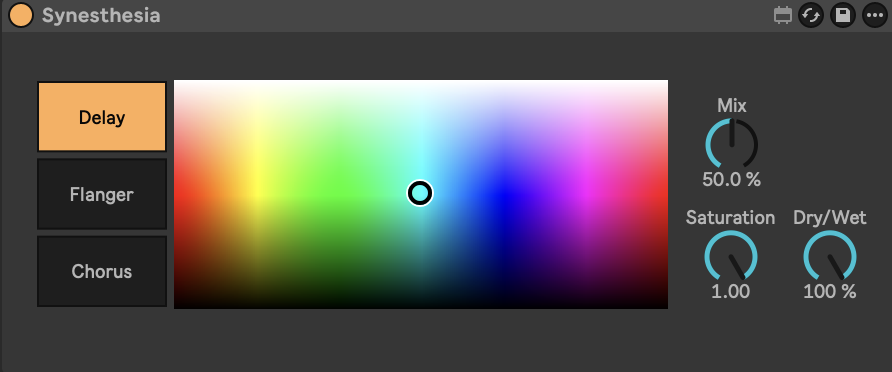
Synesthesia is a Max for Live audio effect that explores the relationship between sound, color, and intuitive musical control. Instead of relying on traditional parameter-heavy interfaces, the device uses a color spectrum as its primary controller, allowing chorus, delay, and flanger effects to be shaped through visual and perceptual gestures rather than numerical adjustment.
The device is built on the idea that many musicians already describe and perceive sound in terms of color, brightness, and texture. By mapping RGB color values to multiple effect parameters simultaneously, Synesthesia transforms a single continuous gesture into a coordinated set of musical changes. Moving through the spectrum alters delay timing, modulation depth, and flanging behavior in a musically balanced way, encouraging exploration while preserving internal coherence between effects.
At a technical level, the spectrum control converts red, green, and blue values into numerical control data that is distributed across the internal effect chain. Individual color channels are mapped to specific parameters within the chorus, delay, and flanger stages, allowing smooth transitions between thickening, widening, and shimmering textures. This approach reduces technical decision-making and supports a more immediate, flow-oriented creative process.
In addition to the spectrum control, the device includes a small set of conventional parameters for fine adjustment. Global saturation, mix, and dry/wet controls allow the user to shape intensity and balance, while a dedicated feedback control is provided for the flanger stage. These controls are intentionally limited to maintain focus on the expressive, color-based interaction.
Synesthesia is designed as a creative and conceptual effect rather than a transparent processor. It functions as a macro-style modulation tool, where gradual, gesture-based movement through color gradients becomes a compositional device. The patch embeds a defined aesthetic and range of musically safe outcomes, encouraging experimentation without overwhelming the user with technical detail.
Requirements
Ableton Live with Max for Live
Audio or MIDI track
Usage Instructions
Insert Synesthesia on an audio or MIDI track.
Use the color spectrum to explore different combinations of chorus, delay, and flanger behavior.
Adjust saturation, mix, and dry/wet to control overall intensity and blend.
Use the flanger feedback control to introduce additional resonance and movement.
The spectrum control is intended for manual, real-time interaction rather than parameter automation.
Notes
Synesthesia is intended to lower the barrier between perception and sound design by replacing technical parameter adjustment with visually guided interaction. It is particularly effective for evolving textures, transitions, vocal processing, and sound design contexts where continuity and emotional direction are prioritized over precise technical control.
