
zen tracker
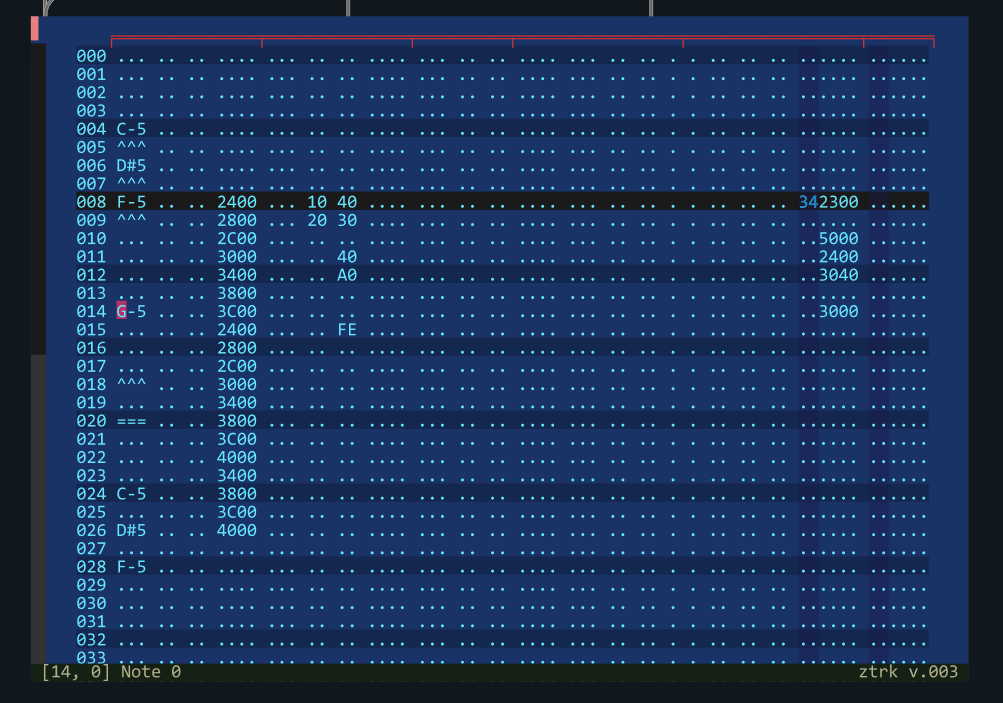
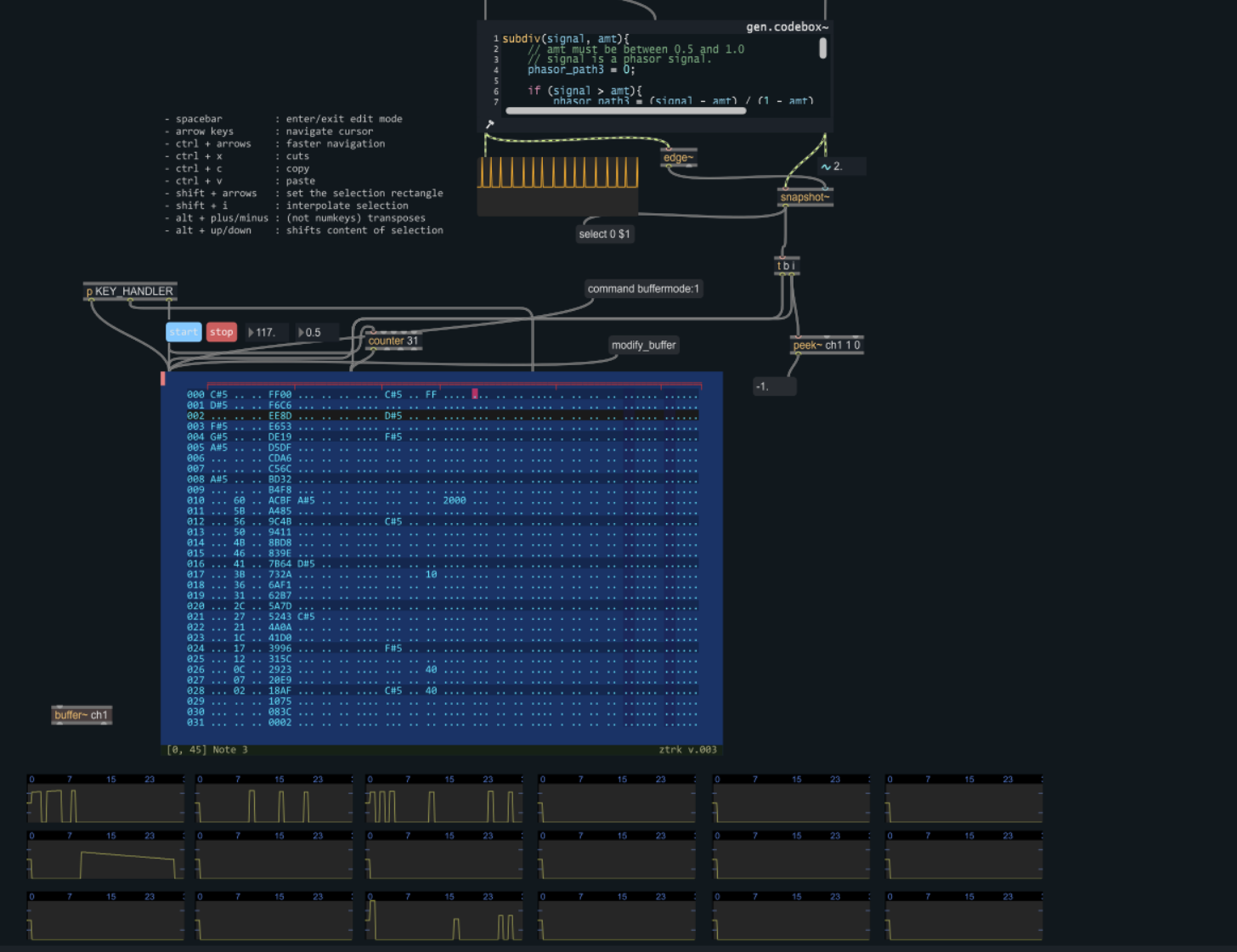
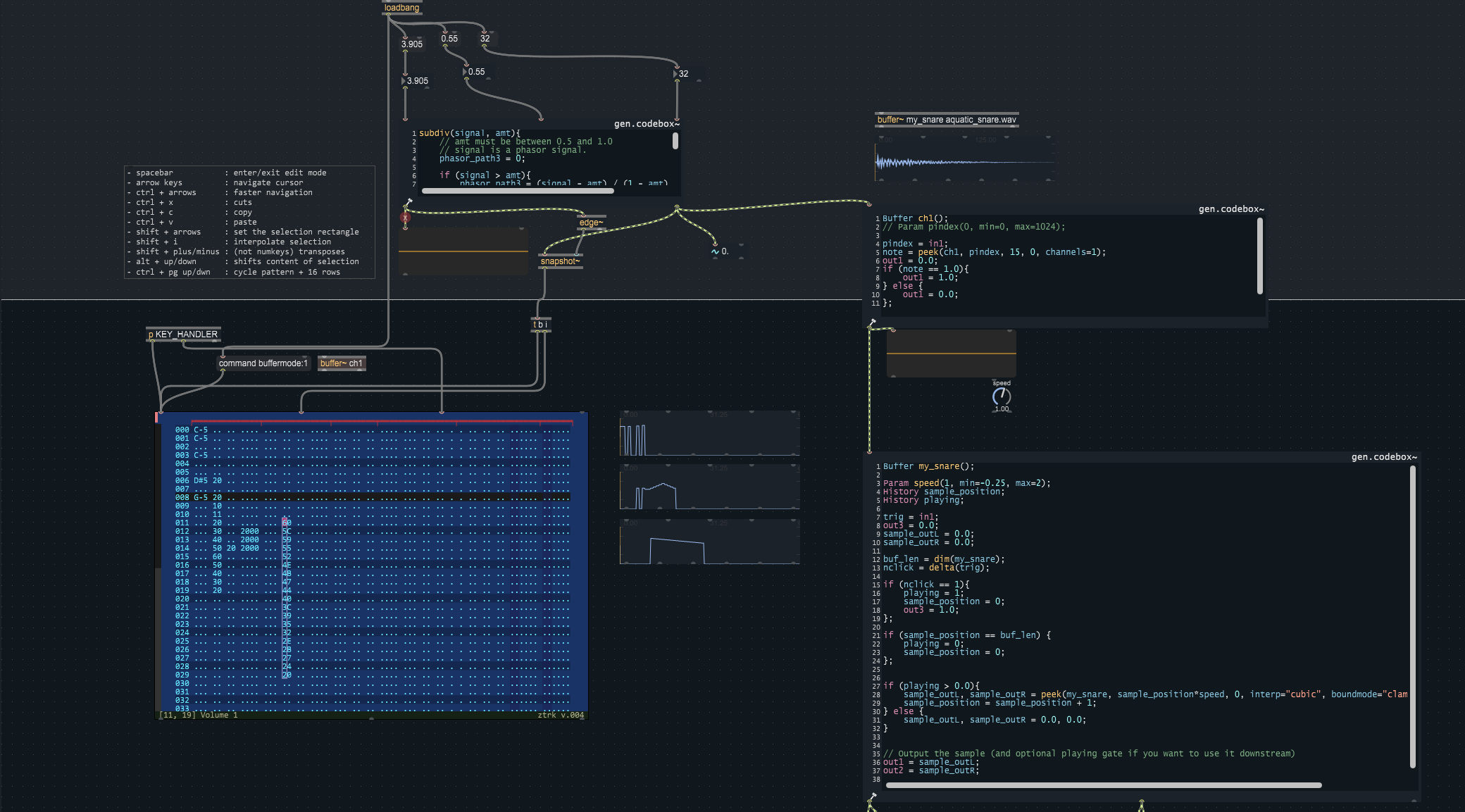
Work In Progress.
Here is the start of a tracker interface for max. It's gone through a few iterations already. The bulk of this project is currently a JS/v8 GUI object, which writes to a multi-channel buffer. I chose the buffer as data-storage because (unless i am mistaken) its indices can be looked-up sample accurately by a phasor, and in turn can trigger a gen~ object. At the moment it only supports one pattern, but it can be as long as you want, and has no hard limits to the number of channels. There will be further abstraction and facilities to store/retrieve patterns, sequences of patterns.
The columns can be any type from the following: Note, 2Hex, 4Hex, FFXXYY, and trigger.
nnn	| note                      |  ... === ^^^  notes
hh      | 2hex                      |  ..
hhhh	| 4hex                      |  ....
b 	| bang/trigger  ( 1 or .)   |  .
ffxxyy	| COMMAND+ARG               |  ......
and a pattern markup in js like this: ( each track needs to have a param-type, a param-name, and a group index. )
var pattern_markup = {
    length: 64,
    descriptors: {
        track: {
            0: ['nnn', 'Note 0', 0],
            1: ['hh', 'Volume 0', 0],
            2: ['hh', 'Duration 0', 0],
            3: ['hhhh', 'Offset 0', 0],
            4: ['nnn', 'Note 1', 1],
            5: ['hh', 'Volume 1', 1],
            6: ['hh', 'Duration 1', 1],
            7: ['hhhh', 'Offset 1', 1],
            ...
            16: ['b', 'Trigger', 4],
            17: ['hh', 'Volume', 4],
            18: ['hh', 'LDelay', 4],
            19: ['hh', 'RDelay', 4],
            20: ['ffxxyy', 'Effect 1', 4],
            21: ['ffxxyy', 'Effect 2', 5]
        }
    },
    data: [],          // filled at runtime
    lexical_track: ""  // this is compiled automatically from the descriptors
};
The Tracker Interface
keyboard shortcuts, at the time of writing, constricted by existing Max kb shortcuts:
- spacebar           : enter/exit edit mode
- arrow keys         : navigate cursor
- ctrl + arrows      : faster navigation
- ctrl + x           : cuts
- ctrl + c           : copy
- ctrl + v           : paste
- shift + arrows     : set the selection rectangle
- shift + i          : interpolate selection
- shift + plus/minus : (not numkeys) transposes
- alt + up/down      : shifts content of selection
- ctrl + pg up/down  : cycle pattern -/+ 16 rows
So, What can you do with it?
It will write data to a multi-channel buffer, and you can read from that buffer at desired time-intervals. I'm still adding some UI/UX for swing (i'm partial to shuffle techno). For the inquisitive the JS module has routines for writing to matrices and Ableton midi tracks (in realtime).
What's the purpose then?
I come from old school trackers, 4 channels then st3, impulse tracker, buzz, sunvox. Of the list of trackers I've used, I think impulse tracker came closest to a direct link between thought and pattern data, and reproducible happy accidents. Everything could be done via keyboard. I would like to achieve some kind of platform where i can drive soft-synths or samples or send midi / CC changes.
The current maxpat that might be interesting to look at in the repo is :
step6_tracker_editor.maxpat
Goals?
Yes, serious goals. This thing has been on my mind for maybe 25 years. I'm keeping the tracker part open source, because - if you think about it - it's just a glorified excel-type interface. Agnostic to the final use-case. Personally I want to make hardware that runs this patch and a variety of max/msp synths/samplers which can be surgically controlled via the tracker interface. I've wanted this stuff way before hardware trackers emerged.
Feedback + warnings welcome :) i've only been using max for 6 months and am slowly going through youtube and the GO book. I've also implemented some routines that write data to Ableton Live tracks, which is also pretty cool as reinventing the wheel is not necessarily my goal.

amazing work for 6 months of max usage! stoked to see this project progress

Thanks for the support Francisco!
I've implemented shedule-based and signal-based midi output.
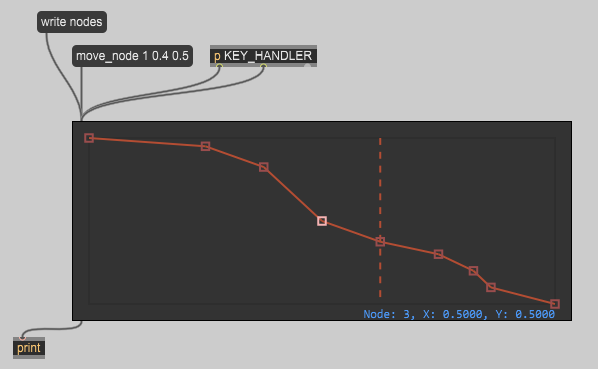
Here's one of the Envelope editors, which is controlled via messages or directly via the keyboard.
I'm also working on a sequence editor so allow multiple patterns to play at once, this is not dissimilar to buzz's sequencer.
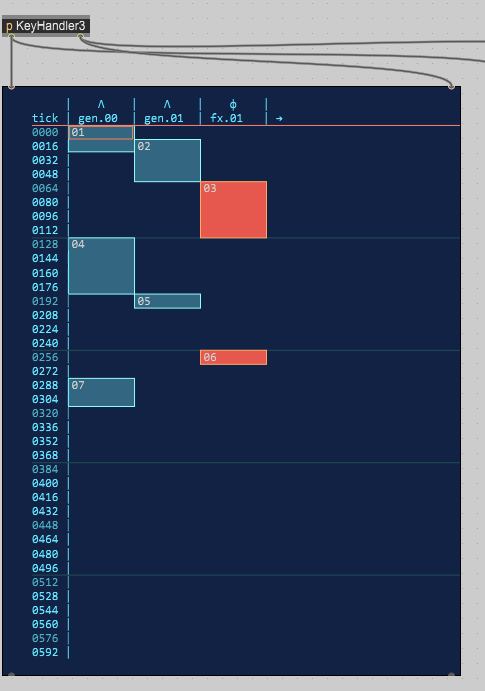
I didn't realize it would get complicated :)
0.007
We can sequence patterns now. 5k lines of code into it, turns out UI coding is a bit expensive with respect to my time, but that's ok. Now onto time :) and shuffle.
file save / load (done)
slice pattern, delete from sequencer.
overlapping patterns are like overlays, rather than truncating underlying patterns.
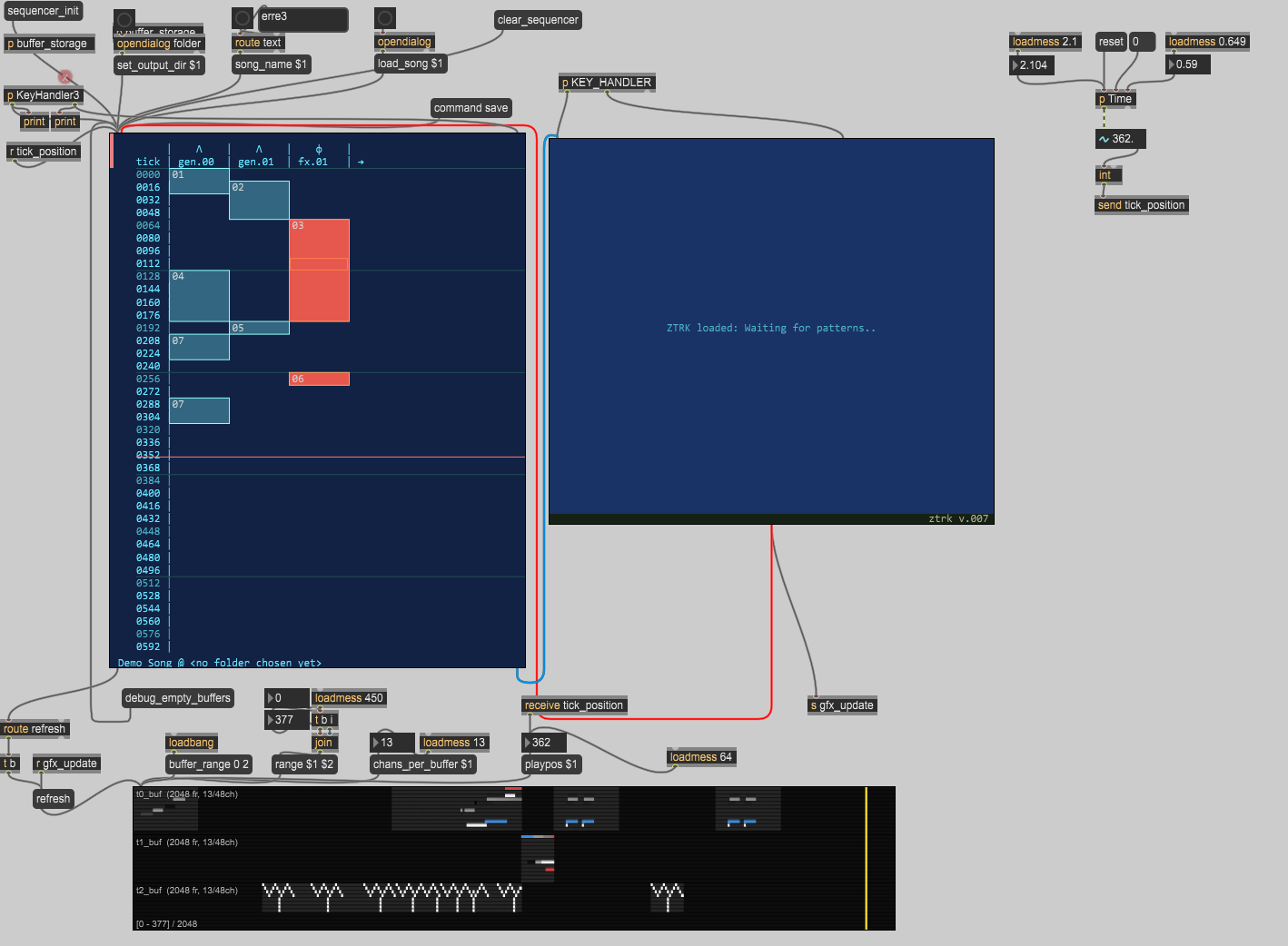
Time for an update. It's about 70% there.
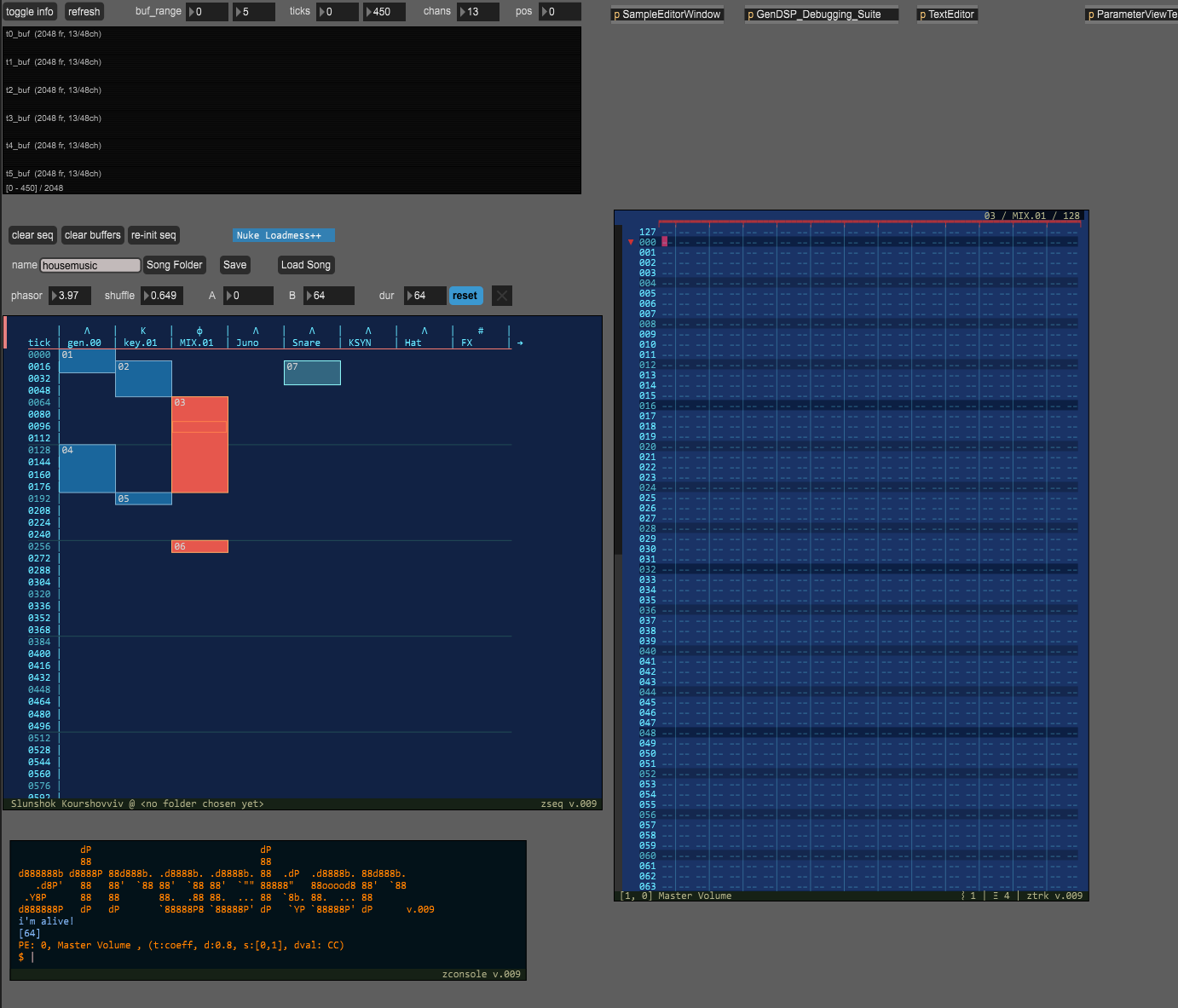
General
Font Face and Size defined in one place, can be updated in one place. Must be monospaced.
Save / Load songs
Buffer visualization ( like seeing a Table of CV values .. easier to find stupid bugs)
No undo yet.
genexpr to MachineInfo converter, (MachineInfo defines the parameters of a pattern, and ultimately how the buffers are read )
Sequencer
Add new Machines into sequencer from menu ( M = menu )
Create / Rename / Color ( I = insert, N = new, P = properties )
Remove Pattern (X = remove)
Slice Patterns at cursor ( S = Slice )
Shift Machine lane ( Shift +
[])Pause play-head ( F8 )
Display pattern under cursor ( Enter ) , this sends the pattern to the tracker UI.
Automatic Buffer creation for each Machine Instance. (Playback reads from buffers like a CV)
Can change theme colors.
Pattern Editor
Notes, 2hex, 4hex, CC14 (CCxxyy), trigger
Key-Jazz while entering notes.
Interpolate, Shift, Delete, Transpose, Copy/Paste selection
Scroll pattern in place. (mouse wheel and shift)
Pattern Editor resizes to match pattern length or to an arbitrarily picked max length of 64 ticks.
Can change theme colors
Scroll bars show how much of the pattern is visible in the window.
Two speeds to grow rectangle selection via cursor
Console (ZConsole)
I rolled my own interactive console.
It can post messages in any color, but the defaults are
_postInfo, _postWarning, _postError, _postLowso debug statements show up in different colors in thezconsole.It shows the received message history
you can type commands, it acts as a dispatch using
eval()for instance it can send
_sendAdvanced("TimeInfo::SEQUENCER_ACTIVE bang")and that will find the subpatcher with scripting nameTimeInfoand an object inside it with a scripting nameSEQUENCER_ACTIVEand `bang` it.It shows the user typed command history
WaveEditor
Load / Play samples (mono, stereo) by dragging them into the dragbox.
Add Markers, marker index is auto re-sorting.
Template included for sending data to
node.jsandpythonover base64 (round trip) , example use is librosa to perform wave-slicing by asking it return the sample markers from its onset detection. (kind of works, but requires tweaking parameters..)
GEN dsp linting
Has a linting feature you drag the
genexprfile into and it perform tree-sitter analyses using cycling74's own code introspection. (again using python and nodejs ) . This feature may be kind of pointless now in max 9.2 which appears to be more informative ongenexprerrors.