Abstractions in Max 8.6

Hello, I am quite new to Max but I have a problem I have been trying to solve for HOURS without any clue. I am currently doing a lot of patches and I am trying to use other .maxpat files as abstractions, like an object or simply a subpatch. I just want to be able to add them to my current patch. I followed every single tutorial and asked every AI possible but it doesn't work. I can't find the files I am looking for. Even in the File Browser I am litterally adding the patches and it says: No patches were added.... I don't know what to do anymore, I just want to organize my work but I am getting crazy. Can someone please help :(((
I am on Mac os
Thanks :)))

.maxpat files are accessible as abstractions for a patch as long as they are in your Max search path.
The most basic location is next to the patch. Like if you have my_main_patch.maxpat in a folder, and my_abstraction.maxpat in the same folder (and not in a subfolder, you will be able to create a [my_abstraction] abstraction in my_main_patch.
~/Documents/Max 8/Library is another common location.
The first section of the Abstraction page of the documentation sums it up pretty well. Also check the search paths page for more details about them.

There are a few things not explained on the abstractions page. And can leave beginners whacking their head with a shoe. As well, some hidden features.
As TFL mentioned - different common search paths.
1. If you put the abstraction in the same folder. Only the other patches in the folder can see it. This is good for exporting a project or sharing with others.
2. I you want to use it everywhere anytime in any patch on your computer your should put in ~/documents/ Max 8/Library/ - but there is more -
if you look in the /Libraray folder there are many folders. Personally, and depending on what you want, one problem-free place to put "everything" you want to build and use locally in /Packages.
Then, inside /Packages you may be faced with another "ow my head" situation. There are many packages already in there ;/ - so you have to go deeper. Since I use Max 9, my 8 is actually empty.
So this is where we start.
Here is a simple tutorial with a patch you can follow along:
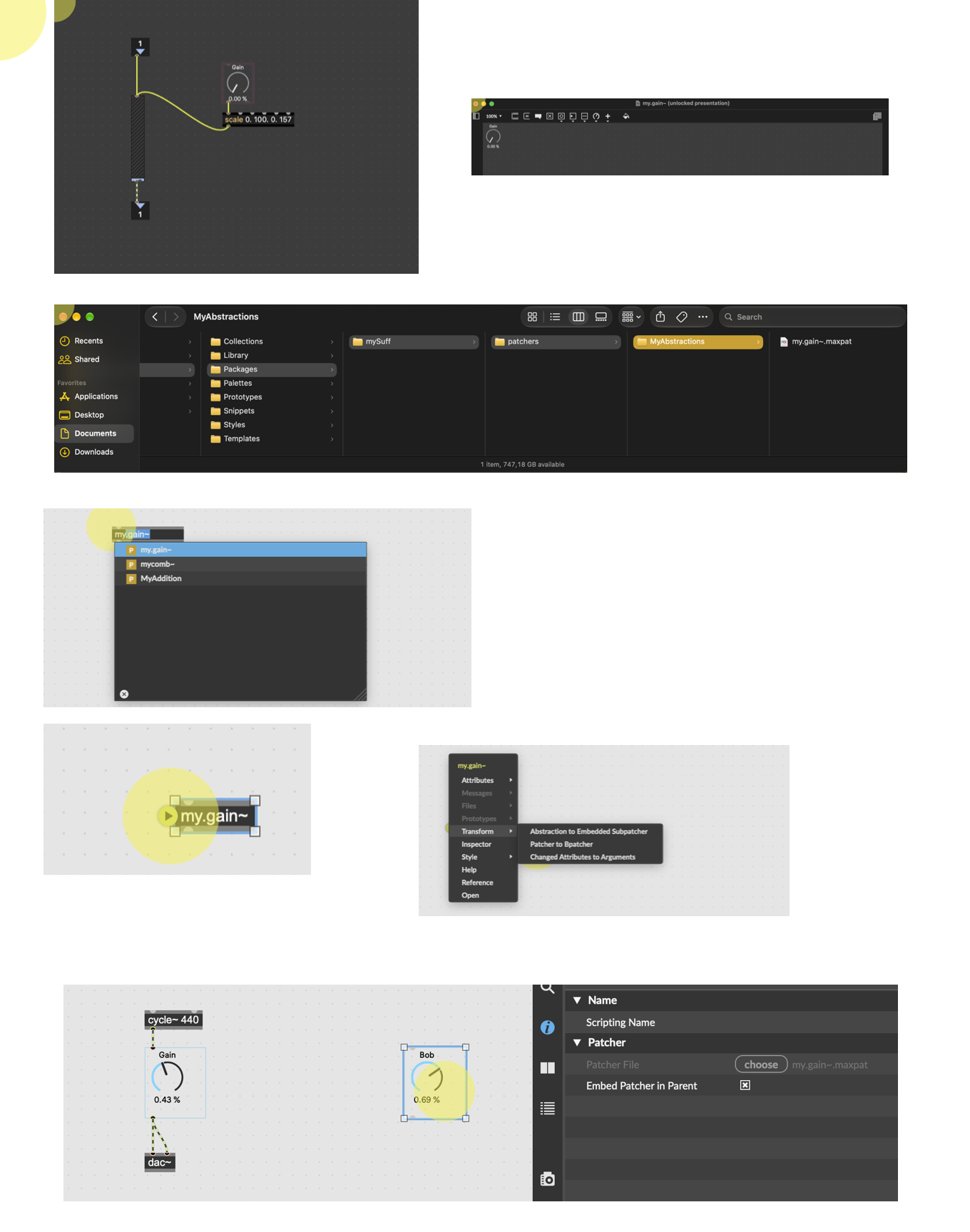
Open a blank patch and create this exact patch.
Put the live.gain in presentation mode - right click the canvas to select (open in presentation mode) and adjust the gain to the top right corner.
Create a folder in /Max 8/Library/Packages/myStuff/patchers/myAbstraction - Max is really finicky about file path. So after /Packages you need your package name (myStuff or whatever) - then it must say /patchers, then you can name many different folders and put anything in them.
Save the the new patch in /MyAbstractions/ -- I called it myGain~ so we know it is audio, and NEVER use something generic like Gain~ - you will run out of shoes.
Open a new patch in Max 8. add and object and type my.gain~ it will auto complete.
Once the object is created hover the left side of the box and choose transform patcher to bpatcher
Viola! Now you have reusable abstraction that you can use anywhere and everywhere in all your max patches - !
Some final notes -
if you want to use the same abstraction over and over but with different label and values, you can embed in parent patcher and change it.
Now the same object is called Bob and range is 0.-1.
And finally - most folks don't do what I just tutored about. Most folk make the abstraction and do NOT convert to bpatcher (I think) - instead , you can make arguments and/or connect external objects to the abstraction inlets.
Follow TFL link to Abstractions to find more about arguments and messaging.
***Hmm - edit , very strange - I put a few helper images but they are not loading
Here are the helper images - 1 is 1, 2 is 2 etc you get it