
Adding "Other" Files to Standalone?

Greetings!
I've noticed that when I use the Max Project Manager to create a Standalone, the project files in the "other" do not get included in the standalone. This is painful because it means I have to manually re-add them... in the right place... every time I update the patches and rebuild the standalone.
The kinds of files I'm talking about:
* .dll's that my externals depend on. These need to be manually added to the "resources/support" folder inside the standalone.
* Fonts. These need to be added to a "resources/fonts" folder that I create myself inside the standalone.
This manual fiddliness is pretty disruptive to rapid iteration when testing and distributing my standalone.
Does anybody have any recommendations or best practices around this? Is their any way to set my project so that when I build it as a standalone, all of its components are included and in the right place?
Thanks!

My advice is - don't use projects.
I have explained why I don't use them in many posts
and it is because of standalone build process.
You can automate copying of that few files using
any kind of scripting, if manual copy is so unconvenient.

custom structures (single search path, which can be removed later) or packages work better.
Interesting. I took a look at the Build scripting under File->Build Collection/Application.
This seems to be the solution, as it allows for more configuration than that "build" command in the project manager. But I couldn't quite get it to work.
If use "include file..." i see that the file is included in the log that appears in the Max Window, but when I search my collective I can't find the file. Where do these file land inside the collective?
I don't include anything in build script
but add needed dependencies manually.
I also build mxf with excluded externals, which again I add manually.
later , when updating same standalone, one only needs to replace mxf
and add new files if needed.
Fascinating! I can test this myself later. But to confirm, you're saying that the .exe is independent of the mxf?
So I just need to build the application once. Get it set up with all the dependencies, and then if I ever need to update the patches, I can just build a collective and drop the new .mxf file into the application?
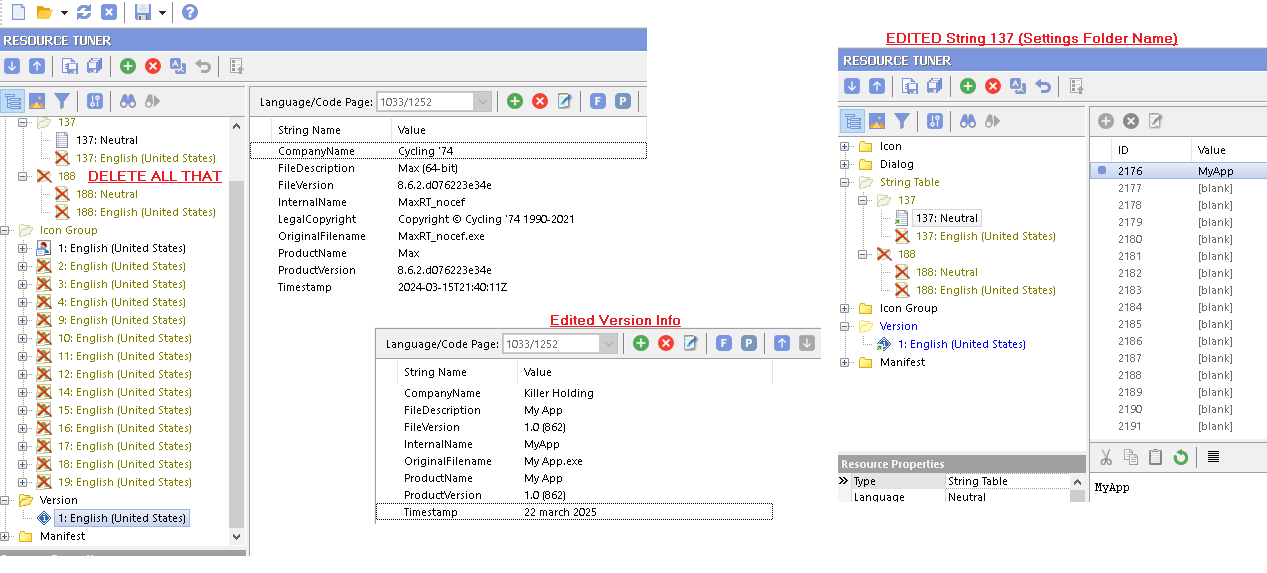
only thing which is custom to compiled exe is few lines of code which
set peferences name (String 137) and custom icon.
normal compiled exe does not even set version info
but leaves it as is .
I even don't bother to compile standalone, but copy runtime,
edit that few things using resource editor, rename it, and add structure arround it.
and yes - you only need to update mxf file.
I usually build them on Mac, even for Windows.
add
excludeexternals true like shown
to have mxf platform independent, free of externals.
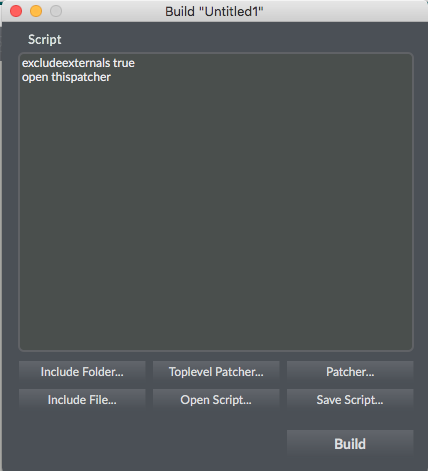
This is all it needs to turn max runtime into custom app.
Take MaxRT_nocef.exe if you don't need node.js
I sometimes use resource hacker, sometimes resource tuner
you can replace app icon (Icon Group 1) with custom one...
Wow! So much undocumented juiciness here. This will make proper devops much easier. Thank you so much for this!