
binary to float

On a Yamaha Motif sound module, general tuning can be adjusted from -102.4 to +102.3 cents. (The question why these values are not integers running from -99 to +99 is another matter.)
The value is represented by a 4-byte sequence, where only the low nibble of each byte is significant. The value of 0.0 is represented by the sequence 0x00 0x04 0x00 0x00.
In the course of developing a routine to convert the sequence to floating point and vice versa, I ran into the obstacle illustrated in the patch attached, which is that when converted to binary (or hex, as here) for the purpose of cobbling the bytes into an Fp, the output does not include the fractional part.
How does one get from -102.4 to 0xFFFFFFFFFFFFFF9A back to -102.4?

P.S. that 4 bytes are simpler to explain like this :
4 nibbles are set so that from right to left each byte step is 16x previous one.
409.6 25.6 1.6 0.1
only that byte 2 is offset by 4x -25.6 = -102.4
For Yamaha Master Tune parameter each byte has range 0 - 15.
byte 1 is allways zero for range -102.4 ~ 102.3
byte 2 1 step is 25.6, but has offset -102.4 (4x -25.6)
byte 3 1 step is 1.6
byte 4 1 step is 0.1
summ 4 bytes
one could ignore byte 1 as it is allways zero and simplify parsing
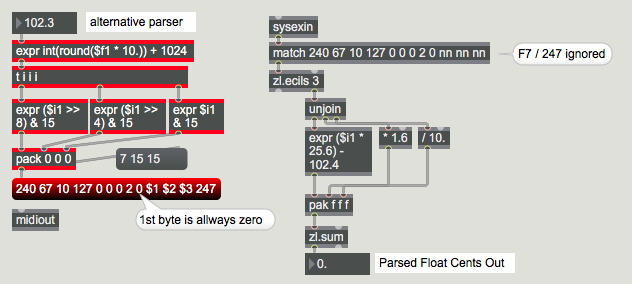
or using single expr
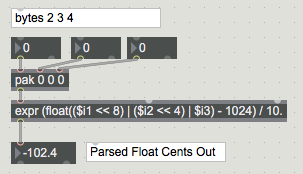

The 4-nibble explanation is the clearest way to think about it. Once you see it as four digits in a base-16 number where each position has its own step and offset, the byte order stops mattering and the conversion becomes simple arithmetic.
For the round trip, treat it as an integer, apply the weights, then subtract the offset. The bit-level float conversion is what was losing you the fractional part, since 0.1 has no exact binary representation.

I think the problem is that 0xFFFFFFFFFFFFFF9A is just the integer -102. By the time you've converted -102.4 to that integer, the fractional part is already gone.
For this Yamaha format, I'd keep everything in tenths of a cent until the final conversion.
If b1 through b4 are the four low nibbles, you can combine them as:
n = b1*4096 + b2*256 + b3*16 + b4
Then the tuning value in cents is simply:
(n - 1024) / 10.0
So 00 04 00 00 gives 0.0 cents, while 00 00 00 00 gives -102.4.
Going the other way, calculate n = round(cents * 10 + 1024) and split that integer back into four nibbles.
In Max, you could use:
expr ($i1*4096 + $i2*256 + $i3*16 + $i4 - 1024) / 10.
The important part is to do the packing with integers and only convert to a float at the end. That way none of the 0.1-cent steps get lost.