
Changing the master volume of the built-in DLS synth

Hi folks,
I have a Max project that I made in version 8 that has become strangely unreliable, in that it works on some but not all of a group of seemingly identical iMacs.
I have a teaching lab full of iMacs that I use for a class about music and brains, and I made a little patcher to record people's ratings of randomly presently intervals. It uses the AU DLS synth, a choice which seemed to make sense at the time because I wanted a piano sample, and the DLS sample is good enough for this exercise. But now I find that the same patcher works on some machines, is very quiet on others, and on some machines, makes no sound at all.
It seems as if the master volume on the DLS synth is getting changed without me realizing it, and I don't know how to change it back. Is there some kind of a message I need to send to the DLS synth? I found this link
which talks about using message boxes and a particular start to the messages, ;#SM, but I don't know the message would be to change the volume, or even where to look for this info (besides here.)
Here's the project - can anyone help me troubleshoot this? I'm sure the answer is stupidly simple....but it is a stupidly simple thing that I don't know (draw your own conclusions!)
Click on the "seal" in the lower right corner to start - it is supposed to present a random dyad, from a random midi note between 50 something and 60 something....you rate it by pressing 1 to 7 on the keyboard and hitting return, at which point it plays a different dyad on a different root. It keeps track of the data (check the console) and at the end of 24 trials asks you to save the file.
On half of my iMacs, it works perfectly. On 3 of them, it is silent. On another 2 or 3, it is very quiet. An explanation would be much appreciated!

it could be system sound volume
you can send midi volume CC# 7 to DLS synth
you can use AU plugin of it instead of midi route
Definitely not system sound volume - other stuff sounds fine, just the DLS synth is super soft on a subset of iMacs.
I wanted to use this approach so it would work on a stranger's mac without the need for plug ins. I think the approach that I need is to send midi volume to the DLS synth. Can you please remind me how to do that? (I'm getting back into Max after a pause, and I am very rusty! I used to know how to do this at one point...)
AU DLS synth is allways present on Macs.
and it is more handy in case you want to capture it's output.
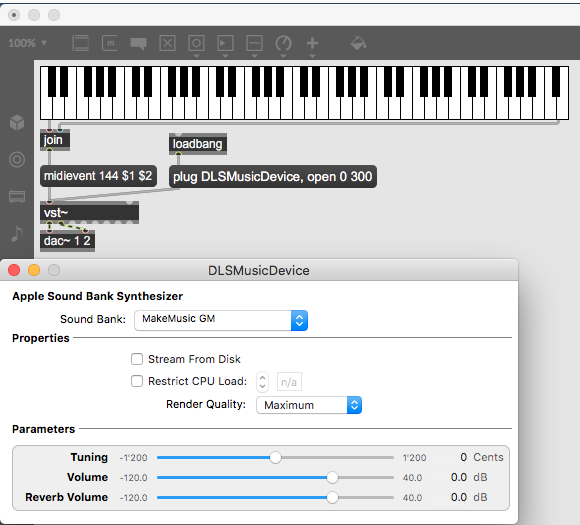
if you prefer midi, here is notes and max volume on ch 1
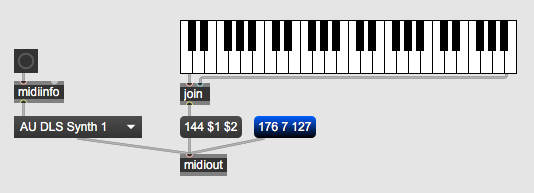
Thank you - I'll give that a try!
Update: I think you just solved my issue. Thanks very much!
p.s. both of your suggestions work in my patch. The first one successfully changes the volume of the DSL synth, but alas, this didn't fix the three ailing iMacs.
But changing the patch so that it puts the DSL in the VST folder works like a charm.
Thanks again!
A followup and update:
The fix of putting the mac AU DLS synth as a VST plug worked great on all of my lab macs. I'm now thinking about using this app with my online class, but some of the students might have PCs. Can the Microsoft GS Wavetable Synth run as a VST, and would do it the same way?
Thanks (again)
"Can the Microsoft GS Wavetable Synth run as a VST ?"
Not that I know.
If this is only related to your posted project, where you only generate 2 notes
I would create poly~ with 2 oscillators that would play them.
poly~ could give you more voices in case you need them,
but actually only 2 cycle~ objects with adsr would serve the purpose.
or then use sfizz~ with a small sample bank.
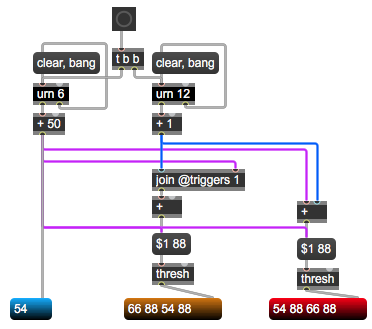
while we are at it, this is all it needs to create that 2 random notes:
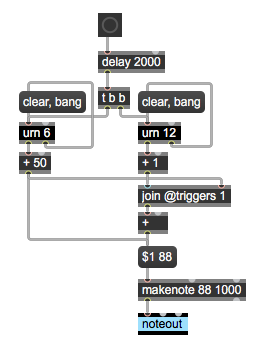
instead of that:
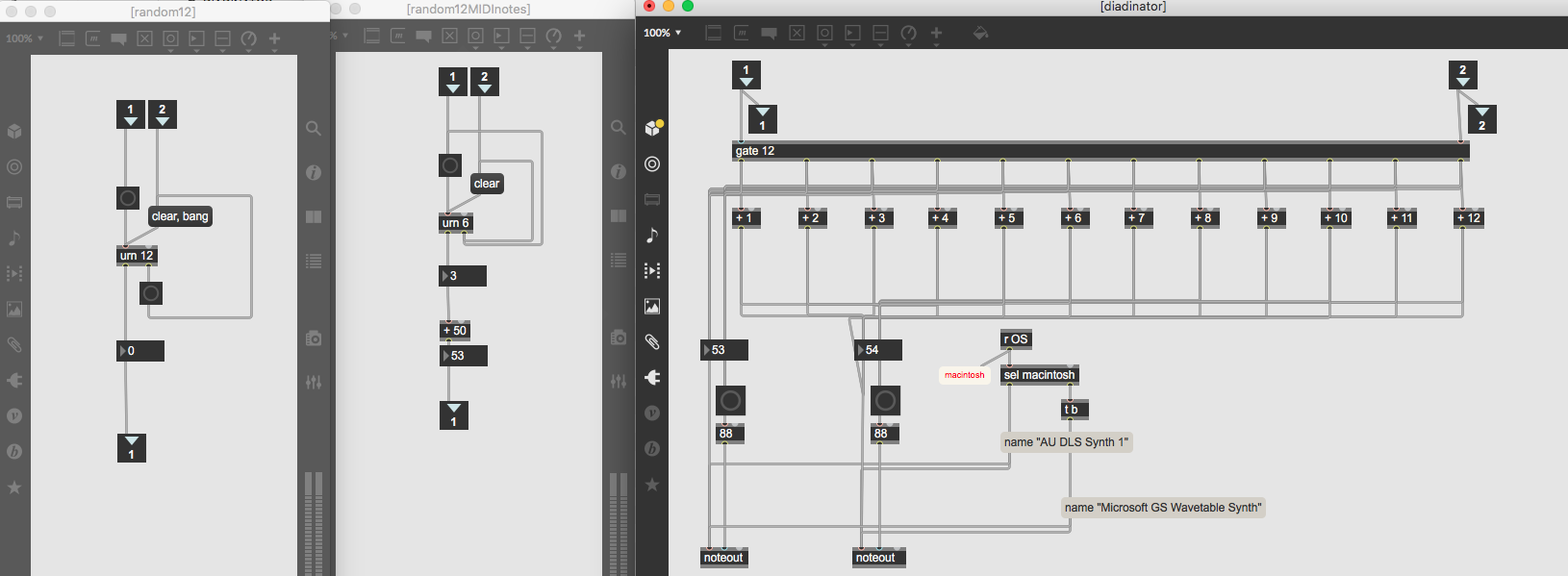
And thank you for that very helpful bit of code! As you can probably tell, I am stumbling my way around a bit, and doing needlessly convoluted things when much better, simpler approaches are available. So my next "inator" will be much less messy!
I have a question though: first, why use join @triggers, and then add the two numbers together? I mean, as opposed to just putting the two numbers into the "+" object directly? What do we gain by going through the join object first?
@triggers argument sets which inlet triggers output.
I wanted random 1 ~12 to be generated first,
and then trigger the list from random note note 50 ~ 55.
In this specific case with only 2 notes to same destination,
it could be done without it, because order does not matter,
but I am used to this kind of "be sure which order something executes" in general.
That makes sense. I also didn't realize that you can put multiple things in a message box and have them happen in order, so thanks for that one too! I am doing pretty much everything the hard way. (That thing I did with the gate with 12 outputs, controlled by a randomly generated number, just to add that number to the original signal is just comically silly. What was I thinking?)
Having an enjoyable morning rewriting some of my needlessly convoluted patchers.