
edit m4l patch

I am trying to edit this m4l patch to make it so I can control what tempo it listens to independently of Ableton's global tempos. Simply putting a number box doesn't seem to work. What can I do?
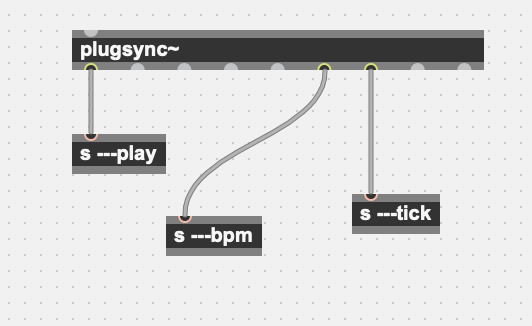

If you work on a MIDI effect (that goes in the track plugins), [plugsync~] should work but you need to edit the M4L device from within Live, and not open it from standalone Max.
But I assume you are actually editing a MIDI Transform device, and it seems [plugsync~] doesn't work in those, although I couldn't find any info about that in the doc.
You can still get/set the tempo through [live.observe]/[live.object]:

plugsync~ and liveAPI are bound to Live transport.
Where would that other play state, bpm and rawticks otherwise come from ?
only own made clock could generate that, at least in Live 11.
You can easilly make it out of metro, counter etc

the only thing what plugsync can provide you for a custom polymetric/polyrythmic solution is the transport state and the samplecount.
recalculating different beats, bars and ticks will 1. mathematically not work and 2. probably not work the way you think.
furthermore, plugsync´s samplecount is not reset by transport, it just counts from dsp-on, so that could be done using other objects as well anyway.
a custom (metro-based) midi-style (or andrew-style) clock, controlled by a combination of transport state and DSP time will work well for custom max patches or for generating midi or OSC data.
however, you might lose timinig precision when you try to record that as midi in the host program. it will be better to use it to directly record audio.