
How does jit.gl stuff combine multiple translations?

As I'm remapping my OpenGL understanding from Pd/Gem over to Jitter -- I've made some progress, reasonably comfortable with jit.gl.multiple now.
But I ran into something I don't know how to translate.
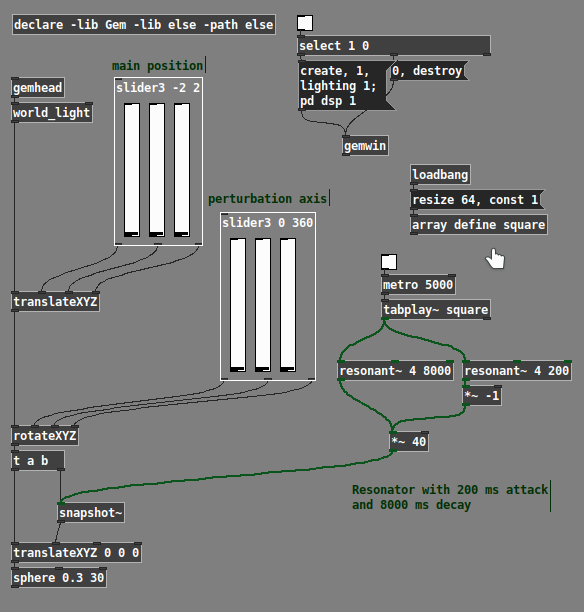
1. [translateXYZ] positions the object (analogous to @position x y z).
2. [rotateXYZ] rotates the axis of movement.
3. Then another [translateXYZ] "perturbs" the object along the rotation axis (spring-like movement from feeding a square pulse of energy into a resonator).
At present, the best I can think of is to calculate a rotation matrix, multiply the no. 3 translation by this, and add to the base position.
But I suspect there's probably some other method. What is eluding me is that, in Gem, you control the order in which transformations are applied (this is good and bad -- it's good that the order is explicit, but also confusing when you have to reverse some of the transformations), whereas in Jitter, @position and @rotateXYZ just "exist" (which is more intuitive initially).
I *guess* it's something with jit.gl.anim something, though it's not clear to me, when you have @position and @rotateXYZ in the drawing object, and additional position/rotation information coming from anim, how are they combined? If I can grasp this, then I can go further on my own.
hjh

Interesting experiment James, very cool to see how PD implements this sort of things.
Regarding the anim vs object transformations:
each jit.anim.node attached to a gl object will override the transformations attributes of that object.
So to have multiple transformations stages you need to chain multiple jit.anim.node objects and then connect them to a gl object.

check out the anim.node example patches by opening a File Browser window and searching, e.g. for anim.node.pivot.simple and anim.node.planets
also check out the animmode attribute, when used in conjunction with a jit.anim.drive object (or simply with the animation messages mode, turn, grow).
happy to help sort things out when you have a patch utilizing these objects.
if you do want to stay with the more old-school techniques, you can set up PD like transforms using jit.gl.sketch, and then using the drawobject message to draw named objects at these transforms. However I would recommend exploring the jit.anim system a bit first, as it is very powerful and (IMO) much simpler to setup.
@FEDERICO-AMAZINGMAXSTUFF
> So to have multiple transformations stages you need to chain multiple jit.anim.node objects and then connect them to a gl object.
@ROB RAMIREZ
> check out the anim.node example patches by opening a File Browser window and searching, e.g. for anim.node.pivot.simple and anim.node.planets -- also check out the animmode attribute, when used in conjunction with a jit.anim.drive object (or simply with the animation messages mode, turn, grow).
Great tips, thanks to you both -- I got a simple one-shape moving.
Had other things to do for the last few days but I'll dig into those examples. One thing that isn't clear at first is how to integrate jit.anim.node with jit.gl.multiple... but I should poke around and see if I can find something first.
Thanks!
hjh
Update on the search: Examples folder struck out -- I used a SuperCollider script to scan grep results and found that only two files include both jit.anim.node and jit.gl.multiple: ./overview/jitter_objects.maxpat, ./render/model/model.bone.rigidbody.maxpat. A few more refer to jit.anim.anything but doesn't look promising.
hjh
@ROB RAMIREZ
> check out the anim.node example patches by opening a File Browser window and searching, e.g. for anim.node.pivot.simple and anim.node.planets
Actually, a closer look at anim.node.planets confirmed my worry... it does "multiple" by copy/pasting drive/node/gridshape complexes.
I tried attaching a jit.anim.node to a jit.gl.multiple --> jit.gl.gridshape, and it rotates/moves the entire multiple as a unit -- which is a cool and useful effect for sure (will definitely use it in class!), just not quite what I was looking for.
I'm just wondering if the only way to control glparams in a multiple is through the input matrices. This would make sense (I imagine it would be difficult to design a logical interface to integrate several transformation sources) -- in which case, I'm not sure what is the Max vocabulary for the matrix manipulations.
Or perhaps jit.gl.sketch is the best way... I'm comfortable with building lists algorithmically (though it will freak the students out).
hjh