
How to detect the [dial] is being clicked?

Hi, I am trying to a dial to gate a metro trigger. Basically the trigger will be 1 at normal. If I click and change the value of the dial object, trigger will turn 0.
I tried [change] but it won't work because no only I want trigger stays 0 when changing values but it should all stay 0 as long as mouse click is on the dial.
Another way is to have [mousestate] to report the boundary of the dial on screen. Then as along as my mouse is clicked and within the dial area it will work. This way is not robust because on different computer/screensize the value will vary.
My best hope is [lcd], by overlaying it on the dial. Then the [lcd] can output mouse state for the control. But then I encountered another problem that when [lcd] and [dial] overlap each other, only the front object can be triggered. I hope there is a way to go around it.
Please shed some light. :)
Regards,
Jiajun

You can use hover for that
Thanks DSMD!!! I didn't know about the [hover] before. It works just fine. I used [hover] to [gate] the [mousestate] click.

i am not sure about max4live (it didnt work in pluggo either), but in max [lcd] should also report the mouse when in background.
another option is to put an [ubutton] on top of the other GUI object and use its output data (mouse down, mouse up, value changes acumulate to last state of dial object) to control everything.
-110

Here is an example that uses an overlapping lcd which takes its Y-delta over to an accum - but only outputs values after the 2nd event so the initial delta (which could be anything) is discarded.
You can use the 3rd outlet of the lcd to get mouse-state (like hover) of mouse-up or mouse-down. I can't exactly tell what the purpose of this is thus can't recommend what it's for. Like if you're wanting to use the dial without it feedback into itself, you'd use set $1 somewhere.. I can't tell what the gating is for. :) sorry
This is 9 years old, the thread :) But I the behavior isn't fully described here. Are you saying you want the output to be zero when the mouse is down - and then the trigger returns to 1 when... what? When the mouse is released?
Part of what you describe sounds like you'd use mouse-up to bang an int that stores the dial value.
I really liked that hover example given, and because the objects need scripting names to have identifiers output from hover, I went ahead and made a python script that modifies all objects without varname fields and assigns one using {classname}-{obj-id} so they're always unique; and skips any that have varname's already assigned.
I figure that'd be handy for retroactively applying varnames to patchers that have lots of GUI elements (i.e. for pattr stuff) without having to manually name everything.
It doesn't recurse into subpatchers, but it'd be easy to modify this to a recursive function to check for patcher objects inside of patchers and call the function again.
import json, sys

filename = sys.argv[1]
print(f"processing: {filename}")
with open(filename, 'r+') as f:
    patcher = json.load(f)
    boxes = patcher['patcher']['boxes']
    scripting_name_key = 'varname'
    for box in boxes:
        b = box['box']
        if not (scripting_name_key in b.keys()):
            var_name = f"{b['maxclass']}-{b['id']}"
            print(f"Updating object {b['id']} with varname: {var_name}")
            b['varname'] = f"{b['maxclass']}-{b['id']}"
        else:
            print(f"Skipping existing varname: {b['maxclass']}:{b['id']}: {b['varname']}")
    f.seek(0)
    f.write(json.dumps(patcher, indent=4))
    f.truncate()

that is all too complicated, including hover
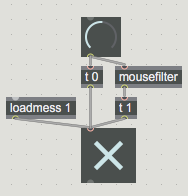
click or click & move = 0, release = 1