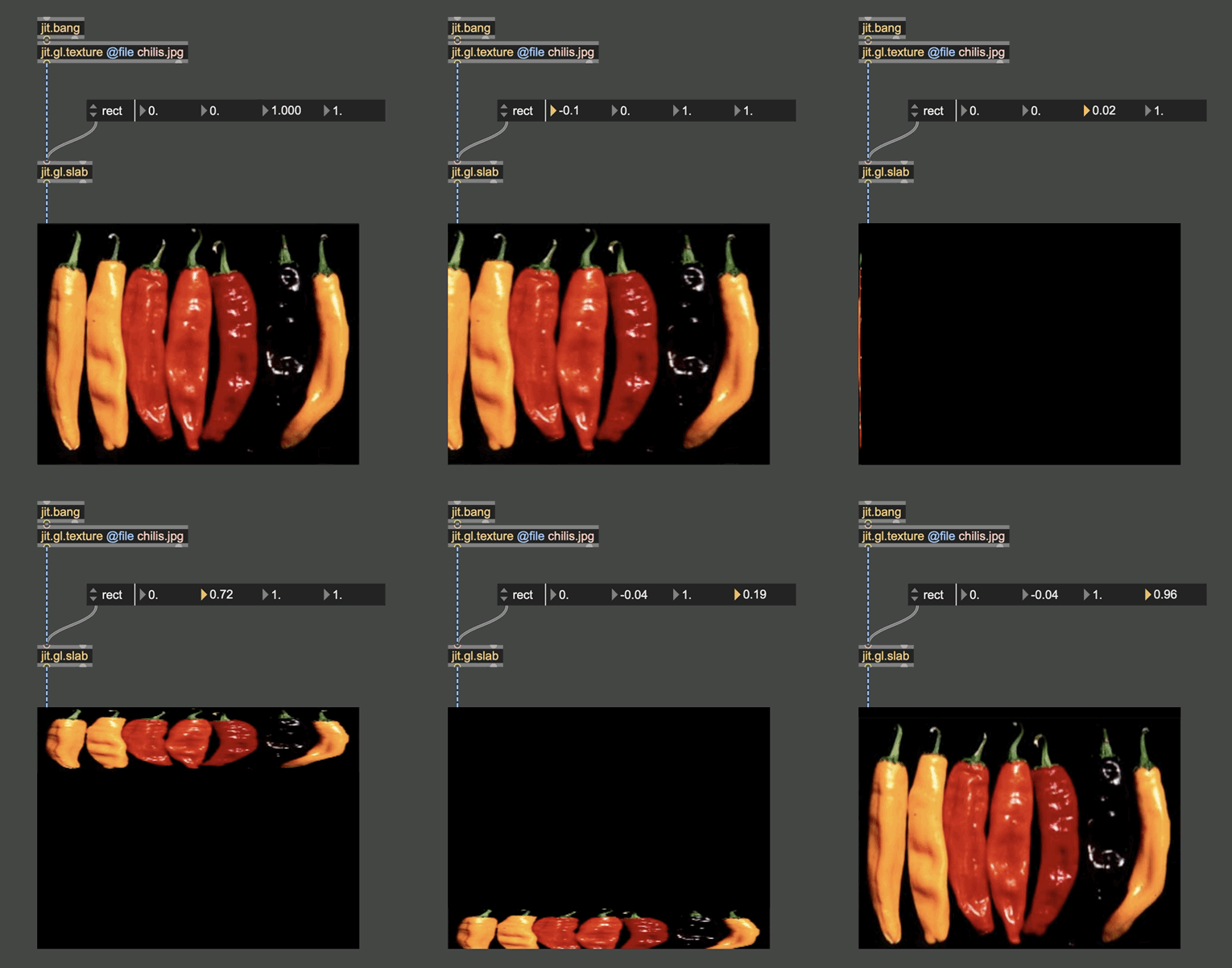
how to mirror an image with jit.gl.pix ?

Hi,
it's probably super simple with jit.gl.pix, but I'm new to this.
What I'd like is to display the mirrored image of an image, with two modes :
flip right to left
flip top to bottom.
Any help ?
Well,
jit.gl.texture has a "flip" arttribute that inverts top and bottom, so I got this covered.
What about flipping right and left ?

Either use the @rect attribute of a [jit.gl.pix], or resample the incoming texture by inverting the x and/or y normalized coordinates:
Thanks !
Out of curiosity, is it possible to make a 90° or 270° rotation with rect messages ? I don't really get what the 4 numbers represent.

is it possible to make a 90° or 270° rotation with rect messages
no. easiest for this is jit.fx.dimmap
I don't really get what the 4 numbers represent
from the ref page: Slab geometry rectangle (default = 0 0 1 1). The four values represent normalized coordinates for the left, bottom, right and top sides of the geometry rectangle. To flip the image horizontally use rect 1 0 0 1 or to flip vertically use rect 0 1 1 0 .

1 0 0 1... reminds me on quicktime... that did it the same way.
1 0 0 1... reminds me on quicktime... that did it the same way.
well, maybe, but I still can't wrap my head around it... not a big deal, but I like it better when I actually knows what/why I'm doing :-)
Hopefully this can help. The green arrow shows the order in which the numbers are read, and the black arrows show the orientation of the normal vectors. The normal, default orientation being from left to right, from bottom to top.
From this example mind you should be able to mentally visualize why 1001 flips the image horizontally by inverting left and right.
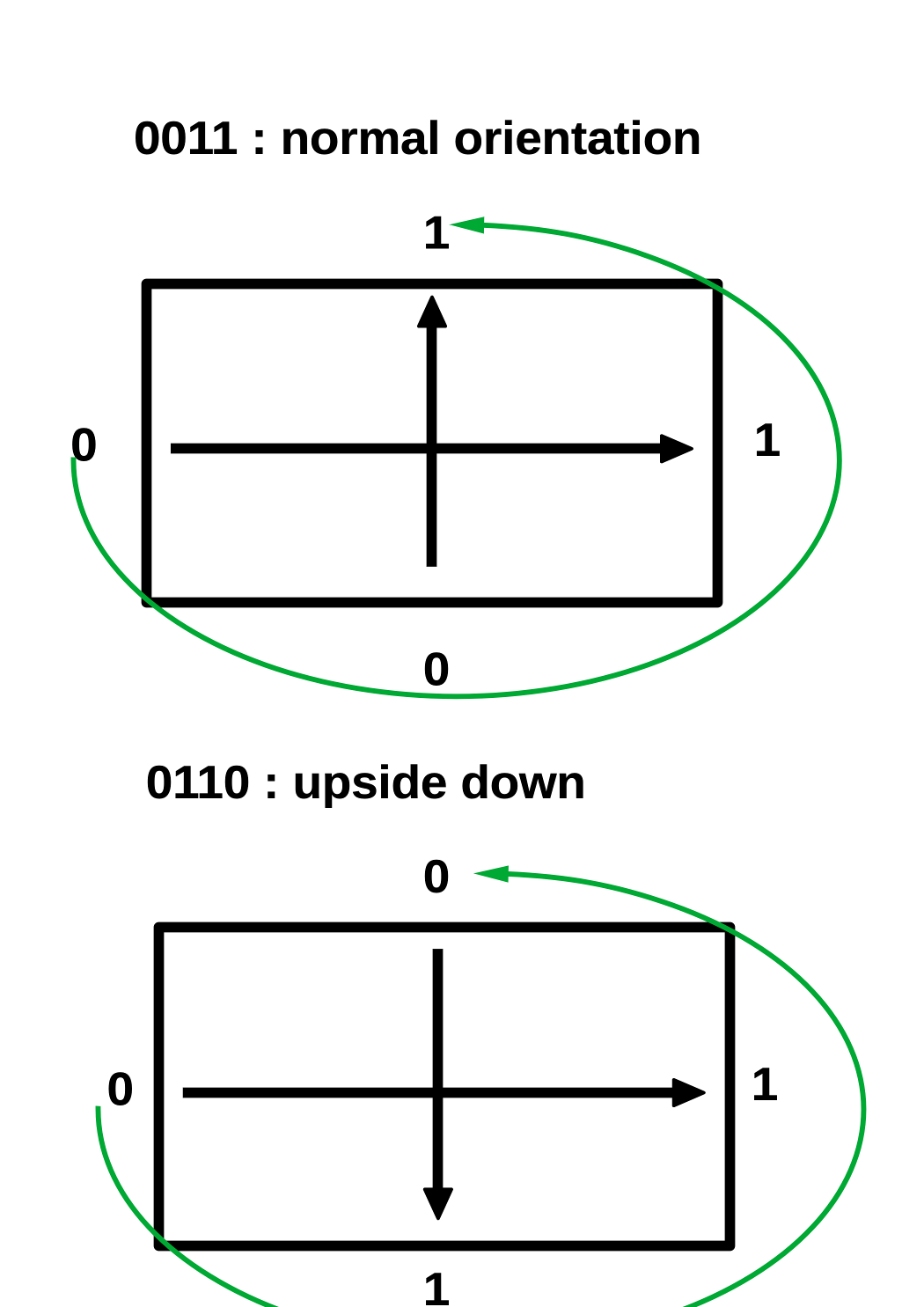
To Rob: it makes me wonder, in shaders the vertical normal vector is from top to bottom, right? So is the doc right when it says
left, bottom, right and top
where I would expect
left, top, right and bottom
Meaning the numbers in my little drawing would be read in clockwise order instead of counter-clockwise
those graphics look really nice, but ain´t it rather 2 corner coordinates which are flipped here?
(0 0, 1 1)
That was my first thought too, and this representation could work, but then it doesn't really match the documentation description anymore:
The four values represent normalized coordinates for the left, bottom, right and top sides of the geometry rectangle.
...unless I misunderstand it?
hahaha, so it's confusing, isn't it ? :-)
ok right, rob said "side".
in either case (edge or corner), think of the canvas as a piece of paper, which you can bend by changing the positions (of edges or corners), and 0 0 1 1 beeing the inital state.
apply mirror H and mirror V as noted above, 0 0 0 0 will give you nothing.
in case it is corners, for 1 0 1 1 and 0 1 0 1 you will need a rubber sheet and end up with a triangle shape or an "8" with distorted content. (in quicktime. eventually in GL, too)
this is probably one of those cases where you should just hook it up and start playing with the numbers.
If anyone has suggestions for how to update the reference language, I'm happy to hear it.