
improve Image()-resolution of text in MGraphics

hi everyone,
In a v8ui I am rendering blocks of text as an Image() using the
push_group()and
new Image(pop_group())method to improve performance on large chunks of text display within the object.
However, the resolution of the Image seem to be restricted and regular fontsizes of, say, 13, are being displayed heavily pixeled. Is there a way to improve the Image-resolution by, say, creating a subcontext of some sort or is this a native limitation in MGraphics?
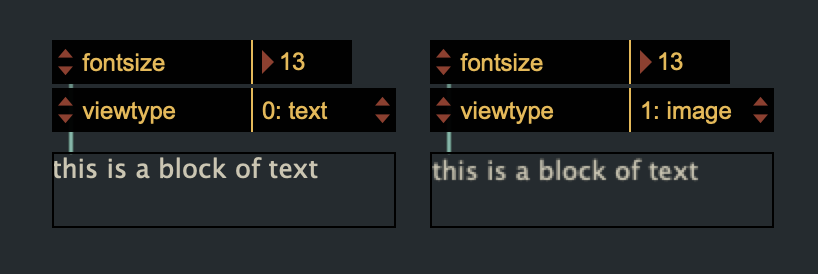
Side note: any
image_surface_draw(img)will always require an initial
translate(-3,-3)to render at the correct position. Sometimes one has to translate arbitrarily, mostly the image gets drawn at an offset from the canvas with a black border. This 'bug' (or unexpected behaviour) is not mentioned in the documentation.
?
Cheers all.
mgraphics.relative_coords = 0
mgraphics.init()

var text = "this is a block of text"
var size, img
var viewtype = 0
declareattribute("viewtype",{style:"enumindex",enumvals:["text","image"],setter:"setviewtype",embed:true})
function setviewtype(v){ viewtype = v; refresh()}
var fontsize = 13
declareattribute("fontsize",{type:"int",min:1,setter:"setfontsize",embed:true})
function setfontsize(fs){ fontsize = fs; refresh() }

function paint(){
    size = mgraphics.size
    mgraphics.set_source_rgba(this.patcher.getattr("color"))
    if (viewtype) {
        mgraphics.translate(-3,-3)
        mgraphics.push_group()
    }
        mgraphics.move_to(0,fontsize)
        mgraphics.set_font_size(fontsize)
        mgraphics.show_text(text)
        mgraphics.fill()
    if (viewtype) {
        img = new Image(mgraphics.pop_group())
        mgraphics.image_surface_draw(img)
    }
}

refresh()
I'm not sure why going through a new Image and image_surface_draw() kinda halves the resolution. I assume it happens only on HiDPI screens, as if Image (or maybe image_surface_draw()?) had no idea of the screens pixel density?
Also, I'm not sure why the Image created from a mgraphics context has a height and width of +21. Like if mgraphics.size = [300, 100], then img.size = [321, 121].
Regardless, what I tend to do when drawing things off screen is to create a new Mgraphics context at twice the size of the canvas, and then draw it at half the size with image_surface_draw() in the on-screen context.
Everything lines up properly this way, no need for that weird -3,-3 translation.
mgraphics.init();

var text = "this is a block of text";
var size, img, offscreen;
var viewtype = 0;
declareattribute("viewtype",{style:"enumindex",enumvals:["text","image"],setter:"setviewtype",embed:true});
function setviewtype(v){ viewtype = v; mgraphics.redraw()};
var fontsize = 13;
declareattribute("fontsize",{type:"int",min:1,setter:"setfontsize",embed:true});
function setfontsize(fs){ fontsize = fs; mgraphics.redraw()};

function paint(){
    size = mgraphics.size;
    if (viewtype) {
        offscreen = new MGraphics(size[0]*2, size[1]*2); // Create a canvas at twice the size
        offscreen.scale(2,2); // Render everything two times bigger
        draw_text(offscreen, text);
        img = new Image(offscreen);
        mgraphics.scale(0.5,0.5); // Draw img at half its size
        mgraphics.image_surface_draw(img);
        mgraphics.scale(2,2); // Back to normal scale if you want to draw further stuff after
    } else {
        draw_text(mgraphics, text);
    }
}

function draw_text(ctx, text) {
    ctx.set_source_rgba(this.patcher.getattr("color"));
    ctx.move_to(0,fontsize);
    ctx.set_font_size(fontsize);
    ctx.show_text(text);
    ctx.fill();
}Also, refresh() is specific to the Sketch API. When using MGraphics, use mgraphics.redraw() instead. And also the absence of ; was throwing my off ^^'
big thanks TFL for the prompt solution !
It took me a little while to integrate this method into my nested functions but eventually it worked like a charm. Thank you also for the syntax-improvements and hints. Appreciated!
Should you read this and have an answer up your sleeve: Seeing as the
offscreen is being used multiple times to render different blocks of text I would have thought I could
offscreen.save()an initial state and
offscreen.restore()to revert to the initial state but that has not worked and the blocks are being rendered on top of each other. Is there a different solution than to re-initialize 'offscreen' as MGraphics() with all the settings every time?
Cheers.
I'm not sure to understand exactly what you want to achieve.
You can definitely run offscreen = new MGraphics(size[0]*2, size[1]*2) only when necessary, ie. only when the object is instantiated or when it is resized.
This is what I demonstrate here:
Do you want to use offscreen to draw possibly different things (like above), or always the same thing? If it's always the same thing, you would even render offscreen to img once, and just redraw img any time you want with mgraphics.image_surface_draw(img). This is what I show here:
But notice that by doing so, you need to make sure to recreate your img any time that something about its content is changed (like here when changing the font size).
Not sure if such a dummy example makes sense. Maybe if you show a bit more what you are actually want to draw I could provide more meaningful examples.
Thanks again for the detailed and caring response.
You're not barking up the wrong tree, and so far I have been instantiating the offscreen only once and later redrew the img (which is why I replaced text rendering with the image capture to begin with). I am using the same offscreen to draw different blocks of text beneath each other and only when they change individually. I had thought that offscreen.save() and offscreen.restore()would be useful for exactly this purpose, i.e. setting it up, saving, populating, restoring later, populating again, etc. — but perhaps I haven't understood those methods properly. It is okay the way it is, unless you know of an instant way to improve the resuse of the same MGraphics().
and talking of the size the reason I use mgraphics.size is because this fetches the box dimensions both in patching and presentation mode, which it otherwise never did.
Has that changed?
From my understandingoffscreen.save() and offscreen.restore() don't render anything, it is just about the context settings, like its transform (position, scale, rotation), fill and stroke colors, font name and size, but nothing about what actually needs to be drawn, for which push_group() and pop_group() is for (at least for a single draw). You could probably get what you want with a combination of both, but at this point it's basically the same as drawing everything in an Image and reusing that image instead.
However, as far as I know the context size can be defined only during the context creation, hence the need to recreate the context every time the object is resized.
This said, I still don't completely grasp how and what you are using save() and restore() for. Maybe if I see a piece of code it will be more clear.
and talking of the
sizethe reason I usemgraphics.sizeis because this fetches the box dimensions both in patching and presentation mode, which it otherwise never did.
You're absolutely right, it's an oversight from me. The problem I guess is that mgraphics.size returns [0,0] until paint() is called for the first time. So in order to define your offscreen context before that first draw you need to rely on other methods to get the canvas size. Instead of box.rect you can maybe use something like
const rect = this.patcher.getattr('presentation') ? this.box.getattr('presentation_rect') : this.box.getattr('patching_rect'); // Returns [X, Y, width, height]
const size = [rect[2], rect[3]];
which will give you either the presentation size or the patching size depending on the patcher state (like mgraphics.size ).
Also, I don't think redefining a MGraphics context at each redraw is that bad, I mean if it works it works, optimize later if necessary.