
jit.cellblock - select a cell without getting output

Hi, is there any way to send a message to jit.cellblock to select a cell without outputting the cell information?
I'm using jit.cellblock to select an item, which then performs a certain task. When it's done, it automatically selects the next item. When this happens, it would be great to have no output to avoid an infinite loop. (This problem is somewhat similar to MIDI echo, which is prevented by the local control switch on most MIDI instruments.)
I wonder if there is a simple workaround I'm missing.

sure it is, it only depends on logic you want to use
to grab values out of the cell, and recall next one when
task gets completed or at any other desired time point.
without knowing the details about what gets selected manually or using other means
it makes no sense to make suggestions about how to separate manual input from auto next
or why should "task done" not continue selecting next and again next cells.
it could even be onebang 1 or anything else ...
I ll look into it as soon as I get home later today

[grab] seems indeed a viable solution here:

can´t you just use the background color to "select" it
I'm not sure what you mean
Roman means to only use jit.cellblock to indicate which cell is selected
using color messages.
This seems so easy to do, it still does not show to me what do you want from jit.cellblock.
why don´t you use tab instead ?
or anything else that can send specific step number when manually set
and only display auto progress steps ?
check also this option:
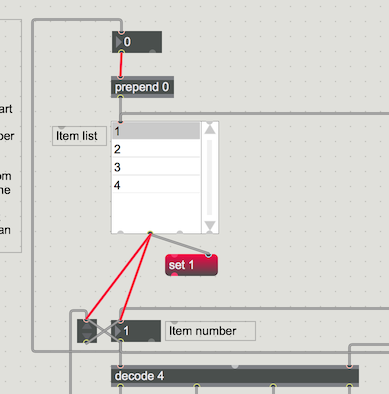
Thanks for all the suggestions.
I'd rename, move, create, and delete items. Since jit.cellblock is quite flexible, I thought it's a good choice.
When I move or delete an item, jit.cellblock must be aware which item is selected. This is why the colour label is not a good option in this case.
The second outlet is great, but there is still no information on whether it was set manually or via an automated process. Probably I can use both outlets. I'll route the first outlet to [zl reg]'s right inlet, and whenever manual interaction occurs, I can send a bang to [zl reg] to pass it through. I'll look into it.
I never used [chooser]. It might be an option as well.
I allways had troubles with jit.cellblock when switching between
inline edit and other modes.
but if you set cells using messages and keep select mode same then all is ok.