
SOLVED: jit.gl.asyncread not working in Max 9.1.4

since upgrading to Max 9.1.4 jit.gl.asyncread seems to be no longer working as expected. Even its help patcher does not work because jit.world cannot 'drawto' the named it.gl.asyncread, thus the latter does not output anything.
Can anyone put their finger on this?
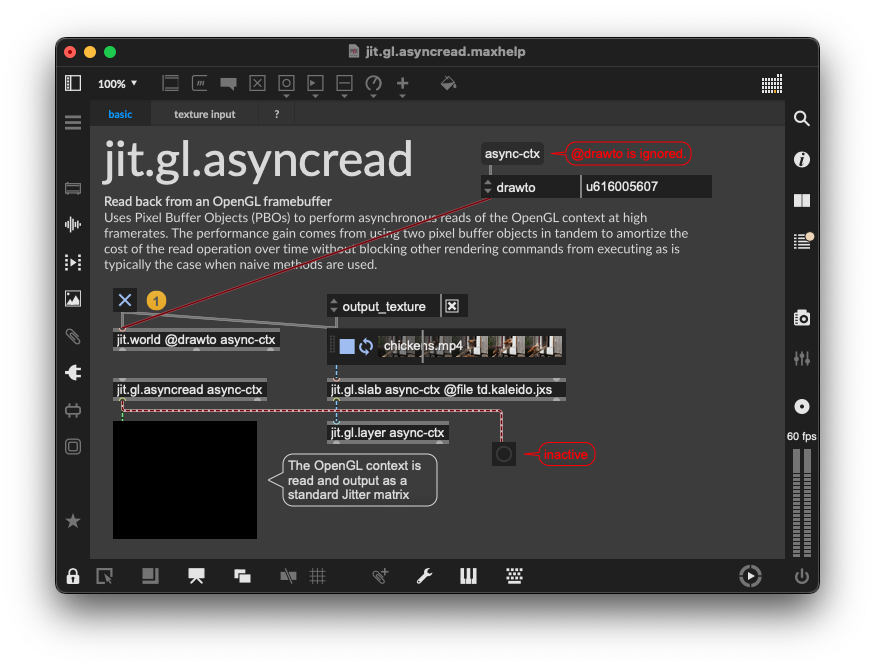

This is due to the new Global Context feature that you can disable from your Max preferences.
Alternatively, you can use @output_texture which will work with both global context enabled or disabled:
fantastic, thanks! It mattered in both congested JS-code and rendered standalones so disabling the global context in their .maxpref's has solved the issue.

this is good to know - ive got windows and a few weeks ago was trying to recreate the "Blob Tracking in Max/MSP (jit.gl.pix Tutorial)" patch on Wellenfront's youtube channel and i found that it was the [jit.gl.asyncread] object (with no args) that stymied success - so i thought maybe the [jit.gl.asyncread] was a problem for windows without a graphics card - and because the left outlet of [jit.gl.asyncread] says "readback matrix output" i tried [jit.matrix] object as a substitute and it worked - got the patch busy framing and tracking blobs/birds in flight like it should - i'm guessing [jit.matrix] works in this case because it was able to manage the data workload of this patch?

Apologies for the breakage here, and big thanks to TFL for posting the solution. Yes with the Global Context feature introduced in 9.1 it is no longer possible to change the name of the jit.world drawto (or to bind any jit.gl. objects to that context). This does in fact break the help file of jit.gl.asyncread. I will get the help file fixed up to reflect the new behaviors, and have the jit.world post an error when attempts are made to change the drawto attribute.
If you want to readback the contents of a jit.world, you can simply enable output_texture and send the texture to a jit.gl.asyncread, or even simpler if you only need the matrix and not the texture, enable output_matrix.
Below is the the new help file, in case that's useful: