
jit.movie in M4L device patch plays back movie file faster than properties indicate

I created and rendered an mp4 movie file using kdenlive where the "slideshow" ends at 02:27:28:21 and an end title displays until 02:27:54:01 giving the movie 266,222 frames at 30 fps and 8874 seconds of run time. The length of the "slideshow" was determined by the length of a set of mp3 audio files that are supposed to eventually be the soundtrack of the final movie.
When jit.movie reads the file, the correct fps 30, framecount 266222, and time_secs 8873.6416 property values are reported, but when jit.movie is running in a M4L device I also created (related question) doing audio reactive video effects to the "raw" slideshow, the movie consistently finishes (and loops or not) before the mp3 audio files finish (and loop or not), video ending nearly a minute early taking the end title time into account.
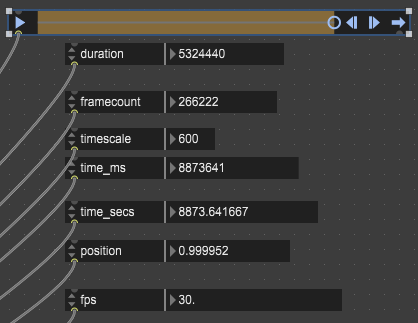
This same "fast clock" run time behavior of jit.movie occurs whether Live is running under External MTC timecode sync or its own clock. And strangely, the "time ruler" display setting at the bottom of Live's Arrangement view might make a difference in how "fast" the movie plays back? After "discovering" that time ruler and switching it to 30 fps matching the movie to verify Live thinks the unwarped mp3 audio files run (approximately) 02:27:28:xx, I think I started seeing the "better" (less fast) end time for jit.movie playing the mp4 file reported here.
I'm using OBS to record the "FX pass" video received from the M4L device patch over Spout, and the recording process might also be impacting the playback? But I would expect any "unexpected impact" like that to slow down performance, not improve it.
I don't need the audio and video to stay in sync and loop for days at a time, one pass within say 10 frames would be fine. What can I do? Anything?

without seeing the patch I can simply suggest you sync playback of the jit.movie to the playback of the mp3. you can do this easily by getting the target timecode from the mp3, say once a second, and if the current time of the movie player is beyond some threshold, adjust the rate value accordingly until it's back in the threshold. this is a simple logic gate to setup and should work flawlessly.
Hi Rob,
Thanks for helps. Most of the patch is in the related question material. For an FX recording run, Live's Transport triggers the jit.movie playback in the M4L device patch via a plugsync~ object and the only audio the patch gets is a channel from the plugin~ object for sampling the average amplitude per frame (to pass the average value to the shader each frame).
Are you saying I need to move the "mp3 playlist" from the Live Track into the M4L device patch so Max can manage playback of both the audio and the video? Could I instead use a clocker object and compare movie time against clocker time then adjust the movie playback rate if when movie time gets beyond a threshold away from clocker time? Something like this (except the compressed patch doesn't account for the short chickens movie looping so often (yet))
Or will "clocker time" inevitably drift away from the mp3 "playback time" just like "movie time" does already?