
Keyboard Shortcuts Tab (Feature Request)

Hi,
I think it would be pretty useful to have a Keyboard Shortcuts Tab in the Max Preferences that lets you see and assign custom keyboard shortcuts for all the actions and operations in Max.
It's a feature that I often find in many programs, so I was pretty surprised that this wasn't already present in Max.
Is there a reason for this or have I missed something? Thanks.

Check out max-keycommands.txt that you can find under Max.app > (Show content) > Resources/C74/init/ or on Windows in a similar path under Program Files/Cycling 74 (I think but am not sure).
For more examples you can search for `definecommand` and `definecommandinstructions` in the forum.
If you don't want your custom shortcuts to be overwritten when you update Max, I'm pretty sure you can declare those definecommand and definecommandinstructions inside a txt file that you put in the init folder of a Package.

imho you can edit yours. i.e. keyskeys in simple mix of P. Nyboer , in Jitter examples
you can too see menubar
hth

anyone found an easy way how to turn key commands completely off and on again programmatically?
if need be by overwriting the defaults and restoring them?

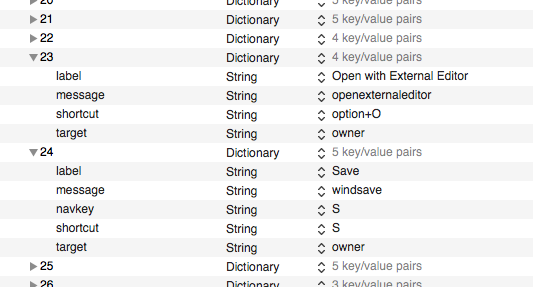
key shortcuts are written into maxinterface.json file.
maybe some are burned into binary file itself, I don't remember.
here a short peek in commands section
sure but how safe or clever would it be to change that file at runtime?
i mostly need to remove and restore everything which does something inside patcher windows.
i want to avoid node.js, but i think i could use [dict] to make a copy of the current file content, then overwrite the original, later allow the user to restore. or what about [text]?
p.s. no in text you can not edit it without breaking the code. i will be using only ready-made versions of the json file and store them in different text objects.
"i mostly need to remove and restore everything which does something inside patcher windows."
Do you mean while a patcher is in edit mode ?
but that are not only shortcuts like command A , but also delete key for example.
What I hate is so called key commands - auto inserting objects
if one typed something like s - inserts a slider
......
on Mac you can assign key shortcuts in keyboard preferences for any app.
if you modify word shortcut to shortX in maxinterface.json
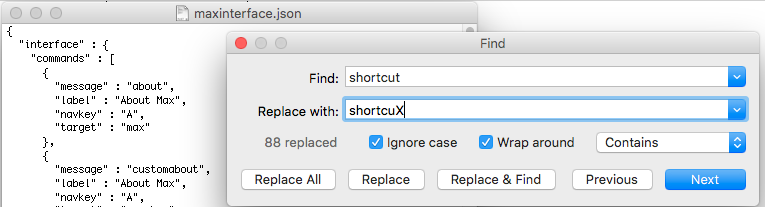
Max will have no shortcuts at all.
but that would work only after max restarted and read modified maxinterface.json file.
other strategies would be custom keyboard layouts, key remappers etc
which would act when max patch is in edit mode and revert when locked.
depends a bit how important that is to spend enough time on it.
yes exactly, while in edit mode.
and as you say, it is those with no modifier keys which create random object boxes nobody has asked for. :)
already in edit i need to use the custom key commands of my patch and would love to have a button to globally disable all patcher related commands from the max runtime, then turn them back on.
using [text] to read, store and write complete copies of the json file seems to work well, the only thing which sucks a bit is that the default json (as master backup solution if something goes wrong) is different between mac and windows and between max 7, 8 and 9.
i know that dict or js would make it a bit easier (to edit only parts of a json), but i´d like to avoid those.
switching on edit mode change will not work with modified json file.
you need something more complex,
after detecting patch locked state you recall custom keytable.
for example karabiner elements on Mac and some alternatives.
But would maybe max menubar object do what you want ?
depends on what exactly
"custom key commands of my patch"
are
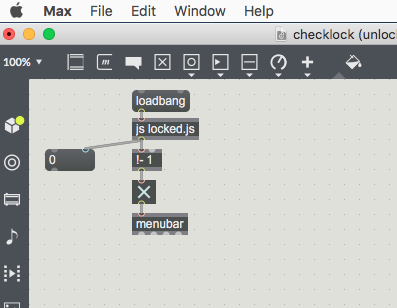
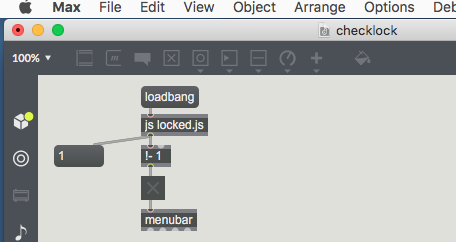
the background is about that:
the main issue with "b" creating a bang object in the patcher is that "b" is a single key.
it would totally trouble-free if the runtime would only be using key combination using modifier keys for such things.
but when single keys are also used, you have basically nothing left to use for your custom keyboard commands without permanent conflicts.
so the easiest way to combine these two worlds would be to turn off the built-in default keyboard commands using single keys.
this works fine using the prefs panel.
but nowadays these prefs panels are no longer max patches. as a result, you can not add custom keyboard sets, as you could do this for colors, search paths or DSP settings in max 4.x, where you just modify the prefs panes and add whatever you like)
so you had to remove 15 entries manually in order to use your custom patch, then eventually later bring back the default ones (or the users own settings).
editing the json using something else should be straight forward, but obviously it is not easy as i thought.
Default unlocked patcher single key commands, like a b c etc
are not visible in maxinterfaces file.
also nothing to disable them in Max preferences.
oh no, what a mess. all my expensive work time for nothing, because i am too lazy to test with the right commands.
but the good news is that they are in max-keycommands.txt, which isnt a json.
so parts of my considerations still apply (use text object to make backups and create new "preset" on one click)
and it is not a json. :)
3 minutes later i noticed that there are even messages to max, which do not require a restart like the init text file would and do the change non-permament.
you can basically edit all the stuff in such textfiles using messages to max at runtime, it is just nowhere documented. not sure yet how safe it is to use that.
in max 8.0
;
max definecommand b " ";
or
;
max definecommand b foo;
work - in later versions they do not.
edit:
aha.
;
max definecommand b patcher " ";
seems to work in max 8.6.x
if it works in 9, too, that´s the ultimate way.
it is getting clearer to me now why it is not documented. :)
I don't see why would it be unsafe to kill all that single key commands.
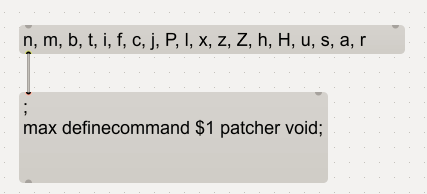
n, m, b, t, i, f, c, j, P, l, x, z, Z, h, H, u, s, a, r
; max definecommand $1 patcher void;