
Multi-Tap Gesture Detection for Screen Zones

How can I make it so that pressing two fast knocks (taps) on a specific area of the screen (let's say the bottom-left corner) outputs one state, while pressing three fast knocks outputs a different state?
For example, I know that the bottom-left area of my screen is around y=75 and x=10. I want to detect fast presses, and I don't want every press in that corner to trigger it.
the problem with my try is that it will always trigger preset 1 even when I tap 3 fast time (it needed to trigger only preset 2)

Store the [counter] input as a variable, and output it only when the [del] bangs. By patching exactly this I realized it would be the same as using [thresh] instead of [del] + [counter]:
Thanks this is great! is there an option to detect something more complicated such as two short taps then long hold of 2 sec? something like * * _____
You could something like this:
But it's not a very good UX choice I would say. It adds up latency (you need to wait after a click is released to know if the user wants to make more clicks or not in order to know which event they want to trigger), and I don't think I ever saw any app relying on such click sequences for anything? One long, one short, two shorts, yes, but combination of both or more than two clicks, no.

It depends of what you need it for, I used such gimmicks a lot to use one pedal switch for many functions.
As TFL stated, you need to set thresholds for detection, like double tap must happen within 200 ms, long press and realease afer 500ms and so on.
You can use for example double tap with long release, or tripple tap with very long release.
In that cases press and release start different timers, or clocker etc
P.S. you must also include rules to only accept touches within zone,
and only when their state changes, like if one touches wrong zone, slides to set one
and then slides out again, what should that trigger ?
Thanks for the above suggestion and patches. Very clear and nice.
and only when their state changes, like if one touches wrong zone, slides to set one
and then slides out again, what should that trigger ?
in that case it should not trigger at all
to compare list I should use zl.compare or any other object?
to start with , you need to simplify capture and add disqualifier for out of range mouse position.
something like this :
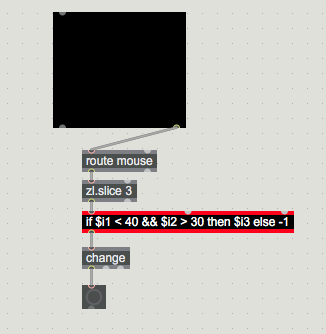
gives -1 whenever mouse gets out of the zone.
then you need to add logic to measure touches and start timer
only if state STARTS with a touch
in correct zone and ENDS with release in correct zone.
[zl.compare] yes, or use [tosymbol] with a [route "1" "1 1" "1 1 2"], or store your various actions in a coll like so:
"1", single_click;
"1 1", double_click;
"1 1 2", two_shorts_one_long;Is this the right combination of the above suggestions?
Edit: not really... it still outputting the tapping even if first tap was outside the range but the second was in the range.
no, not really, as first you don't track -1 == out of range mouse at all.
if $i1 < 40 && $i2 > 30 then $i3 else -1
You must monitor order of incoming numbers, for press and release you need 1 & 0
in any of that combinations -1 should cancel output.
like if you click 1, move mouse out and release you should have 1 & -1
So have fun with getting that to work,
Be aware that without change object you can not track states correctly.
How many presets do you need to target ?
One could maybe simplify everything depending on that factor.
And also do users see any kind of info on the screen when they touch ?
Depends on the behavior you want.
I would say that a click outside the range cancels the sequence (stop [del] and zlclear [zl.group]).
If the first click is out of range it shouldn't be recorded, but following clicks should be if they are in range. To make this more user friendly you might need some visual feedback to instantly know if a click was registered or not. This way if you click out of range, you know that you have to start over.
Something like that:
Another option is something that shows you the ongoing sequence:
@TFL thanks for the suggested patches.
How many presets do you need to target ?
3 presets, maybe 4, no more
And also do users see any kind of info on the screen when they touch ?
No, perhaps in the future.
I think all the above patches example are great
in any of that combinations -1 should cancel output.
This sound as very good logic..! of course
I'd say depends how strict you want to be.
for very strict detection, you would detect click in wrong area and disable detection till next mouse release.
for only 3 presets, click, doubleclick, and hold with threshold and release would be
simplest and fastest way.