
non-real time recording an audio patch ?

I've got a patch that loops, records, and degrades audio material over several hours.
Instead of letting it play and record the output, I figured this could be what "non-real time" audio driver is made for.
I can't figuer out how to use it. There is supposed to be an example here, but it's missing. Any help ?

it really depends on the stuff used in the patch.
it works perfectly to capture into buffer
and then write it to disk.
but several hours directly to disk - I haven't done that yet,
and would not try to do so.
it is otherwise simple procedure,
you set driver to non-real-time, start processing and recording
till something ends the procedure.
I would suggest you test what works and what not
while running in non-real time and in small portions,
and if possible use non system disk drive,
otherwise you could ruin your system drive.
here a little example using buffer
plays using "normal" driver, bounces non-real time
Thanks, but no matter how I try I get a silenced file recorded....
Edit, got it working. Does it make sense that if I record several files that don't have the same sampling rates, they get recorded at different speeds ?
Also, in my scenario, I notice a few structural differences :
files are read with [groove~]
there is no end of the process, so this should be specifically added to the patch
time of recording is not fixed, as it involves a lot of randomization in the timing of events
Edit again : it's working just fine ! (except maybe for the issue regarding mixed sample rates)
In max, audio file sample rate is ignored when importing into buffer or sfplay
all other questions only you can answer after testing.
As I allready siggedsted, test what works
and what not without recording to disk
untill you have it sorted
did you read docs about non-real time driver ?
it says non-real,
means your delay times are performing outside of dsp chain.
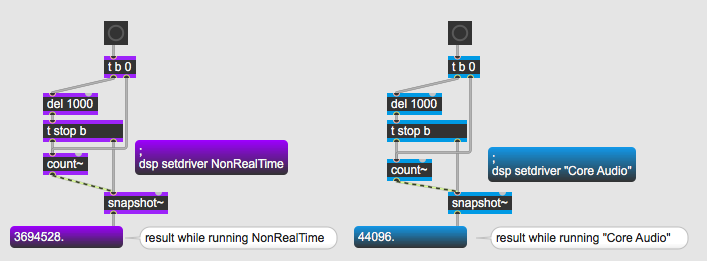
you can only use signal objects to perform timing tasks
related to audio processing.
Ok, I see, thanks !
I'll make some tests to see if the ratio of NonRealTime/CoreAudio is fixed, so I can somehow "translate" the whole patch to run in non-real time.
I would not count on that.
you must use signal based delays, triggers etc

"means your delay times are performing outside of dsp chain."
they are still in it (or actually "under it", max is not pd :) ) - and that is why the times in milliseconds are different.
the scheduler works fine in NRT and does what it should, but you must turn off interrupt to make sure the scheduler thread has a time progress other than 0.
and when you use the NRT to save render time (as opposed to using 5000% CPU) you must be careful not to write files too fast. many many tracks or video can get dangerous even on a modern macbook when the CPU use is at 10%.