
Problem automating shell commands

Hi!
I'm trying to create an automated file-name changer with the shell object. It works with individual files but not with multiple files at the same time. Is there any reason why?
The process is very simple: A [dropfile] gives the path for a file, a bunch of regexp to prepend a number (with a [counter]) for the file. I made some text files TEST1.txt, TEST2.txt and TEST3.txt to try it in order and they should return 0-TEST1.txt, 1-TEST2.txt and so on...
That works completely fine when I'm trying individual files, but if I use [dropfile] to [folder] and [absolutepath] the content, for some reason doesn't work. It only changes the first file. In the above example, it would return 0-TEST1.txt but the other files remain the same. I printed the messages going to [shell] and they are all correct, I don't understand why it won't change the files
Any ideas? Is there a limitation in iterating messages to [shell]?
I'm attaching the patch I used for my texts. Excuse me if the renaming process isn't very clean, but it should work

I guess you made the process completey wrong.
1- no file type specified
2- you can not tell shell to do something before it did what you told it to do before.
in simpler words you have to wait for done bang to continue itering through list of files to rename.
P.S.
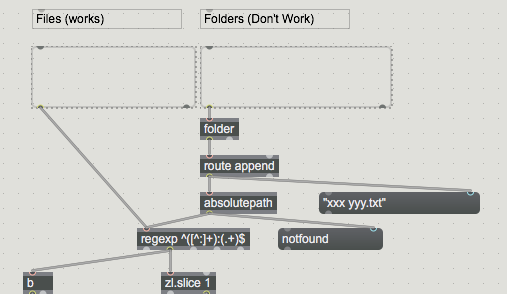
folder spits only file names.
absolute path can't work like that, only if folder is in search path.
then you don't check if files allready have numbers prepended ?