
Recording data from two adxl345 sensors

Hi,
I'm working on a tree vibration installation and receiving live data from two ADXL345 accelerometers via the serial object in Max/MSP.
The data comes in as six float values per reading:
x1, y1, z1 (sensor 1)
x2, y2, z2 (sensor 2)
I'd like to record this data and play it back later for prototyping the sonification without needing the physical sensors connected.
Two options I'm considering:
1. Record and playback directly inside Max
2. Save to CSV and read it back in Max later
What would be the recommended approach for this kind of multi-channel float data? Any patches or objects you'd suggest?

You could do all in Max:
Receive data from serial in Max
Parse data to extract your 6 floats
Either:
timestamp each set of x1 y1 z1 x2 y2 z2 value with a delta time between current and previous event ([timer] is perfect for that), and record that data into [coll] or [text] that you can then write to disk. You'll then need to develop your own reader based on a [delay] and a [counter] requesting a new line after waiting for the delta time recorded in the current line
use [mtr] to automatically timestamp and record incoming data, write it to disk and provide a way to replay it
if you want to go extra fancy, use [mubu.record] from the MUBU package, which can be quite difficult to set up if that's the first time you use this package, but then allows you to easily store, replay at various speeds, display, edit, analysis, that data.
How is possible to record it into file?
See the "Storage" tab of [mtr] help file.
I create the folder in advance, it was suppose to be something simple, just to save some data on my local computer. I of course make it over complicated...
Thanks for the above suggestion.

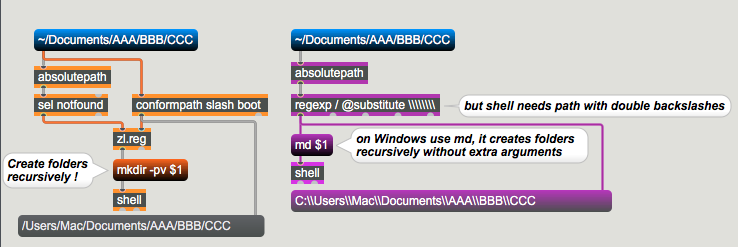
just in case you need to create folders, including subfolders.
regexp has 8 backslashes, needed to produce 2 backslashes out of 1 slash.
regexp / @substitute \\\\\\\\
Hi,
I'm receiving live XYZ data from an ADXL345 accelerometer via serial into Max/MSP. The values are normalized between 0 and 1.
I'm looking for suggestions on how to visualize this data in real time — something that reflects the movement and vibration of the sensor
Any recommendation regarding the visualisation of the data?
another question - Is there a way to "translate" this ADXL345 data of x y z into frequency?
ESP32S3 code:
#include <Wire.h>
#include <Adafruit_Sensor.h>
#include <Adafruit_ADXL345_U.h>
#include <WiFi.h>
#include <esp_now.h>

Adafruit_ADXL345_Unified accel1 = Adafruit_ADXL345_Unified(1);

const float THRESHOLD           = 0.01;
const float RANGE               = 2.0;
const float ALPHA               = 0.2;
const int   CALIBRATION_SAMPLES = 100;

uint8_t receiverMAC[] = {0x68, 0xEE, 0x8F, 0x46, 0x4E, 0x34};

typedef struct {
  float x;
  float y;
  float z;
} SensorData;

SensorData dataToSend;
bool sensor1ok = false;

struct SensorState {
  float centerX = 0, centerY = 0, centerZ = 9.8;
  float prevX   = 0.5, prevY = 0.5, prevZ = 0.5;
  float filtX   = 0.5, filtY = 0.5, filtZ = 0.5;
};

SensorState s1;

void onSent(const wifi_tx_info_t *info, esp_now_send_status_t status) {}

void setup() {
  Serial.begin(115200);
  pinMode(LED_BUILTIN, OUTPUT);
  delay(1000);

  // Init ESP-NOW
  WiFi.mode(WIFI_STA);
  if (esp_now_init() != ESP_OK) { Serial.println("ESP-NOW init failed"); while(1); }
  esp_now_register_send_cb(onSent);

  // Add receiver peer
  esp_now_peer_info_t peerInfo = {};
  memcpy(peerInfo.peer_addr, receiverMAC, 6);
  peerInfo.channel = 0;
  peerInfo.encrypt = false;
  if (esp_now_add_peer(&peerInfo) != ESP_OK) { Serial.println("Failed to add peer"); while(1); }

  Wire.begin();
  scanI2C();
  initSensors();
  calibrate();
  blinkLED(3, 200);
  Serial.end();
}

void loop() {
  heartbeat();
  if (sensor1ok) readAndSend(accel1, s1);
  delay(20);
}

float normalize(float value, float center) {
  float n = 0.5 + (value - center) / (2.0 * RANGE);
  if (n < 0.0) n = 0.0;
  if (n > 1.0) n = 1.0;
  return n;
}

void readAndSend(Adafruit_ADXL345_Unified &accel, SensorState &s) {
  sensors_event_t event;
  accel.getEvent(&event);

  float nx = normalize(event.acceleration.x, s.centerX);
  float ny = normalize(event.acceleration.y, s.centerY);
  float nz = normalize(event.acceleration.z, s.centerZ);

  // Low pass filter
  s.filtX = ALPHA * nx + (1 - ALPHA) * s.filtX;
  s.filtY = ALPHA * ny + (1 - ALPHA) * s.filtY;
  s.filtZ = ALPHA * nz + (1 - ALPHA) * s.filtZ;

  bool changed = false;
  if (abs(s.filtX - s.prevX) > THRESHOLD) { s.prevX = s.filtX; changed = true; }
  if (abs(s.filtY - s.prevY) > THRESHOLD) { s.prevY = s.filtY; changed = true; }
  if (abs(s.filtZ - s.prevZ) > THRESHOLD) { s.prevZ = s.filtZ; changed = true; }

  if (changed) {
    // Send via ESP-NOW
    dataToSend.x = s.filtX;
    dataToSend.y = s.filtY;
    dataToSend.z = s.filtZ;
    esp_now_send(receiverMAC, (uint8_t *)&dataToSend, sizeof(dataToSend));

    // Debug print
    Serial.print("X1 "); Serial.print(s.filtX, 3);
    Serial.print(",Y1 "); Serial.print(s.filtY, 3);
    Serial.print(",Z1 "); Serial.println(s.filtZ, 3);
  }
}

void calibrate() {
  Serial.println(F("Calibrating..."));
  float sx = 0, sy = 0, sz = 0;

  for (int i = 0; i < CALIBRATION_SAMPLES; i++) {
    sensors_event_t event;
    if (sensor1ok) {
      accel1.getEvent(&event);
      sx += event.acceleration.x;
      sy += event.acceleration.y;
      sz += event.acceleration.z;
    }
    delay(20);
  }

  if (sensor1ok) {
    s1.centerX = sx / CALIBRATION_SAMPLES;
    s1.centerY = sy / CALIBRATION_SAMPLES;
    s1.centerZ = sz / CALIBRATION_SAMPLES;
    Serial.print(F("Center X:")); Serial.print(s1.centerX, 2);
    Serial.print(F(" Y:")); Serial.print(s1.centerY, 2);
    Serial.print(F(" Z:")); Serial.println(s1.centerZ, 2);
  }

  Serial.println(F("Ready."));
}

void blinkLED(int times, int ms) {
  for (int i = 0; i < times; i++) {
    digitalWrite(LED_BUILTIN, HIGH); delay(ms);
    digitalWrite(LED_BUILTIN, LOW);  delay(ms);
  }
}

void heartbeat() {
  static unsigned long last = 0;
  unsigned long now = millis();
  if (now - last >= 500) {
    digitalWrite(LED_BUILTIN, !digitalRead(LED_BUILTIN));
    last = now;
  }
}

void scanI2C() {
  Serial.println(F("Scanning I2C..."));
  int found = 0;
  for (byte addr = 1; addr < 127; addr++) {
    Wire.beginTransmission(addr);
    if (Wire.endTransmission() == 0) {
      Serial.print(F("  Found: 0x"));
      Serial.println(addr, HEX);
      found++;
    }
  }
  if (found == 0) Serial.println(F("  No I2C devices found"));
  Serial.println(F("---"));
}

void initSensors() {
  sensor1ok = accel1.begin(0x53);
  if (sensor1ok) {
    accel1.setRange(ADXL345_RANGE_2_G);
    Serial.println(F("Sensor 1 OK"));
  } else {
    Serial.println(F("WARNING: Sensor 1 not found"));
  }
}For visualization, try [multislider] with size set to a high value and setstyle to 2 (point scroll) or 4 (reverse point scroll).
Another solution could be [zl.stream] >[jit.fill] > [jit.matrix] > [jit.pwindow].
You could go fancier with jit.gl objects or jsui/v8ui/jspainterfile, but I would need further detail about the kind of visualization you are after.
My max9 still crashing when I read the coll file
Try to put a [defer] or [deferlow] just before your read message reaches [coll]. There is a chance it comes from the scheduler thread, which sometime can cause crashes with read/write operation since those are asynchronous. You can also use [threadcheck] to know in which thread your read message lives in.
Try to put a [defer] or [deferlow] just before your
readmessage reaches [coll]. There is a chance it comes from the scheduler thread, which sometime can cause crashes with read/write operation since those are asynchronous
Both did not solved it
how can I reset all values to 0?
Go through the messages accepted by the object, there are a couple ways to reset it in scrolling mode.
how can I change the direction of the data flow in the multislider so new value will be on the right hand side?
I gave you the answer in my suggestion already. There are two scrolling mode. The second one is reversed.
Is there a way to take those 3 value x y z and make it into 3d visuality?
You could superimpose three multisliders with transparent backgrounds, if that's what you mean. If you want an actual 3D view of the points history in space you'll need something more fancy.
the output of split go inside coll?
where this gray line to the right of coll go to/come from?
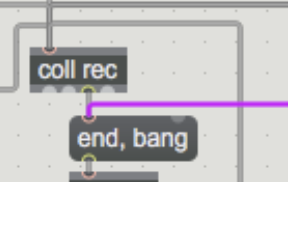
The time present when the record stop is not the actual time
Another small question - Assuming a recording of x time long - is there a way to report at what segments in that recording there was more then 5 seconds of no change in data?
so if between 6000 to 65700 that data stay the same it will be reported, as well if it happens between 7800 to 17800.
but if there was same data between 0 to 4998 it won't report that
I try message min - did not work. I try set 0 but it zero only the last value. I try with uzi and it will reset only the last value. Not sure what am I missing
My bad, there is one easy way, not two. But still listed in the available methods:
no need for any timer, you know you start recording at time zero, on record stop grab that number and send it where you want.
here dual reporter
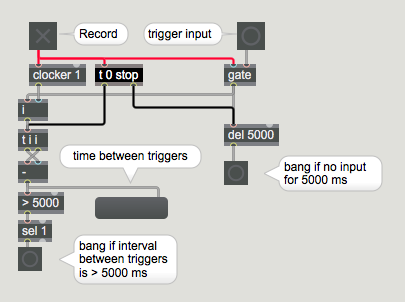
you get bang as soon as no data for 5 sec, or measure time between data.
to dump coll simply connect it to t i i and it will give you every interval.
you grab > 5000 ones
Thank you.
I'm sorry of not getting it so fast. I'm not sure I understand how to connect it with the previous system?
to dump coll simply connect it to t i i and it will give you every interval.
You mean to connect the output of coll to t i i ?
I translate those pair of ms into mm:ss I have two question regarding it:
How to add hh as well?
How to display the results in something like jit.cellblock?
Thanks!
mean is do you need to only display it or to display and write as file
Basically only to display
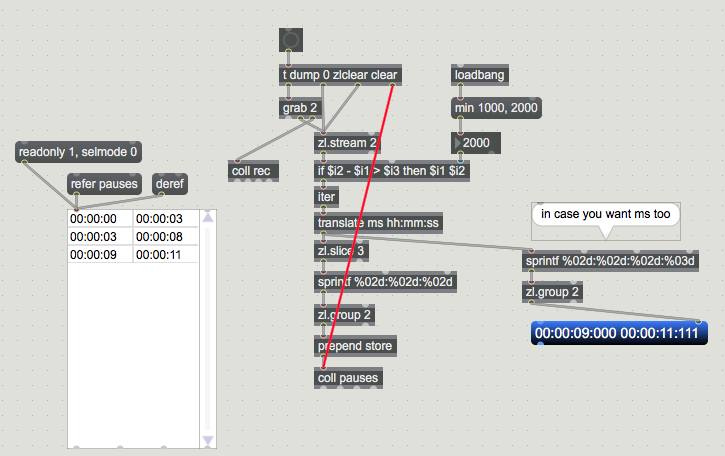
ok one thing I noticed that I dont know if it possible to solved easily with the current system:
if there was no movement for longer then 2 sec before I pressed stop to the recording it will not present it. so if my clocker run for 10 sec and there was no new data between 2000 to 10000 the system will not show it . Is it possible to fix in the current system?
sure it is possible, you can for example insert recording end time when recording stops.
so the last line in coll rec would allways be for example Record-End
to get this correct you need to delay record = 0 bang a bit so that last line gets inserted first.
as last input to zl.change now is Record-End, one does not need to reset it using zlclear any more.
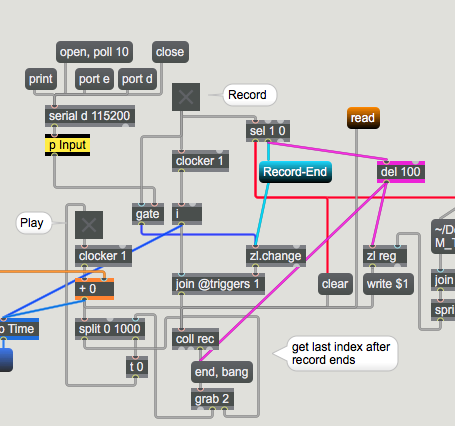
Ok - there is one thing left to do : to auto stop playback on last inserted Input, not at record end.
replace end, bang with end, bang, prev
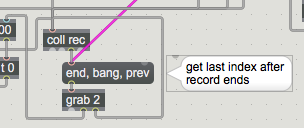
Great! how can I dump the last index of coll when pressing the playback button? (the one that save the time when record stops (which is the total record time)
or to put in in another words - how can I display the total record time of the current playback?
when I use the message "length" into coll it will output the number of entries I have inside coll. I try to figure out how the extract the first element of the last entry of coll. The problem I have is that as much as I know i can access only the data at x index of coll and not at a specific entry
I found a solution:
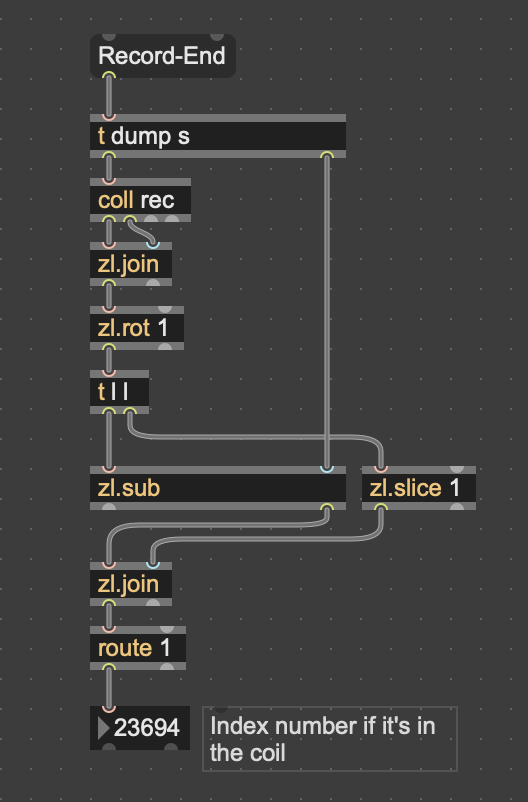
end, bang ? outputs LAST coll index
end, bang, prev ? outputs SECOND LAST coll index
which gives you last entry captured by Input trigger.
And that should be used to stop playback.
in fact end, bang, prev outputs both last and second last entry, but that is irrelevant in that patch
thanks for taking your time to explain in details. It might be confusion with my English. I just wanted to know the total time of the recording that is found at the last line of coll where "Record-End" is
no problem, but I suggest you don't play till Record-End, but stop at last captured data index.
you can still have both values displayed using end, bang, prev
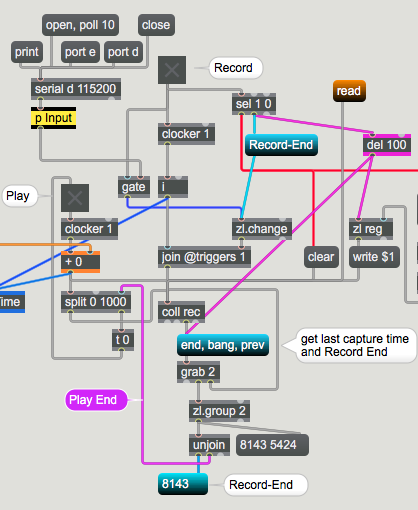
Thanks for that!
Is this the right way to autocreate folder inside the data folder with the date and save all files from that date to that folder?
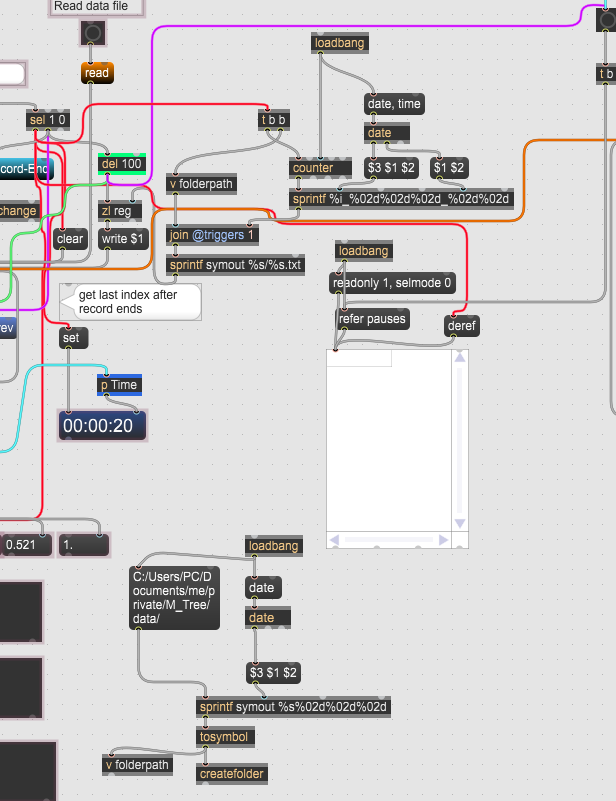
Seems to work for me
I am not sure about jasch createfolder, does it exist on Windows ?
Yes it is
in any case, you have 2 date objects in that screenshot, and I don't understand what you want them to do.
True I can use only 1.
It will give the folder name the data, for example 20260721
and inside that folder the files will be:
0_20260721
1_20260721
2_20260721
etc
the allready known one creates date-time based session folder, that is clear, but what with this date only one ?
I'm not sure I understand the question
Do I see it right, you want ONE Folder for a Date, and then add recording files without time stamp ? not realy safe, because you reset file counter - and then it rewrites files.
This is true, timestamp is needed in order to not overwrite it.
This works for me well:
naming file using record number, date and time is not safe
because you use common date and time stamp in file name.
resetting counter would rewrite files

then the chance that you overwrite ist still 1:59, plus the alphabetical order is scrambled.
what about using subfolders per day or per project?

I've posted this before
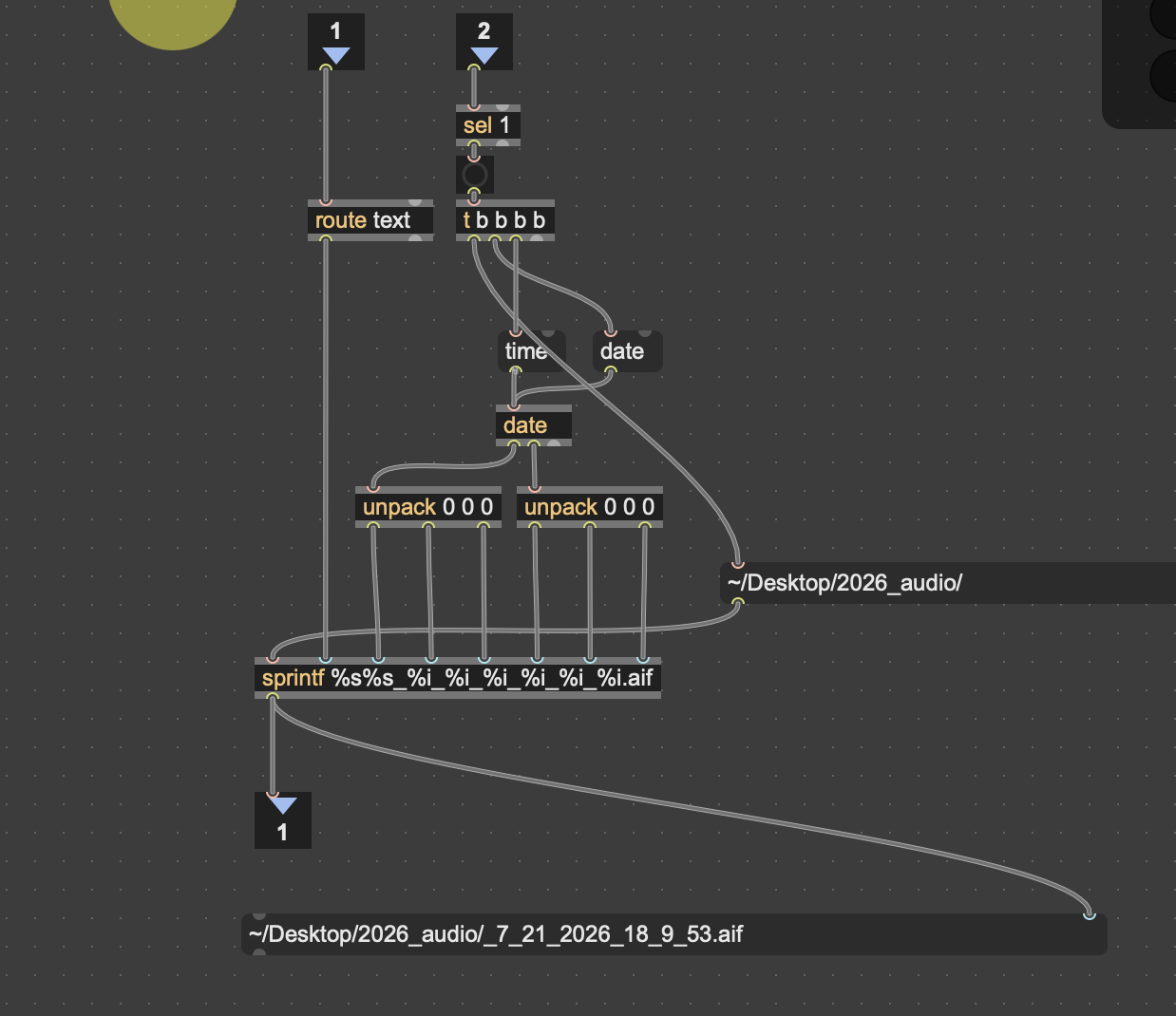
put the file in any location // add file name if you want to
never a chance to overwrite a file
entire task is automatic - just click [record] - file is audomaically created
Im recording audio here- but this patch is just for file naming
Should be able to use to name your data files
then the chance that you overwrite ist still 1:59, plus the alphabetical order is scrambled.
what about using subfolders per day or per project?
If I'm putting also seconds in the file name there is no really a chance I will record to files at the same exact time isn't it?
WILL thanks for this suggestion!
in your case 1 second would mean failed recording, so overwrite would be wanted.
I would even make a timer to disqualify recordings shorter then what makes sense.
Using that long RecCount_Date_Time file names are needed only if you need to
look at them out of folder structure.Otherwise one Folder per SESSION using
date and time stamp would be enough, then name files using time stamp OR record counter.
You used something similar allready in audio recording project a while ago.
I still have that patch somewhere, with dialog "Enter session Name" and the rest of it,
if you need it just post
I have another two questions:
Regarding the system that tracks idle time (time since the last detected movement) — how does it is possible to add a noise threshold, so that any movement below a certain value (y = 0.02) within that window is still treated as no movement?
Regarding the data received from the ADXL345 accelerometer — I'll be attaching it to a tree branch / trunk , and I'd like to extract frequency data from the readings. Do you have any thoughts or suggestions on how to approach this?
*down the road it will be used to effect a sound system in max
or trace each individual float, and well if ANY of them passes the threshold then trigger.
This what I am looking for.
you other question about "tree branch / trunk" and measure frequency ???
sorry, but I don't really understand what you mean with that
Sorry for the confusion — I don't mean audio frequency. The ADXL345 is mounted on a tree trunk/branch, so it's picking up very slow mechanical oscillation: how the tree physically sways or vibrates over time (likely sub-1Hz to a few Hz, not audible on its own). I want to analyze that motion signal ( via FFT?) to extract its dominant oscillation frequency, and use that value as a control source in Max to modulate a sound — similar to how a seismometer extracts frequency from ground motion, just applied to a tree instead. And of course, any suggestions or ideas are very welcome
I have another question regarding the data presentation.
The system that shows when no change is happening within a specific time frame is working great!
I wanted to ask if the following is also possible: to show, for each of the 4 values, the time at which a transition occurs beyond a certain range?
For example, my fourth index value comes from a moisture sensor, where dry ground gives a low value (closer to 0) and wet ground gives a higher value (closer to 1). I'd like to be able to see, in the recorded data, when a transition between states happened — for example, the sensor stays for a long time on dry ground (values reading between 0.2-0.23), then the ground gets wet and the sensor jumps to 0.56-0.67. I want to be able to identify and look at those transitions specifically.
Is that possible? Is it complicated to set up? If so, how would you approach it?