
Recording data from two adxl345 sensors

if not complicated - the only thing I would like to add is the addition is the current state of the ESP at the beginning if the recording log. so once recording is starting it will write the state of the ESP rather OK or disconnected
I did it my self but I'm sure I manage to overcomplex it
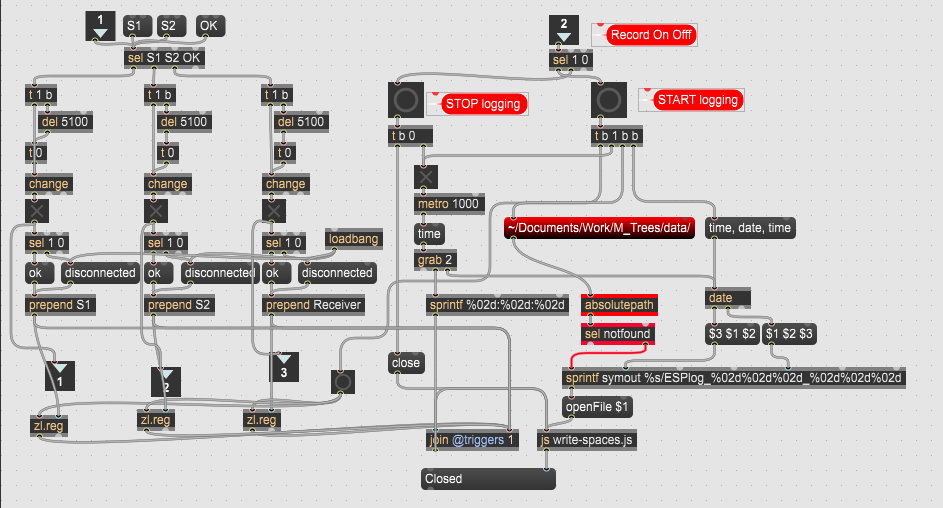

please wait with that, it is onky entry in the log, nothing to do with path.
do you want day month year europe kind time stamp ?
do you want day month year europe kind time stamp ?
Yes that is fine
please wait with that, it is onky entry in the log, nothing to do with path.
OK
I have it ready with the path, one needs to modify record button
to start after folder/path has been created.
you need to add js writers and connect them
I should connect join object of each sensor to coll as well or only to js files?
the output of regexp is empty:
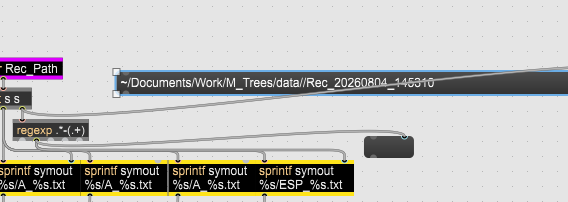
I forgot to change the name....
that fixed. file created but without data and time in the file name
it needed _ and not -
ok it write the file correct now.
I think the two unsolved things are
To integrate it to work with scheduled recording as well, not only manual
To write to the ESP logger
Sorry I posted too fast, there are couple of mistakes in there.
andare more things to consider , also when gates for sensors should open,
inserting of ESP status on recording start is tricky before one needs last seen
values befor record timer jumps in, dio you just need 3 states or also recording start time ?
inserting of ESP status on recording start is tricky before one needs last seen
ok in that case this can be avoided
values befor record timer jumps in, dio you just meed 3 states or also recording start time ?
ust 3 states is enough — I don't need the recording start time in there too, since it already appears in the filename itself. But if there are actual state changes (a sensor connecting/disconnecting), then yes, those specific events should have their own timestamp.
yes ok, I forgot that ESP log is also connected to recording elapsed time, not to real time.
here is new patch with js files too.
Thanks!! how complicate it is to insert this system of manual or schedule recording?
Logger file won't create. The other work perfect
you mean ESP file ? it gets ok here, do you have js file in same folder ?
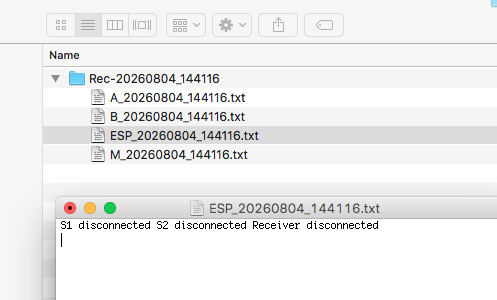
you mean ESP file ? it gets ok here, do you have js file in same folder ?
Yes. ESP file
it is not recorded into the folder or at all.
all js write "ready"
it is the only one that is not
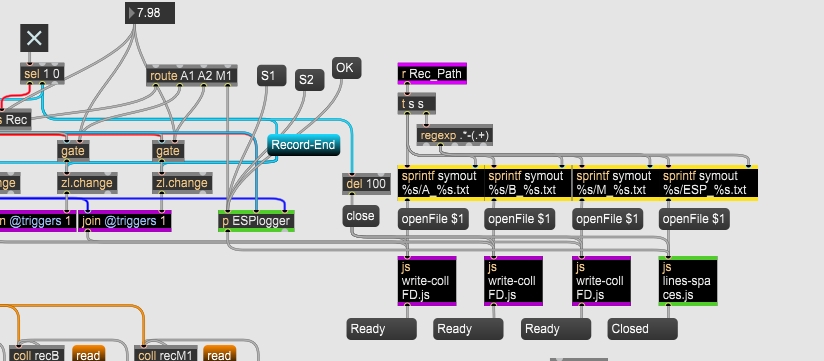

did you double click js object to check if code is inside
You are right. no code!
does it make sense no mm ss rather only 00 00
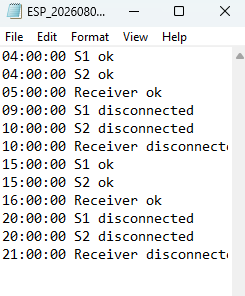
code I'm using:
outlets = 1; var f = null;
function openFile(filename) {if (f) f.close();
if (filename.slice(-4).toLowerCase() !== ".txt") {filename = (filename.indexOf(".") !== -1 ? filename.substring(0, filename.lastIndexOf(".")) : filename) + ".txt";}
f = new File(filename, "write");
if (f.isopen) {f.eof = 0; outlet(0, "Opened OK");} else {error("Failed to create file: " + filename + "\n");}}
function anything() {if (!f || !f.isopen) {outlet(0, "Error: No file opened!"); return;}
var cleanArgs = arrayfromargs(messagename, arguments);
if (cleanArgs === "list") cleanArgs.shift();
var line = cleanArgs.join(" ");
f.writestring(line); f.writebytes(13);}
function close() {if (f) {f.close(); f = null; outlet(0, "Closed");}}
function notifydeleted() {close();}
paste this inside lines-text.js
it uses same eady and Failed messages
outlets = 1; var f = null;
function openFile(filename) {if (f) f.close();
if (filename.slice(-4).toLowerCase() !== ".txt")
{filename = (filename.indexOf(".") !== -1 ? filename.substring(0, filename.lastIndexOf(".")) : filename) + ".txt";}
f = new File(filename, "write");
if (f.isopen) {f.eof = 0; outlet(0, "Ready");} else {outlet(0, "Failed");}}
function anything() {if (!f || !f.isopen) {outlet(0, "Error: No file opened!"); return;}
var cleanArgs = arrayfromargs(messagename, arguments);
if (cleanArgs === "list") cleanArgs.shift();
var line = cleanArgs.join(" ");
f.writestring(line); f.writebytes(13);}
function close() {if (f) {f.close(); f = null; outlet(0, "Closed");}}
function notifydeleted() {close();}
sorry that with mm ss is a mistake.
one should convert that
I still have 00 00 :
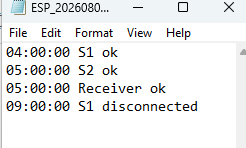
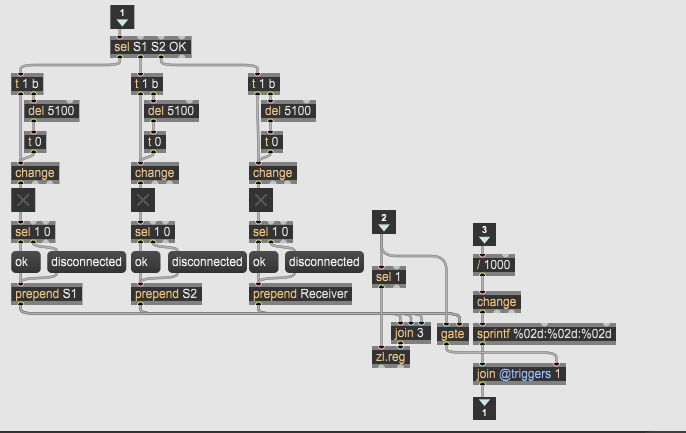
ESPlogger:
change counter to this, input is different than in old test file, here we get ms from clocker
and connect zl.reg it was missing
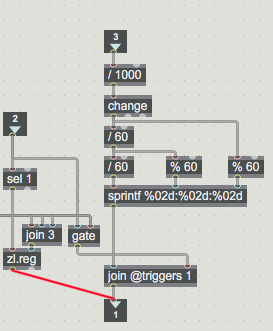
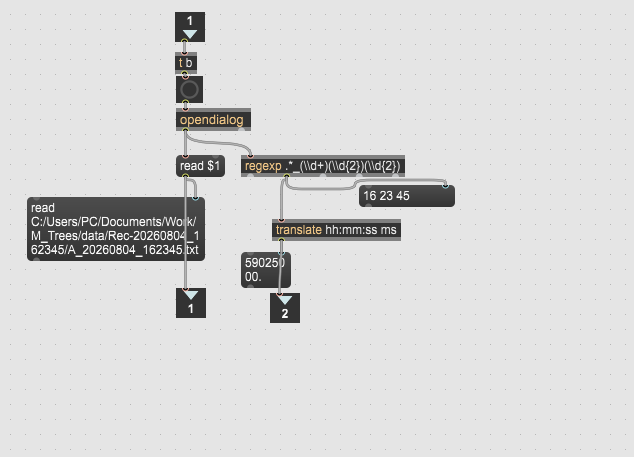
in order to read file into dump I'm using this system:
and connect zl.reg it was missing
Great!
edit: still something wrong:
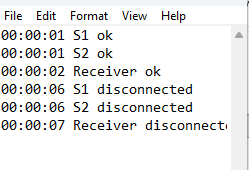
Is this system for dumping into active window is valid?
change counter to this, input is different than in old test file, here we get ms from clocker
ok I understand now. it is printing recording time and not timestamp
I am using this
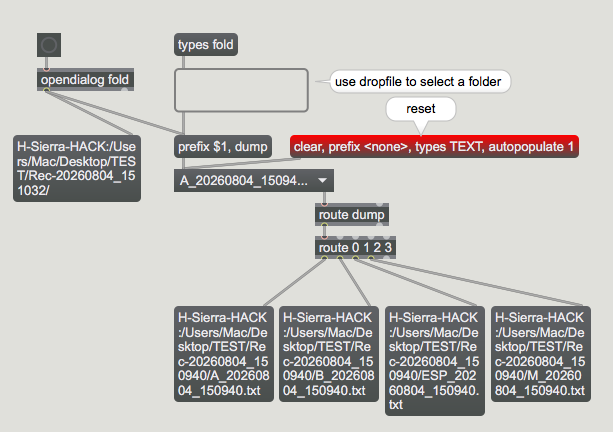
in case you want to read recording folder in one go ...
Amazing!
something change in my dumper system? for some reason it won't show any active windows although I do have
I also need to extract time from file to show actual time in active windows
here is the patch with time extract
Could you please help me integrate the dumping system as well the scheduled/manual recording system whenever you have time?
I'm having a hard time making it all work together with the new additions.
for some reason I'm not sure it is not working for me
it is printing recording time because you want ti be able to compare disconnected time with recording pauses
to dump into detectors, jut connect grab objects to their coll objects, and pass recording start time from file name
which variant did you choose at the end ?
I went with Variant 2 (buffered pauses) in the end.
Will you be able to integrate that as well?I bang my head around it without success for this time speaking
I will try my bets to do that, but you please don't ask for non important changes.
tell me which dump1 or dump2, is it ok to popem all files in the folder ?
Auto record is easier now as it finds all prepared from manual recording,
all one has to do ie^s to activate autor record and don't touch malual record till it is done.
you would want to read / write auto-record fies too, right ?
tell me which dump1 or dump2, is it ok to popem all files in the folder ?
Dump2. Yes it is ok
you would want to read / write auto-record fies too, right ?
True
I will try my bets to do that, but you please don't ask for non important changes
Ok sure