
Sound Design Toolkit v. 3 conflict

Does anyone else's SDT package exhibits peculiar behavior? Specifically, when I load objects from it and then try to save the patch, max console throws an error message: "unable to locate package 'sdt', could not add to standalone". I have this issue on three computers - two pc and mac, so I doubt that it's my hardware's fault. I installed it through the Package Manager - it acts the same, I uninstalled it and then downloaded it straight from SDT website - again, same issues. On top of that Max package manager then does not recognize "outsider" SDT package and offers to overwrite it with the one from the Package Manager... And the issue persists both in Max 7 and Max 8.5.5 , although it seem that despite the error the objects function, although, given the error, I cannot be sure they work exactly how they are supposed to ... Would really appreciate some opinion and advice. Thanks in advance
Has no one experienced the issue or am I the only one here who 's interested in Sound Design Toolkit package?

that errros are due to incompetence of package creator...
if you want to get rid of that errors, rename package folder to SDT,
and also package info to SDT in :
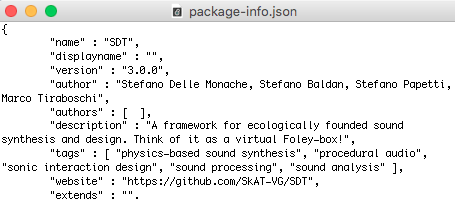
after that you will have no errors.
well, live and learn... Seems like it helped. Thank you very much!
Although there is a little nuance: after I renamed the package accordingly, all the content disappeared from the SDT package in the file browser, but the SDT-overview in the extras, or the package in the objects left-side menu in a max patch got their contents intact... Doing the same thing in Max 7 did not delete the contents from the renamed SDT package in the file browser , which makes it all even more puzzling... Is something going on on Max 8's side?
maybe file browser expects old foder name,
exernals are refering short name ...
what do you need file browser for ?
I see... Well, the file browser is one of the ways to get access to the packages, I so understand. In any way, it's not normal that the content disappeared. But good news - c'74 tech support let me know that are investigating the issue, so hopefully next update will fix it.