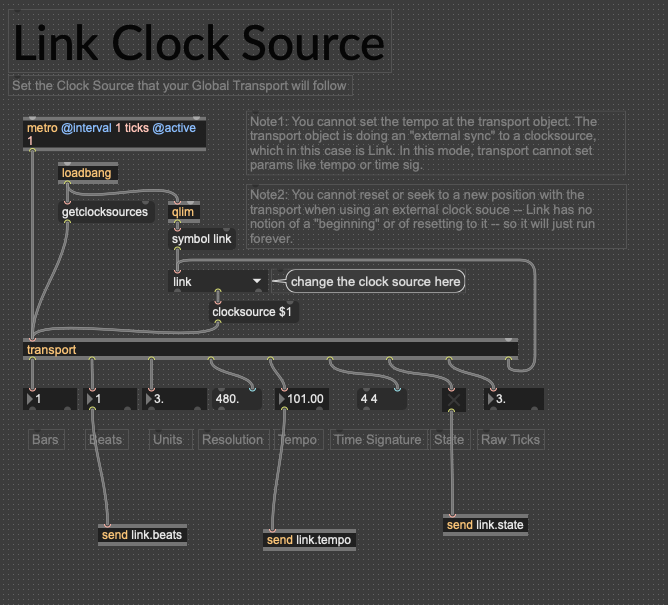
Transport object clock-sourcing to Ableton Link not working?

Hi, I am trying to set the clock source of the Transport object to Ableton Link, I tried using the link.clocksource example from the Link Package but somehow the Transport object is not outputting anything. I tried starting a link.session or link.beat object, or starting Ableton and Ableton link, and nothing changes... I remember I used to be able to just start it without need to set anything up, but now it just doesn't function at all. Did I miss something, or anyone encounter the same problem as I do?
Thank you!!
Chi Him

Hey Chi Him,
I'm having the same issues. I had to add "send link.xxx" out of the Link Clock Source Patch and then place a "receive link.xxx" in my main patch. See attached image. Also, the State toggle doesn't work correctly. It will work once after opening the Link Clock Source patch initially, so once Live is put into play mode, the state toggle button will turn on. When stopping Live, the toggle button stays on. I can confirm the State will be received in another patch but only that initial first time since the State can't seem to toggle off when hitting stop in Live. So if I start Live again, all my toggle buttons within my main patch are still on from the previous State toggle. Would love to see this fixed since that completely breaks the patch when trying to work with resets, etc in other patches. I have not tested "send link.beats" I can only confirm that "send link.tempo" and "send link.state" (only once initially up opening the patch) works. I also thought I remember the transport numbers changing in real time inside the Link Clock Source patch? They're all static for me. I did a search for other Link Clock Source patches and there isn't as much out there as one would think. This seems like a really important patch to have up to date since there aren't a lot of other link transport options. I'm totally new to MaxMSP so having pre made patches like this one are a huge help!