
Understanding data from arduino to max via Serial

I'm using arduino to print button press. if button is pushed I'm printing A 1, if button is not pressed I'm printing A 0
I understand that the data of A 0 is ascii code to the numbers: 65 32 48 13 10
and data of A 1 is ascii code to the numbers: 65 32 49 13 10
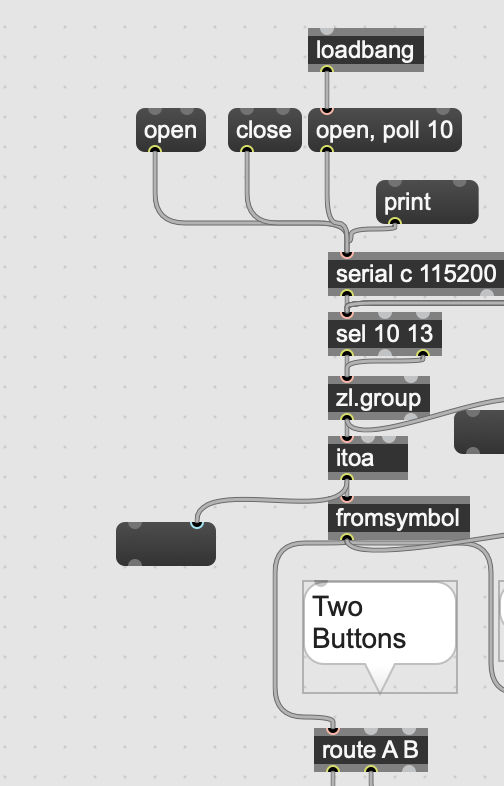
inside max I'm using this code to translate those numbers to string then to message/numbers:
the code is working great but I try to understans the setup of the sel 13 10 object. why the second outlet is left blank? it should also work then if using sel 10 alone?
if not why?

Hello R_GOL.
Right, 10 and 13 seem to be extra terminator characters. But that [sel] object seems out of context, at least for me. Anyways where is a simpler alternative:
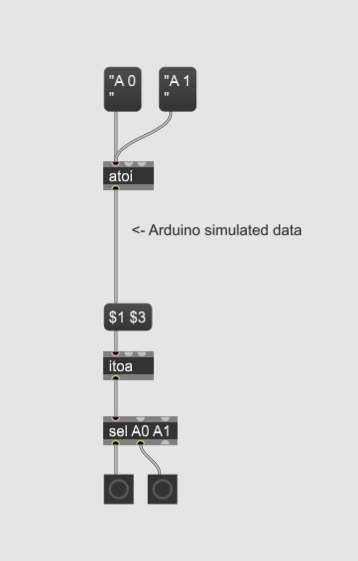

If I understand correctly, 13 corresponds to the Serial.println() message (Carriage Return or CR) and 10 to the new line created after Serial.println() message.
Serial.println("A 0") => 65 (A) 32 (" ") 48 (0) 13 (CR) 10 (new line)
Serial.println("A 1") => 65 (A) 32 (" ") 49 (1) 13 (CR) 10 (new line)
[sel 10 13] lets 65 32 and 48 or 49 (or anything different from 10 and 13) flow through its rightmost outlet to [zl.group] and a bang is sent by its left outlet to [zl.group] when a 10 is received (new line), to truncate the flow of values, generate a list and start grouping the new values again.
NB : as 13 and 10 are always sent consecutively, all the solutions below should give the same results ?
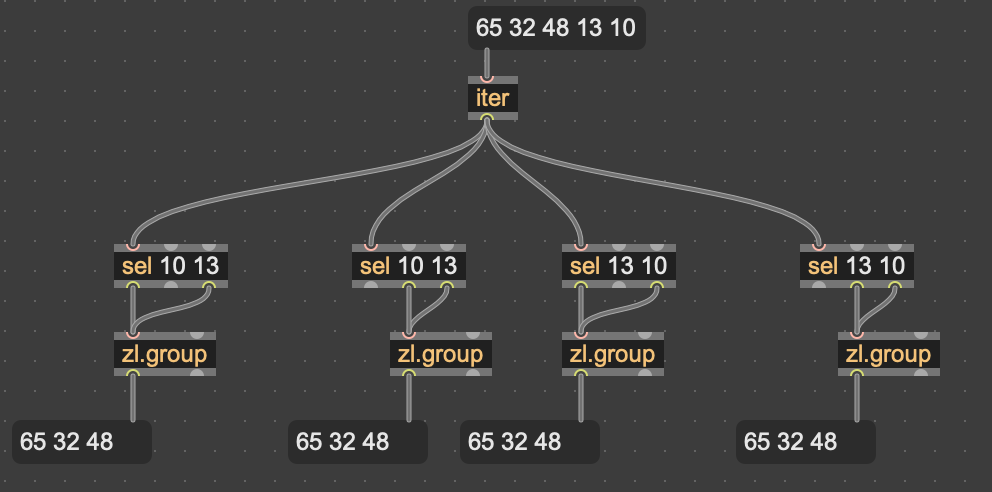
And yes, [sel 10] or even [sel 13] give the same final results (but, with [sel 13], after the second initial input [zl.group]'s output will start by the 10 remaining from the input n-1) :
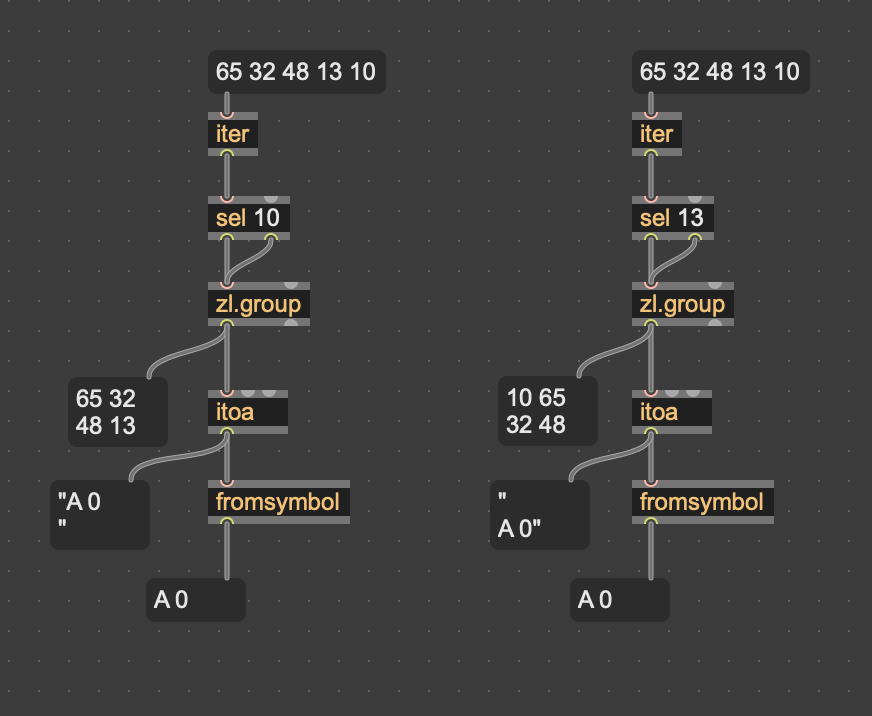
Thanks for the explanation. so there is no reason to use sel 13 10 as in here: (because the sel 13 outlet left blank)

rather it is make more sense to use sel 10 (assuming the number 10 will be always the last number sent before new data )
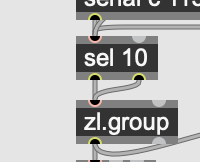
The only rational I see for using [sel 10 13] with the middle outlet unconnected, is patch optimization : you want to filter out 13 right at the beginning, in order to prevent it from being further processed by the downstream objects, without any added value ?
OK this actually make sense! 13 has nothing to do with the message (A 0 or A 1) but it is build in character before the 10 that represent the end of the data. so it is filtered by leaving it unconnected.
You could also use your own separator, in order to avoid Serial.println()? @ for instance is 64 :
In the Arduino code : Serial.print("A 0");Serial.print("@"); and Serial.print("A 1");Serial.print("@");
Then [sel 64] is sufficient. I made a quick test here :
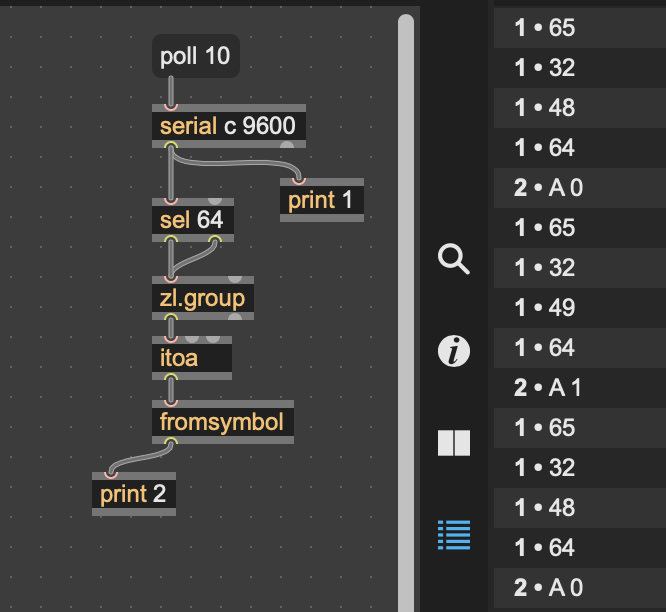
Yes, Once I understand the fact whatever is printed to the serial is translated to ASCII I could decide on any separator. I am fine with the build in 13 10 of the Serial.println.
Regarding the other way around:
I have this simple max code that sends a symbol with a number:
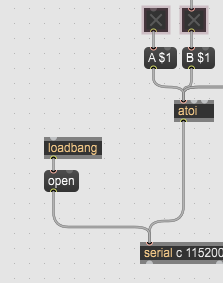
I have this arduino code to take the data from max and use it to turn on and off LEDs.
void LEDsControl() {
  if (Serial.available() > 0) {
    char id = Serial.read();
    int state = Serial.parseInt();


    for (int i = 0; i < NUM_LEDS; i++) {
      if (id == LED_ids[i]) {
        digitalWrite(LED_pins[i], state);
        Serial.print(id);
        Serial.print(" ");
        Serial.println(state);
      }
    }
  }
}
In the max side I'm translating the message A 0 or A 1 from symbol to integer using the [atoi] object - so what is really sends is 65 32 48 or 65 32 49.
it the Arduino code I'm receiving the data and stores it into char variable for the ID (A or B) and the number 0 or 1 I'm storing into integer (state). I don't understand what is the type of value arriving inside Arduino? is is integers that get translating automatically to symbols and integers? so when Arduino see 65 (A) he knows to store it as char? and when he sees 48 or 49 he automatically translate it into number? how this happens?
Thanks

your code from max to arduino makes no sense at all.
read basic arduino documetation about serial protocol to start with.
otherwise you will allways stumble over simplest tasks.
and back to 2 buttons from arduino.
you don't need anything more then 4 ints for 4 button states.
using Serial.write instead of Serial.print(ln).
example:
button1 states 0 & 1
button2 states 2 & 3
you can send states of 128 buttons that way.
your code from max to arduino makes no sense at all.
Why not?
Assuming the way I'm sending data from Max is always id char and an integer my code is suitable for that isn't it?
 if (Serial.available() > 0) {
    char id = Serial.read();
    int state = Serial.parseInt();
First line check if thereis anything in the serial buffer.
Second line takes the first byte and store it as char into 'id'.
The third line will take the first valid integer from the serial and will store it into 'state'
the above code will not work if instead of single char id I will want to send a string such as "led 1" or "led 3"
No, your posted max/arduino code is not working.
is this a joke :
" if (Serial.available() > 0) {
char id = Serial.read();
int state = Serial.parseInt();
for (int i = 0; i < NUM_LEDS; i++) {
if (id == LED_ids[i]) "
how do you link char 'A' (button ID) with LED number ?
you don't take ID of a button into account at all.
you also don´t understand at all what Serial.parseInt() does
and how it behaves,.
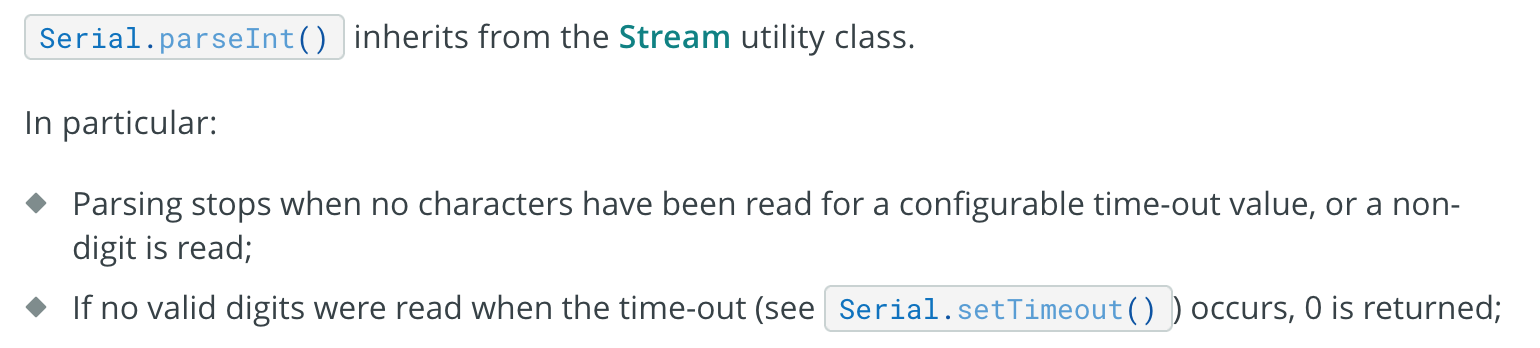
IN YOUR MAX CODE - IF YOU PRESS A BUTTON AND HOLD IT LONGER THEN TIMEOUT, Serial.parseInt() WILL RETURN 0
As I allready adviced you, learn that stuff properly.
You can´t pick bits and pieces from different code snippets
which you used over years not knowing what exactly it does
and stick them together expecting it to work.
Why don't you first test your theories in praxis
before posting here about what should work or not.
Ok i might needed to post the full arduino code -
//digital pins connected to Leds//

const int NUM_LEDS = 2;
const int LED_pins[] = { 13, 4 };
const char LED_ids[] = { 'A', 'B' };


void setup() {

  for (int i = 0; i < NUM_LEDS; i++) {
    pinMode(LED_pins[i], OUTPUT);
  }
  Serial.setTimeout(10); //window time to receive data from Serial
  Serial.begin(115200); // start serial communication at 115200 baud (bits per second)
}

void loop() {
  LEDsControl();
}
void LEDsControl() {
  if (Serial.available() > 0) {
    char id = Serial.read();
    int state = Serial.parseInt();


    for (int i = 0; i < NUM_LEDS; i++) {
      if (id == LED_ids[i]) {
        digitalWrite(LED_pins[i], state);
        Serial.print(id);
        Serial.print(" ");
        Serial.println(state);
      }
    }
  }
}
I did check my theory and it is indeed working. My question was more to understand why it is working and not how to makes it works.
regarding this statment:
IN YOUR MAX CODE - IF YOU PRESS A BUTTON AND HOLD IT LONGER THEN TIMEOUT, Serial.parseInt() WILL RETURN 0
I did not encounter this issue but will confirm it with more testing.
Thanks for your replay