Unpacking OSC messages

Hello,
I am trying to unpack OSC messages which are picked up from Mind Your OSCs software designed for EPOC EEG headset.
I am using udpreceive object and it receives all messages correctly. I don't know how to unpack incoming values and stream them into separate flonum outputs.
I tried to use unpack object and added 20 float outputs and it gave me error.
I added two images, first one is showing incoming OSC messages and second one is my stupid trial to unpack them.
Any help much appreciated,
Thanks!

route object or OSC-ROUTE from http://cnmat.berkeley.edu/downloads should help you
ad
Thanks for direction!
Many thanks, Ad!

Hello there
I've followed your image to the letter but it doesn't work for me. I seem to have an extra number that you don't in my max window. It looks like this: print: /EXP/SMIRK_RIGHT/0 0.
So there is this extra number ahead of the floating point. How would I add that to my OSC-route in order to make it pass the floating point message? I'm not very familiar with how OSC works. Any help much appreciated!
Hello there
I've followed your image to the letter but it doesn't work for me. I seem to have an extra number (always a 0) that you don't in my max window. It looks like this: print: /EXP/SMIRK_RIGHT/0 0. This is apparently the 'user number'.
So there is this extra number ahead of the floating point. How would I add that to my OSC-route in order to make it pass the floating point message? I'm not very familiar with how OSC works. Any help much appreciated!
heya, could you please screencapture your patch together with Max window and see if i can help you.
.))

Hello there, for some reason I have been unable to install the route object or OSC-ROUTE on max. I already downloaded it but I do not know how to incorporate in max as an object! Can you help me with that please. I need to do exactly what Kevi did! I need some instructions if it is possible! I appreciate it!

Options - File preferences - add folder path

I'd hope JIMLUIS solved this already?
Also, to anyone else watching, you do NOT need OSC-ROUTE or similar externals to handle OSC in Max. It will do this handily in vanilla Max. It has been able to do this for a very long time now.
could you post a patch receiving and routing OSC without OSC-route?
well normal route doesn't mind OSC messages... I'd honestly be happy to help with it, but it's a bit of a... broad question :)
For instance, this is perfectly fine OSC reception from the JazzMutant and ipad Lemur versions.
yup:
oh thank you :)

thank you for this one !

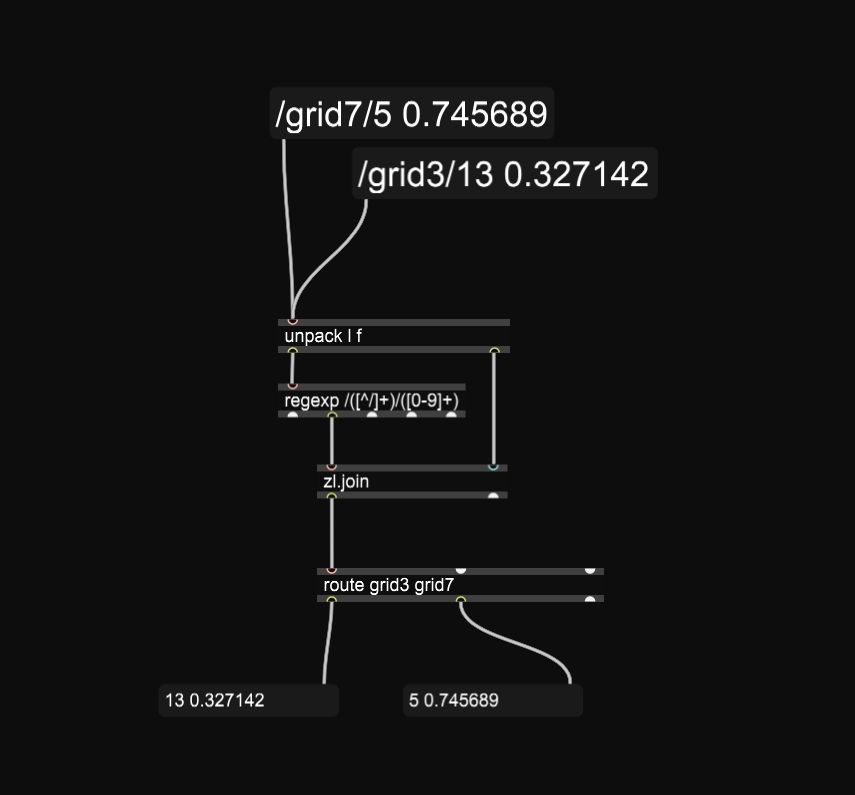
Just I want to contribute - in case you have a more complex message,like
/grid7/5 0.745689
the route object cannot extract [route /grid7] the number 5
What you can do instead is to use regexp like in the patch

Why not just remove slashes ?