
using tabs inside a max4live device

Hello, I just realized the Max tabs (patcher inspector > "show on parent patcher tab") actually work inside a Max4Live device. Tabs even offer the possibility to scroll through patches with the mouse wheel, which is great for debugging.
One question though: the root tab is always called "unnamed (root)", is there a way to change this to the actual device's name?
thanks
Florent
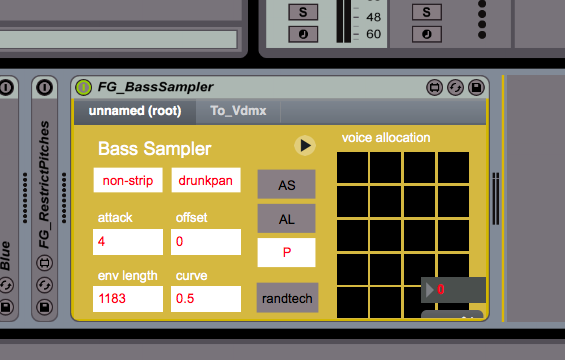

hey, that mouse scrolling may become handy someday, good find!
You can send "title" to a thispatcher obj in your root patchto change the displayed name, but you can't get rid of the trailing "(root)" . It's possible to hide the rootpatcher from the tab, that's how max helpfiles work.
But I don't really like how much space the tabbar takes away, as long we can't hide/style it I prefer a custom solution for paged devices.
thanks !
yes the scrolling is pretty useful for debugging small subpatchers
how do you hide the rootpatcher from the tab?
thanks! this is great, I actually never understood how these help patches were made!

Hey @11Olsen
Thank you so much for this share. A follow up question: If you double click on these tab1 and tab2 subpatchers, the tabs are opening in a new window in Ableton. Is it possible that this windows don't disappear when I click somewhere else? I'm looking for an option which is called something like "stay always on top" or so.
Greetings,
M
Hi,
if it isn't a floating window, "topmost 1" to thispatcher should help.
O.
thx!!